
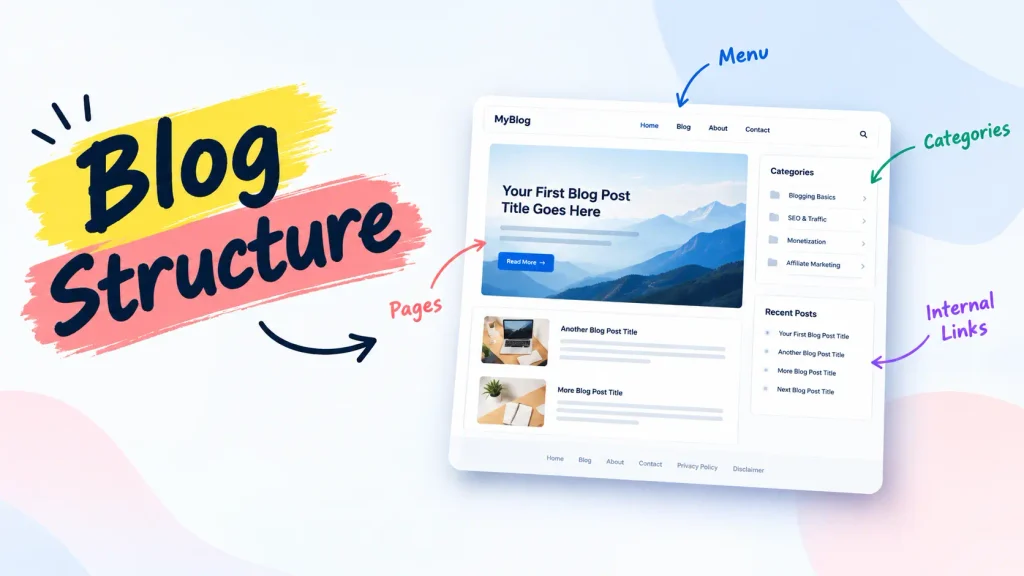

TL;DR: Blog structure is the system of pages, categories, menus, and internal links that organizes your content, not how your blog looks. A beginner-friendly blog structure uses 4-6 core pages, 3-6 categories, a logical menu, and 3-5 internal links per post. Getting this right early helps Google crawl your site faster and helps readers find what they need without getting lost.
Nobody taught me how to structure a blog for beginners before I started, so I published 40 posts before I ever thought about structure, and I almost quit blogging because of it.
Every article lived on its own little island. No categories that made sense. No menu that guided anyone anywhere. Google indexed maybe half of what I wrote, and the readers who did land on my site left after one page. I didn’t have a content problem. I had a structure problem, and I didn’t know it yet.
If you’re setting up your blog right now, you’re in a much better position than I was – you get to build this correctly from day one instead of rebuilding it eighteen months in. Before you go further, it’s worth reading our blog SEO and traffic growth strategies for beginners hub, since structure is the foundation everything else in that category builds on.
This guide walks through exactly how to structure a blog for beginners, including what pages a beginner blog should have, how many categories a blog should have, and the internal linking structure for beginner blogs that ties it all together.
I’ll also show you a full blog structure for beginners, for example from my own site, plus a simple scoring framework to check your progress, all built as one seo friendly blog structure you can copy today.
Key Takeaways on How to Structure a Blog for Beginners
Blog structure is organization, not design — it means pages, categories, menus, and internal links working together as one system.
Start with 4–6 core pages — Home, Blog, About, Contact, Privacy Policy, and Disclaimer.
Keep your categories focused — for a new blog, 3–6 clear categories can provide a practical starting structure without creating unnecessary topic overlap.
Connect your content with internal links — aim for 3–5 genuinely useful internal links per post as a starting point, using descriptive anchor text where appropriate.
Plan your structure before publishing heavily — publishing without a structure plan can create overlapping categories, disconnected posts, and a painful rebuild later.
Structure matters beyond traditional search — clear headings, direct answers, logical relationships, and well-connected content can make information easier for search and AI-powered systems to interpret and retrieve.
What is blog structure? (Beginner explanation)
Blog structure is the organizational system of pages, categories, menus, and internal links that makes a site easy to navigate for both people and search engines. It’s separate from design, and it’s the single biggest factor in whether a new blog gets crawled and indexed efficiently.
Blog structure is the organizational system – pages, categories, menus, and internal links, that determines where your content lives and how visitors and search engines move through it.
It has nothing to do with your color scheme, fonts, or hero image. That’s design. Structure is the logic underneath the design, the part that keeps working even if you switch your entire theme tomorrow.
I confused the two for months. I kept tweaking my homepage banner and font pairings, convinced a prettier blog would perform better. It didn’t, because Google wasn’t confused by my fonts, it was confused by the fact that half my posts weren’t linked from anywhere.
A blog structure exists to serve two audiences at once:
- Readers, who need to find what they came for without clicking around aimlessly
- Search engines, which follow links and patterns to understand what your site is about and which pages matter most
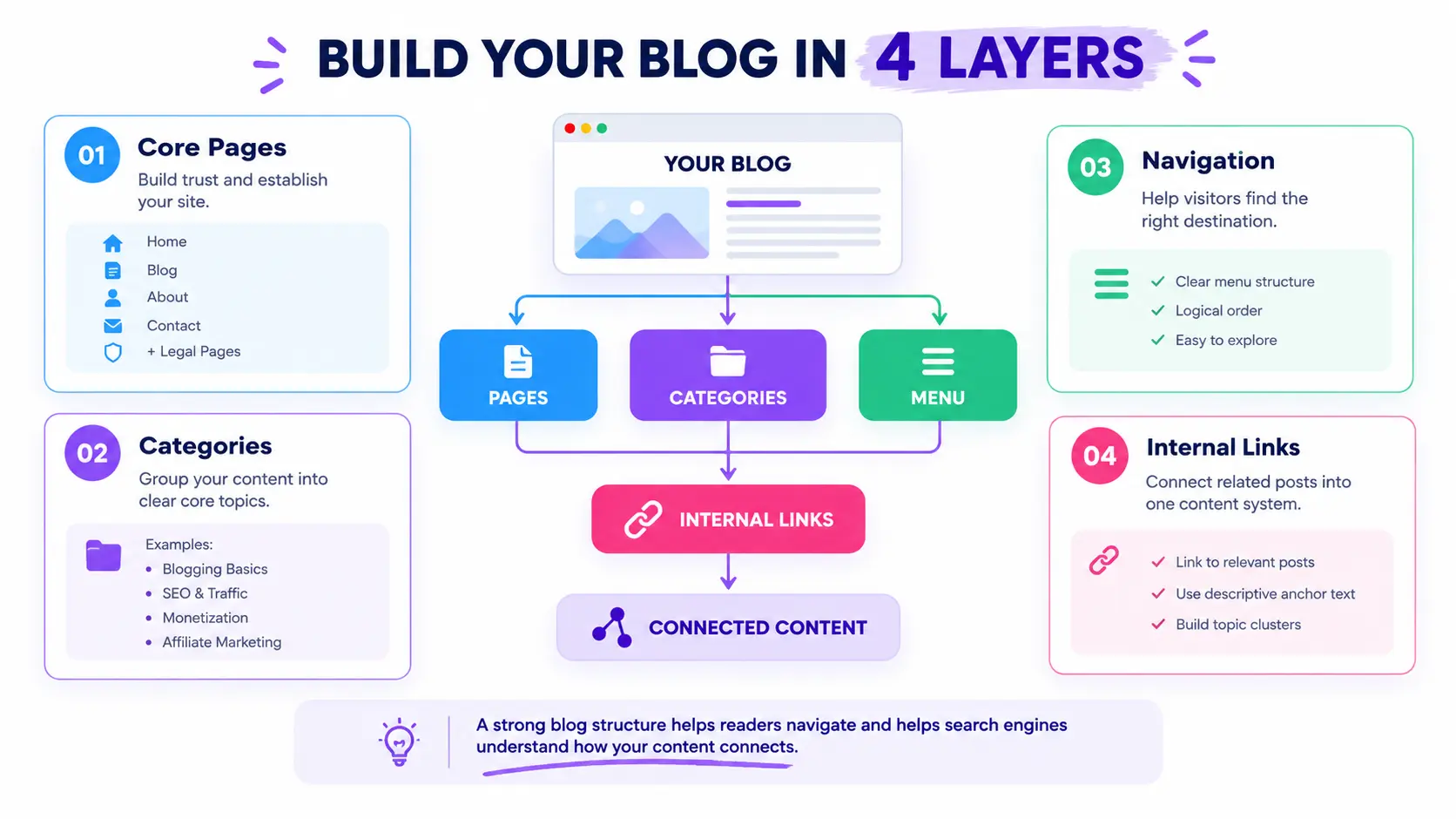
A beginner-friendly blog structure is built from four elements:
- Pages – Home, About, Blog, Contact, and a few legal pages
- Categories – the topic groupings your posts live under
- Menus – the navigation that guides visitors through the site
- Internal links – the connections between related posts and pages
Structuring your blog into clear pages and categories also makes writing easier going forward, every new post has an obvious home instead of becoming another orphaned page.
If you haven’t written your first article yet, it’s worth reading how to write your first blog post for beginners before you publish anything, since your first post sets the tone for everything that follows it.
Why blog structure matters for SEO, EEAT and AI citations?
Blog structure impacts SEO by improving crawlability and reducing bounce rate, and it impacts AI citation by making content easier for systems like AI Overviews and Perplexity to extract as self-contained answers. Both outcomes come from the same root cause: clear organization.
An SEO friendly blog structure matters because it’s the layer search engines and AI systems use to judge whether a site is trustworthy, organized, and worth ranking – before they even evaluate your writing quality.
Google doesn’t read your blog the way a person does. It follows links, checks hierarchy, and measures how confidently it can crawl from your homepage to your deepest post. A messy structure – orphaned pages, no categories, a menu that goes nowhere – signals a site that isn’t maintained, regardless of how good any individual post is.
Structure affects three things directly:
- Crawlability – Google can find and index new posts faster when they’re linked from a category and a menu, not floating in isolation.
- Bounce rate and time on site – readers who can navigate easily stick around longer, which is itself a quality signal.
- Bounce rate and time on site – readers who can navigate easily stick around longer, which is itself a quality signal.
- EEAT (experience, expertise, authority, trust) – a blog organized around clear topics with a real author, real pages, and real internal connections reads as a maintained, credible site rather than a content farm.
This is exactly why learning how to structure a blog for beginners early pays off far more than optimizing individual posts later – structure is the layer everything else in SEO gets built on top of.
There’s a newer layer to this too. AI Overviews, ChatGPT Search, and Perplexity don’t just crawl your site – they extract specific, self-contained passages to cite as answers. A clearly structured post with defined sections and direct answers is far easier for these systems to lift and attribute than a wall of unstructured text.
Structure and on-page writing work together, not separately. Once your pages and categories are in place, on-page SEO for blog posts is what makes each individual post crawlable and rankable within that structure.
The core elements of an SEO friendly blog structure
The four core elements of an SEO friendly blog structure are pages, categories, menus, and internal linking. Each supports a different function – trust, topic organization, navigation, and hierarchy and they only work as intended when built together, not in isolation.
An SEO friendly blog structure is built from four interdependent components – pages, categories, menus, and internal links, each of which supports a different part of how visitors and search engines navigate your site.
Think of it as a system, not a checklist. Change one piece and the others adjust:
| Element | What it does | Beginner target |
|---|---|---|
| Pages | Establishes permanent, trust-building sections | 4–6 pages |
| Categories | Groups related posts by topic | 3–6 categories |
| Menus | Guides visitors to your most important pages | 1 top nav + optional footer menu |
| Internal links | Connects related content and builds hierarchy | 3–5 links per post |
None of these elements works well in isolation. A perfect menu means nothing if your categories are a mess. Flawless categories mean nothing if nothing links back to them. This is exactly why beginners who focus only on writing, the way I did – end up with a blog that looks fine post by post but fails as a system.
What pages should a beginner blog have?
A beginner blog needs six core pages – Home, Blog, About, Contact, Privacy Policy, and Disclaimer. These establish trust, meet compliance requirements for ads and affiliate programs, and give visitors a clear starting point for navigation.
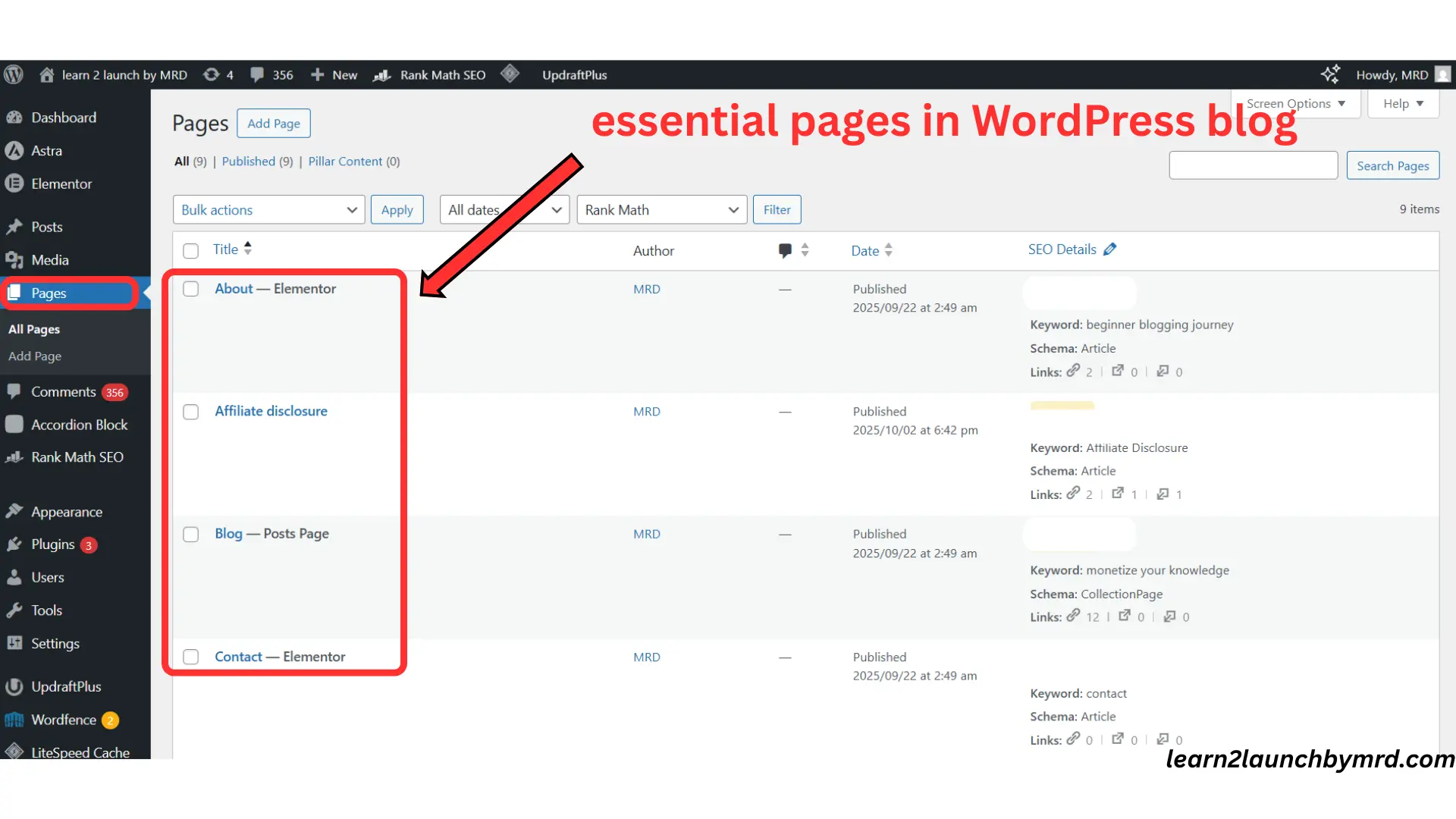
A beginner blog needs six pages – Home, Blog, About, Contact, Privacy Policy, and Disclaimer. Each serving a distinct role in building trust, guiding navigation, and meeting basic compliance requirements.
You don’t need more than this to start. Here’s what each one does.
Home page
Your home page is the first impression of your blog, and its only real job is to answer one question fast: what is this blog, and who is it for? A visitor decides whether to stay within a few seconds, so the home page should point clearly to your most important content – categories, a “Start Here” page, or your latest posts, rather than trying to show everything at once.
Blog page
The blog page is your content hub. It’s where all your posts live in one browsable place instead of forcing visitors to guess where to find them. For SEO, a clean, regularly updated blog page signals to Google that your site is active, which affects how often it gets recrawled.
About page
The about page builds trust and connection. Readers want to know who’s behind the content and why they should listen. This isn’t the place to list credentials in bullet form, it’s the place to explain your actual journey, including the parts that didn’t go smoothly, since specific, honest detail is what separates a real about page from a template.
Contact page
A contact page signals legitimacy. Even before you’re ready for brand partnerships, having a real way to reach you tells both readers and Google that your site is maintained by an actual person, not an abandoned project.
Privacy policy and disclaimer
These pages protect you legally and are often required before ad networks or affiliate programs will approve your site. A privacy policy explains how visitor data is handled; a disclaimer is essential if you use affiliate links or give advice of any kind.
Optional pages – start here/ resources
A Start Here page helps confused first-time visitors orient themselves fast. A Resources page collects your recommended tools in one place. Neither is required at launch, but both pay off as your blog grows.
Go deeper on blog structuring
- What pages should a beginner blog have? (Complete checklist)
- How to write an About page that builds trust fast
- Do you need a privacy policy before your first blog post?
If you haven’t set up your blog yet, How to start a WordPress blog for beginners step by step walks through creating these exact pages from scratch and how to start a high quality blog on a budget shows you can do all of this without overspending on tools you don’t need yet.
How many categories should a blog have?
A beginner blog should have 3–6 categories, with each one representing a single core topic. Categories are broad topic groupings for navigation, while tags describe specific post-level details – mixing the two up is one of the most common structural mistakes beginners make.
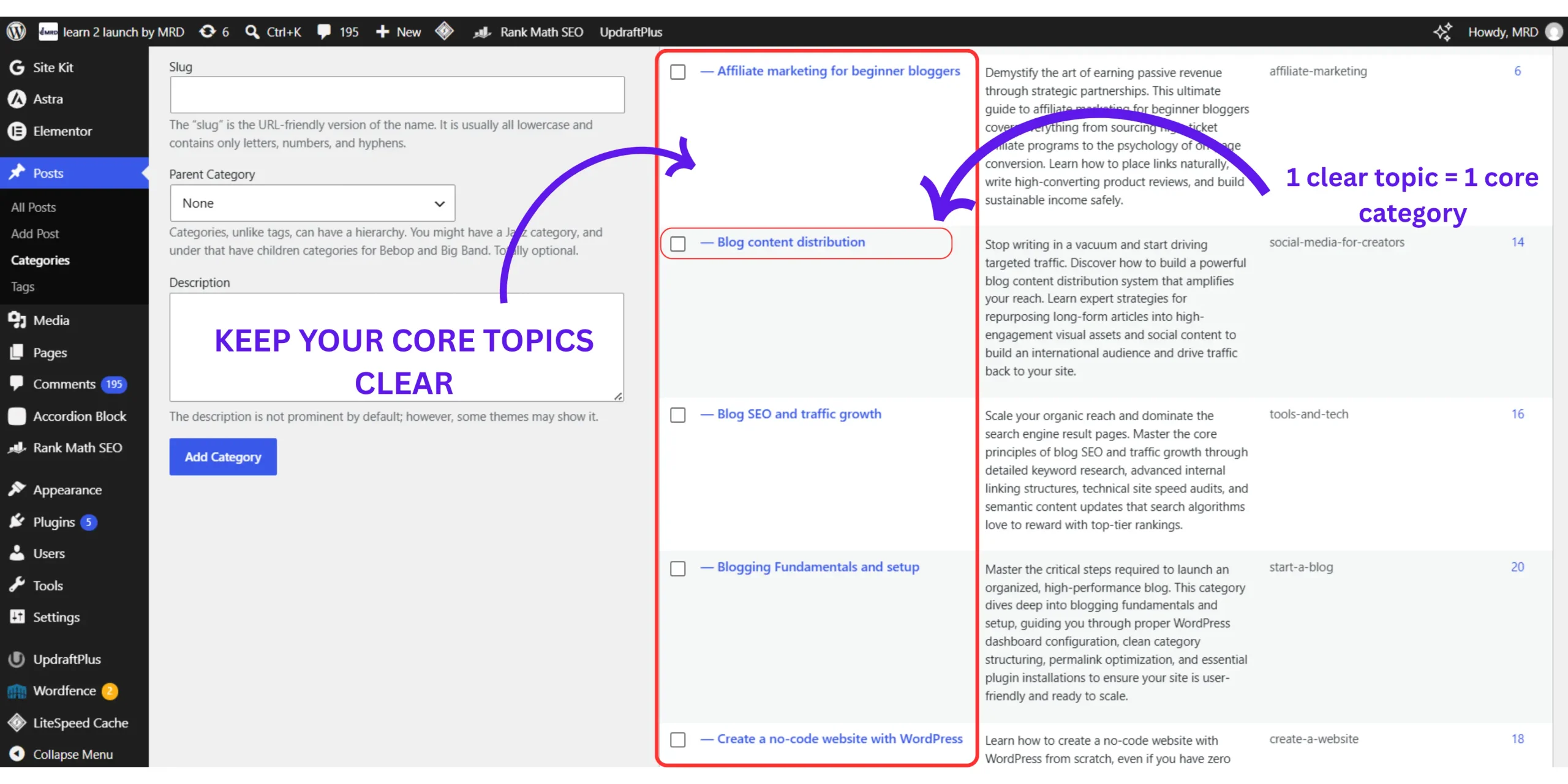
A beginner blog should run 3 to 6 main categories, each covering one clear, non-overlapping topic that groups related posts together for both readers and search engines.
Too few categories and your content feels scattered with nowhere to belong. Too many and you dilute each category’s authority while confusing readers about where to look. Somewhere in the 3–6 range is the sweet spot for almost every beginner blog, regardless of niche.
One category, one core topic
Each category should represent a single idea, not a loose cluster of related-but-different ones. A travel blog, for example, might run “Destinations,” “Travel Tips,” and “Food & Culture” – three distinct topics with no real overlap.
If you find yourself unsure which category a post belongs in, that’s usually a sign your categories are too broad or too similar to each other.
Categories vs tags
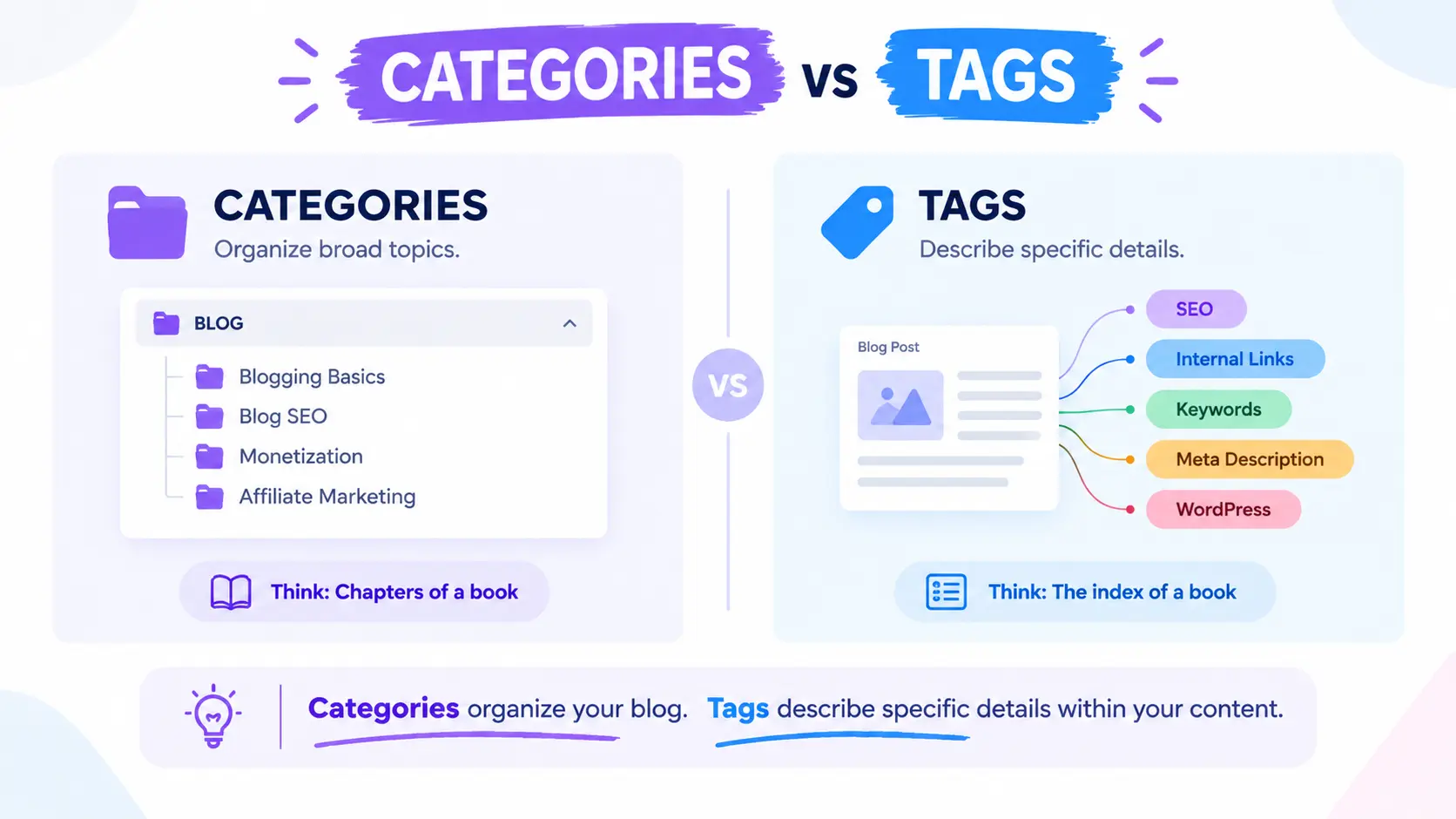
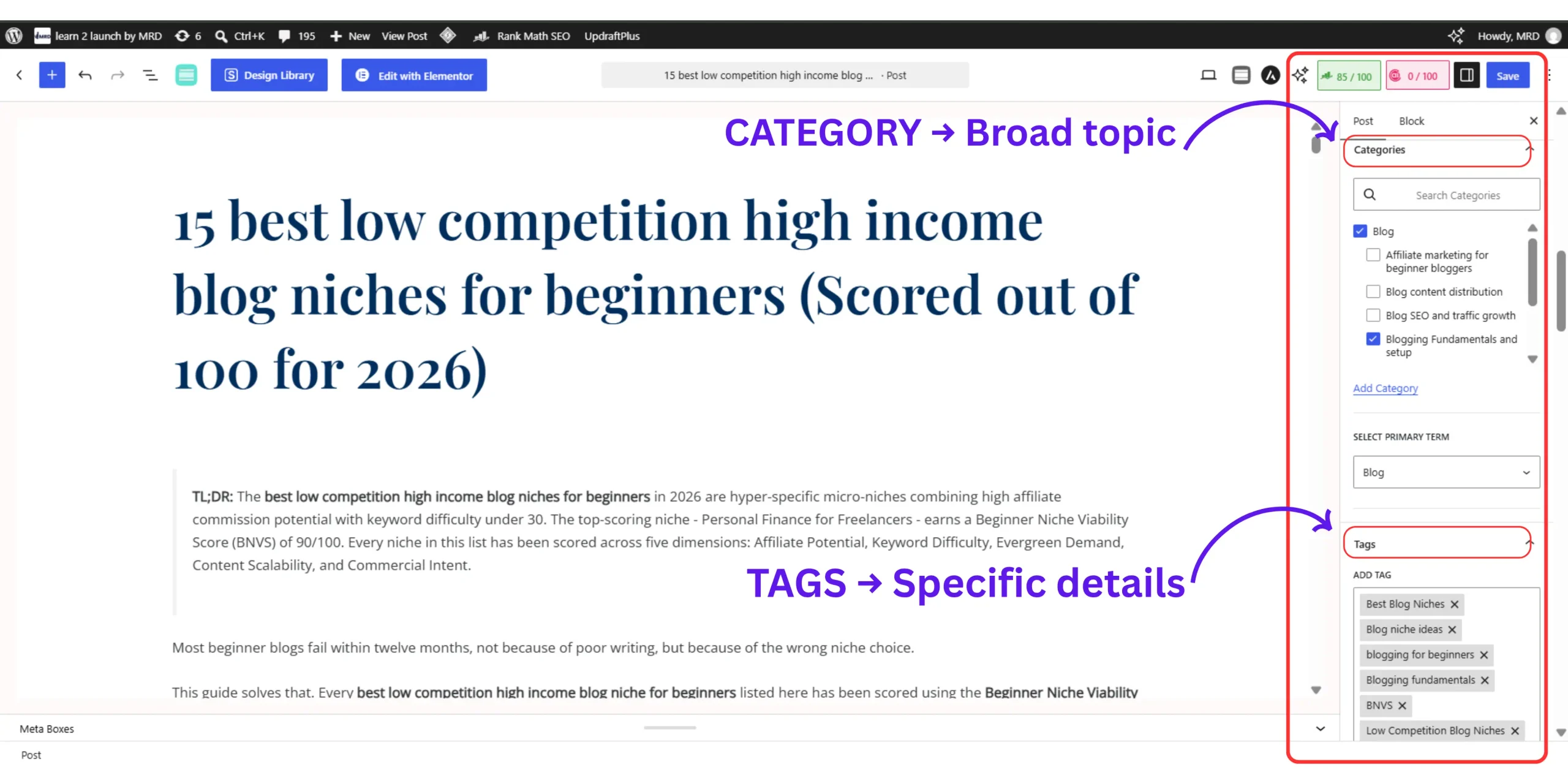
Beginners mix these up constantly, and it costs them SEO value.
Think of categories as chapters and tags as the index at the back of the book. If you’re relying on tags to do the job categories should be doing, your navigation will feel disorganized even if your writing is excellent.
Common category mistakes
- Creating too many categories in the first month, before you know your actual content mix
- Using vague names (“Misc,” “Updates”) instead of clear, searchable topic names
- Forgetting to assign posts to a category at all
- Relying on tags instead of categories as the primary navigation structure
Go deeper on categories in blog.
- How many categories should a blog have? (The beginners rule)
- Categories vs tags : (What is the real difference)
- How to create blog categories in WordPress without hurting SEO
Choosing the right categories gets much easier once you know what your audience is actually searching for. How to do keyword research for a blog for free will help you map real search demand to the categories you build.
Best blog menu structure for beginners
The best beginner blog menu uses a top navigation bar for Home, Blog, About, and Contact, with a footer menu for secondary links like Privacy Policy. Menu order should follow the sequence of questions a new visitor actually has, and it must work cleanly on mobile.
The best blog menu structure for beginners uses a top navigation bar for core pages and an optional footer menu for secondary links, arranged in the order a first-time visitor would logically need them.
Top navigation vs footer menu
Your top navigation is where visitors expect your most important pages – Home, About, Blog, Contact. Your footer menu is optional but useful for lower-priority links: Privacy Policy, Resources, or social profiles.
Don’t put everything in the top nav just because you can; a cluttered menu is as confusing as no menu at all.
Logical menu order
Arrange your menu the way a new visitor’s questions would naturally flow:
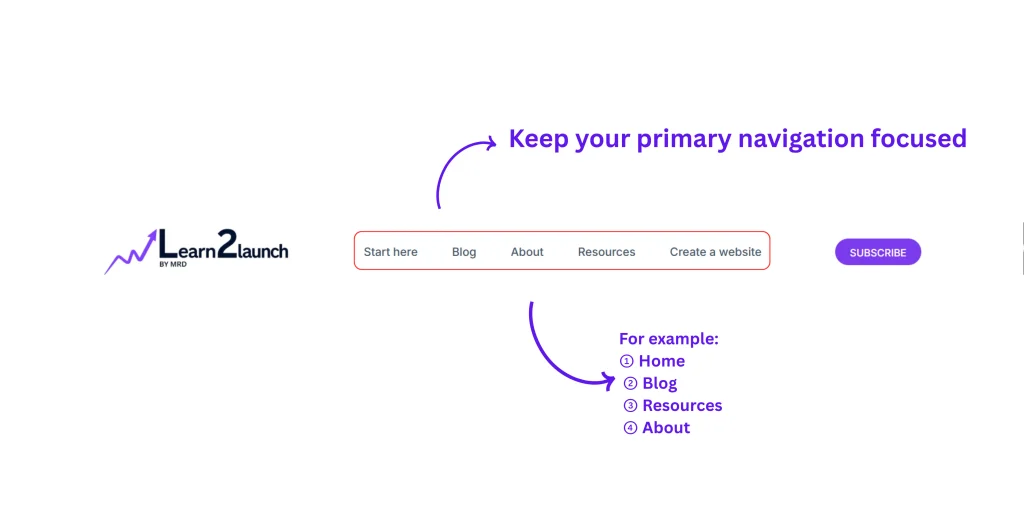
This order answers “what is this,” “where do I begin,” “what’s here,” and “who are you” in the sequence a confused first-time reader actually needs them.
Mobile friendly navigation
Most of your readers will hit your menu on a phone, not a desktop. A simple dropdown or hamburger menu keeps things usable on small screens – this is not optional in 2026, it’s the default case you should design for first.
Go deeper on Blog menu structuring
- Best blog menu structure for beginners (With real examples)
- Top navigation vs footer menu : Where should each link go?
- How to design a mobile friendly blog menu
Internal linking structure for beginner blogs
An internal linking structure for beginner blogs is built using pillar posts linked to supporting cluster posts, with 3–5 descriptive internal links per post. This structure helps Google understand site hierarchy and helps readers discover related content naturally.
An internal linking structure for beginner blogs connects individual posts to each other and back to pillar guides, using descriptive anchor text so both readers and search engines can follow the site’s topic hierarchy.
This is the piece most beginners skip entirely – I certainly did for my first year. Internal linking is what turns a stack of individual posts into an actual knowledge network Google can understand.
The pillar and cluster model
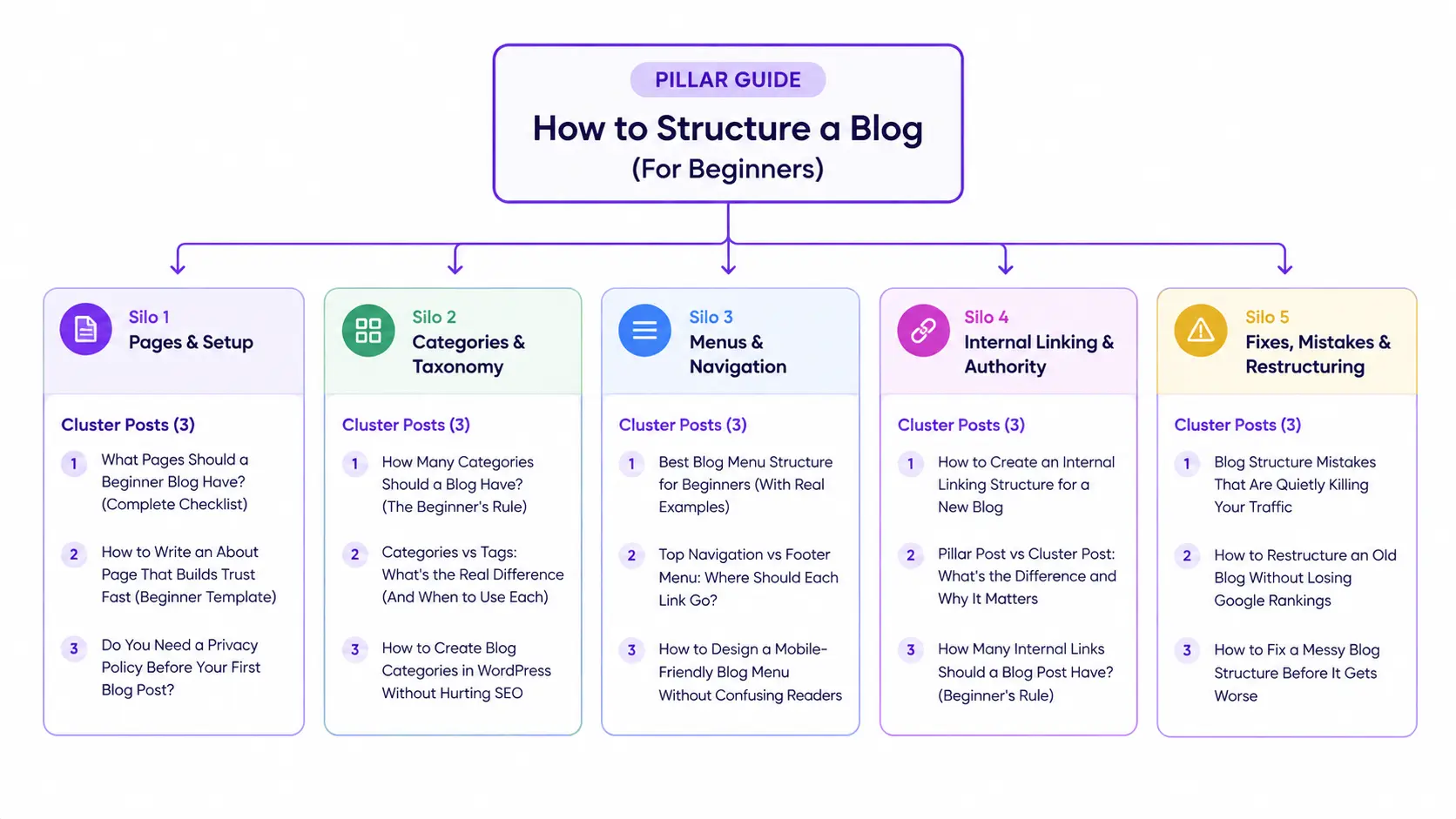
The simplest way to build this is with pillar posts – comprehensive guides on a core topic, like this one – linked out to cluster posts that go deeper on specific subtopics.
This guide, for example, links out to dedicated posts on categories, menus, and internal linking itself, each of which links back here.
How many links per post
A safe rule for beginners is 3–5 internal links per post. Fewer, and you’re leaving crawl paths and reader engagement on the table. More, and you risk overwhelming readers or diluting the value of each individual link.
Anchor text basics
Anchor text is the clickable text itself. Keep it natural and descriptive – “learn more about blog categories” tells both readers and Google what to expect. “Click here” tells them nothing.
Go deeper on Internal linking structure
- How to create an internal linking structure for a ne blog
- Pillar post vs cluster post : What is the difference and why it matters
- How many internal links should a blog post have?
Planning your pillar and cluster topics in advance makes this whole system much easier to maintain. I use a notion blog content planner to build topical authority – it’s the single tool that keeps my internal linking from turning into guesswork.
Blog structure by niche : What should change?
Blog structure by niche changes in the details – category focus, extra pages, and linking emphasis, even though the core framework of pages, categories, menus, and internal links stays the same across every type of blog.
I learned this the hard way by assuming every blog should look like mine. It shouldn’t. A personal lifestyle blog and an affiliate review site are solving different problems, and their structures should reflect that.
Blog Structure by Niche Type
Your ideal blog structure depends on the type of niche you operate in. Use this comparison to identify the right category structure, supporting pages, and internal linking approach for your business model.
| Niche Type | Category Focus | Extra Pages Needed | Internal Linking Emphasis |
|---|---|---|---|
| Personal / Lifestyle | Life stages or themes | None extra | Story-based cross-links between related posts |
| Affiliate / Review | Product categories | Affiliate disclosure page | Product comparison links between reviews |
| SaaS / Business | Feature and use-case topics | Pricing, Docs | Feature pages linking to relevant blog posts |
| Local Service | Service areas or locations | Service-area landing pages | Location-based cross-links |
Match your categories and internal links to how your audience actually explores your niche. The goal is a structure that makes important content easy to discover without creating unnecessary pages or layers.
Use this as a decision framework, not a rigid rulebook:
- If your niche is affiliate or review-based → prioritize a disclosure page and comparison-style internal links between related product posts.
- If your niche is a SaaS or business blog → treat your product pages as pillars and link blog posts back to the relevant feature or pricing page, not just to other posts.
- If your niche is local service-based → build location or service-area pages as a structural layer above your blog categories, since local intent often gets typed differently than general search.
- If your niche is personal or lifestyle → don’t over-engineer this. A simple 3–4 category structure with story-based internal links will outperform an overly rigid system that doesn’t match how personal content naturally connects.
The core blog structure framework – pages, categories, menus, internal links – stays consistent across niches, but the details shift.
Affiliate blogs need comparison-style linking and disclosure pages, SaaS blogs need feature-to-post links, and local blogs need service-area pages layered above standard categories.
Blog structure for beginners examples : A real walkthrough
A blog structure example typically includes a home page linking to a small set of clear categories, with individual posts assigned to one category each and connected through 3–5 internal links. Scoring your own structure across pages, categories, menu logic, and link density (1–5 each) shows exactly where to focus first.
A blog structure for beginners example makes the whole system concrete – seeing how pages, categories, and internal links actually connect is far clearer than reading about each piece separately.
Here’s a simplified version of the structure I run on my own site:
- Home page — introduction + featured posts from each core category
- Categories — “Blogging Fundamentals,” “Blog SEO,” “Monetization,” “Affiliate Marketing”
- Posts — individual articles assigned to exactly one category each
- Internal links — every post links to 3–5 related posts, including at least one pillar guide
For instance, a post under “Blog SEO” about internal linking links back to this pillar guide, and forward to the dedicated internal linking cluster post. That’s the whole system in miniature: one clear home for each piece of content, and a link path connecting all of them.
The blog structure readiness score
Instead of guessing whether your structure is “good enough,” score yourself across four factors, 1–5 each:
- Page completeness — do you have Home, Blog, About, Contact, Privacy Policy, and Disclaimer?
- Category clarity — are you within the 3–6 range, with each category covering one clear topic?
- Menu logic — can a first-time visitor find your most important page in one click?
- Internal link density — does every post carry 3–5 internal links with descriptive anchors?
Reading your score:
- 16–20: Your structure is ready. Focus on publishing volume.
- 11–15: Solid foundation – fix your lowest-scoring factor before writing new posts.
- 6–10: Pause new content and rebuild pages or categories first.
- Below 6: Start with pages and categories only. Menus and internal linking come after you have content to link.
I built this scoring model after realizing “just add more categories” and “just link more” were useless advice on their own – you need to know which piece of your structure is actually weak before fixing it.
Run this score once a quarter, not once. Structure isn’t a launch-day task you finish and forget, it’s a maintenance habit.
A blog that scored 18 out of 20 at launch can quietly drop to 12 six months later simply because new posts weren’t assigned categories or linked back to older content. The score matters less as a one-time grade and more as a recurring check that catches drift before it becomes a full rebuild.
Common blog structure mistakes beginners make
The most common blog structure mistakes are over-categorizing, skipping core pages, publishing with no internal links, and using a disorganized menu. All of them are easier to prevent early than to fix after dozens of posts are already live.
The most common blog structure mistakes beginners make are adding too many categories too soon, skipping core pages, publishing without internal links, and building a menu with no logical order, each of which creates problems that compound the longer they go unfixed.
- Too many categories — overwhelms readers and fragments your topical authority
- Missing core pages — skipping About, Contact, or Privacy Policy hurts trust and can block ad network approval
- No internal links — visitors leave after one post, and Google struggles to find your other content
- Random menu structure — a confusing menu frustrates readers regardless of how good your writing is
- Publishing without planning — writing dozens of posts before deciding on categories or linking forces a full rebuild later
That last one is exactly what happened to me. I wrote first and structured never, and by the time I noticed the problem I had 40 posts to reorganize instead of 4.
Here’s what that rebuild actually looked like in practice: I exported a full list of my published URLs, grouped them by real topic rather than the categories I’d randomly assigned along the way, and rebuilt my category list from that grouping instead of from guesswork.
Then I went back through every post and added the internal links that should have existed from the start. It took a weekend I didn’t have to spare. Doing this before you publish your tenth post, instead of your fortieth, is the entire difference between an afternoon task and a weekend project.
Most of these mistakes disappear the moment you actually know how to structure a blog for beginners before you publish, rather than figuring it out after the fact the way I did.
Go deeper on blog structuring mistakes
- Blog structure mistakes that are quietly killing your traffic
- How to restructure an old blog without losing Google rankings
- How to fix a messy blog structure before it gets worse
My step by step blog structure audit process
A blog structure audit involves exporting all published URLs, regrouping them by real topic, scoring the result against a readiness framework, flagging orphaned posts with no internal links, and fixing one weak factor at a time. Running this quarterly prevents structural drift from becoming a full rebuild.
My blog structure audit process is a quarterly check I run using five steps: exporting my published URLs, regrouping them by real topic, scoring the result against the readiness framework, flagging orphaned posts, and fixing the lowest-scoring issue first.
I built this process after my own rebuild, specifically so I’d never have to repeat it from scratch again. Here’s exactly what I do:
- Export every published URL. I pull this from Google Search Console’s Pages report or a simple WordPress export – anything that gives me a full list, not just what I remember publishing.
- Regroup posts by real topic, ignoring current categories. I ask “what is this post actually about” rather than “what category did I assign it,” since the two drift apart over time.
- Score the result against the readiness framework. I run the four-factor score from earlier in this guide – pages, categories, menu logic, internal link density and write down the two lowest numbers.
- Flag orphaned posts. Any post with zero internal links pointing to it gets flagged immediately. These are invisible to both readers browsing my site and to Google’s crawler.
- Fix the lowest-scoring issue first, not everything at once. Trying to fix categories, menus, and links in the same afternoon is how beginners burn out on restructuring. I pick one factor, fix it fully, then move to the next quarter’s audit.
This isn’t a one-time launch task, it’s a recurring habit, the same way you’d check your site’s broken links or page speed. Blogs drift out of structure quietly, post by post, and a quarterly audit catches that drift before it becomes another full weekend rebuild.
How to structure a blog for AI search and AI overviews
A blog structure ready for AI search uses clear, self-contained sections that open with a direct answer before supporting detail, consistent page and category hierarchy, and specific headings AI systems can match to real search queries.
Structuring a blog for AI search means writing content that answers one clear question per section, in a self-contained way that AI Overviews, ChatGPT, and Perplexity can extract and cite directly.
This is the newest layer of blog structure, and almost no beginner guide covers it yet. AI systems don’t reward keyword density – they reward clarity.
A section that opens with a direct definition, states its claim plainly, and doesn’t require the surrounding paragraphs for context is far more likely to get lifted as a cited answer.
Practically, this means:
- Lead each section with a direct, quotable answer before adding supporting detail
- Use descriptive, specific headings instead of vague ones (“How Many Categories Should a Blog Have” beats “Category Tips”)
- Keep the structural elements – pages, categories, internal links, consistent enough that AI systems can infer your site’s hierarchy the same way Google does
If you’re using AI tools to help draft content, structure still matters more than the writing itself. How to use ChatGPT to write blog posts for beginners and How to edit AI generated content for SEO both assume you already have the page, category, and linking structure this guide covers, AI drafting fills the structure in, it doesn’t replace it.
For a deeper technical breakdown, How to optimize blog posts for Google AI overviews covers formatting specifics beyond structure alone, and if you’re choosing between AI tools for your workflow, Google Gemini vs Claude for blog SEO and keyword research breaks down where each one actually helps.
Frequently asked questions on how to structure a blog for beginners
The best blog structure for beginners combines four elements: core pages, 3–6 categories, a logical menu, and an internal linking structure connecting related posts. This combination improves both user experience and SEO performance, helping Google crawl your site efficiently from day one.
A beginner blog should have 3–6 main categories, each representing one core topic. Too many categories confuse readers and dilute SEO value, while too few make content feel scattered and disconnected.
Every beginner blog needs six pages: Home, Blog, About, Contact, Privacy Policy, and Disclaimer. Optional pages like “Start Here” or “Resources” can be added later as your blog grows and your navigation needs become more specific.
Start by creating pillar posts on your core topics, then link them to supporting cluster posts covering subtopics. Use natural, descriptive anchor text and aim for 3–5 internal links per post to help both readers and Google understand your site’s hierarchy.
Yes – your blog structure should evolve as you publish more content, but your core pages and categories should stay relatively stable. Beginners should prioritize clarity and simplicity first, then adjust menus and internal links over time rather than rebuilding everything at once.
Your blog structure is AI-search ready when each section answers one clear question, uses specific headings, and connects to related posts through internal links AI systems can follow.
These are the same qualities that make a blog easy for human readers and Google’s crawler to navigate.
How to structure a blog for beginners : Your next steps
You now know exactly how to structure a blog for beginners, from your first six pages, to 3–6 clear categories, to an internal linking structure for beginner blogs that actually connects everything you publish. That’s more than I knew after my first year of blogging.
Learning how to structure a blog for beginners can still feel overwhelming to put into practice, and I’ve been there myself.
When I started, I focused only on writing and ignored pages, categories, menus, and internal links entirely. The result was a messy blog that frustrated readers and confused search engines in equal measure.
The good news is you don’t need perfection from day one. Start with a few essential pages, 3–6 clear categories, a logical menu, and an internal linking structure built around 3–5 links per post.
These steps alone put you ahead of most beginner blogs still figuring out how to structure a blog for beginners through trial and error, the slow way.
Choosing the right keywords for your categories and posts matters just as much as the structure itself. How to use keywords the right way and How to on-page SEO for blog posts both build directly on the foundation this guide covers, and together they’ll take you from “structured” to “structured and actually ranking.”
Your blog’s structure will keep evolving as you grow – that’s normal, not a failure. Run the readiness score and the audit process from earlier in this guide once a quarter, fix one weak factor at a time, and the foundation you build today will keep paying off long after this post is live.