
Have you ever had the thought , “I want to start a blog , but i have no idea where to begin?”. I have been there , too, If that describes you. I remember staring at my laptop screen, completely overwhelmed by hosting, domains, plugins and design choices. The reality is that it’s not as difficult as it seems to learn how to start a WordPress blog for beginners step by step
Everything begins to make sense once you take things one easy step at a time. what is the best part? to create something amazing, you don’t have to be an expert in technology or a professional writer. All you need is the appropriate road map. which is what you will find here.
In this comprehensive beginner friendly guide , i will take you step by step through , how to start a WordPress website for beginners step by step, from selecting your niche and configuring hosting to clicking “publish” on your first post. this isn’t just a theory, it’s based on my personal experience starting my first blog, making all the typical beginner’s mistakes, and finally figuring out what actually works
You will learn how to :
- Even if you have never created a website before, start a WordPress blog for beginners.
- Choose the best hosting for WordPress blog that’s affordable, fast, and reliable
- Understand how to pick a niche for your WordPress blog that feels true to you(and has real potential to grow).
- Learn and make it engaging for readers.
This guide is written with you in mind – the beginner who wants to do it right from day one without confusion or wasted time . By the end your blog will be ready to develop into something you are proud of, not just live. Take a deep breath, grab your coffee, and let’s begin. because you are actually talking the first step toward making something meaningful today , not just reading another guide.
Table of Contents on creating a WordPress blog
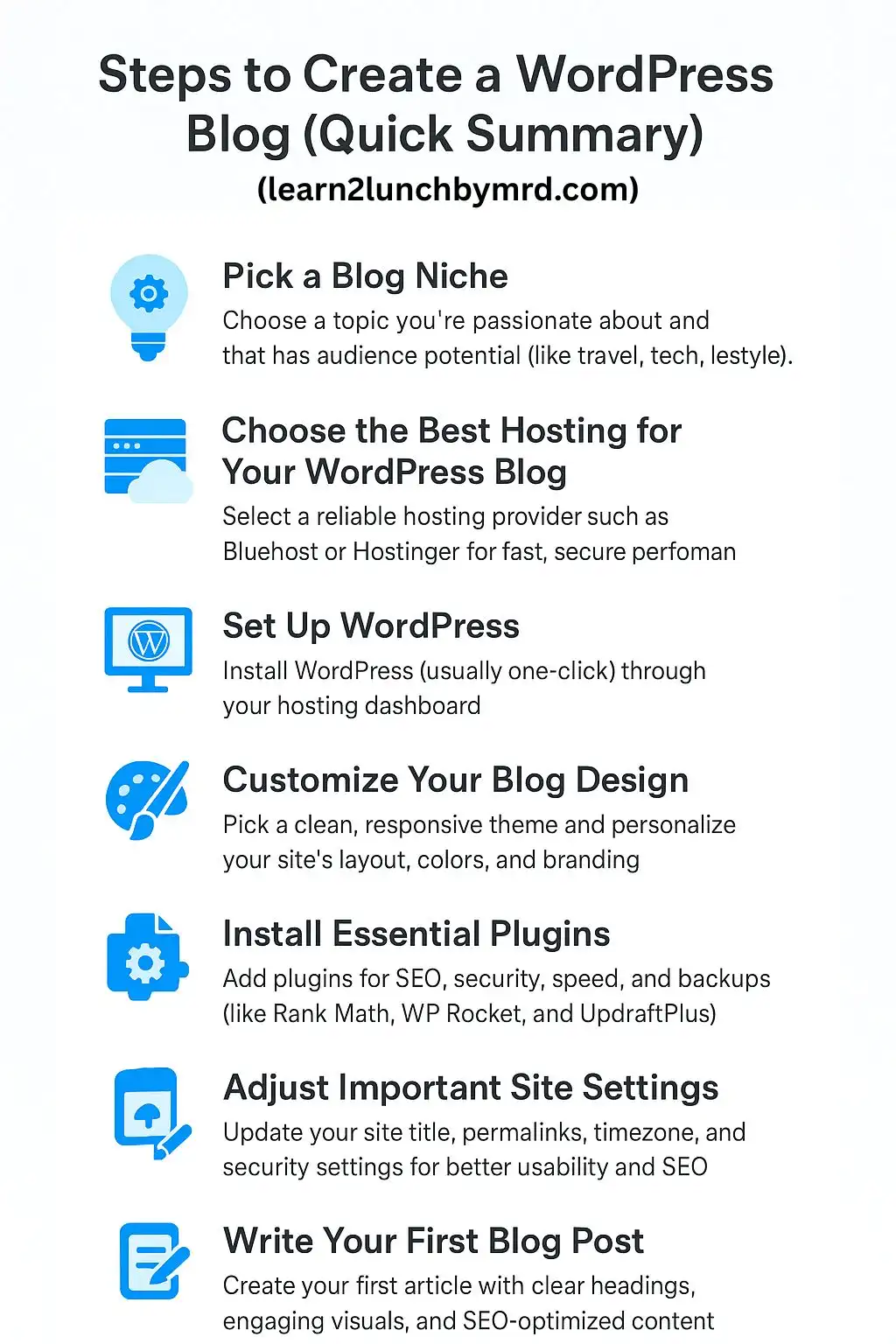
How to pick a niche for you WordPress blog (The foundation of your success)
When I first decided to start a WordPress blog for beginners , the hardest part wasn’t buying hosting or installing plugins. It was figuring out what my blog should actually be about .
Believe me , you are not alone if you are stuck at that point . selecting your niche is similar to determining what your virtual “home” will represent. It’s the first step in How to start a WordPress blog for beginners step by step. And it establishes the tone for everything else you do later on including your design and potential revenue.
Why your blog niche matters so much?
Imagine you trying to build a house without deciding the function of each home. that’s how blogging without a niche feels, confusing and inconsistence.
- Direction – So you know what to write about
- Audience clarity – you attract readers who truly care about your topics.
- monetization potential – you can later link your niche to products or affiliae programs.
I made a mistake of writing about everything when i was creating my first website. including technology , travel , health, and random ideas. the outcome? No authority, no loyal readers, no clear identity.. Everything changed after I focused on just one niche.
How to pick a niche for your WordPress blog (that you will actually enjoy)
Let’s keep this simple and real . here’s my 3 step formula for picking the right niche.
- Choose something you genuinely care about – could I write about this topic for the next year and still enjoy it ask yourself. If you said “yes “, that your sweet spot
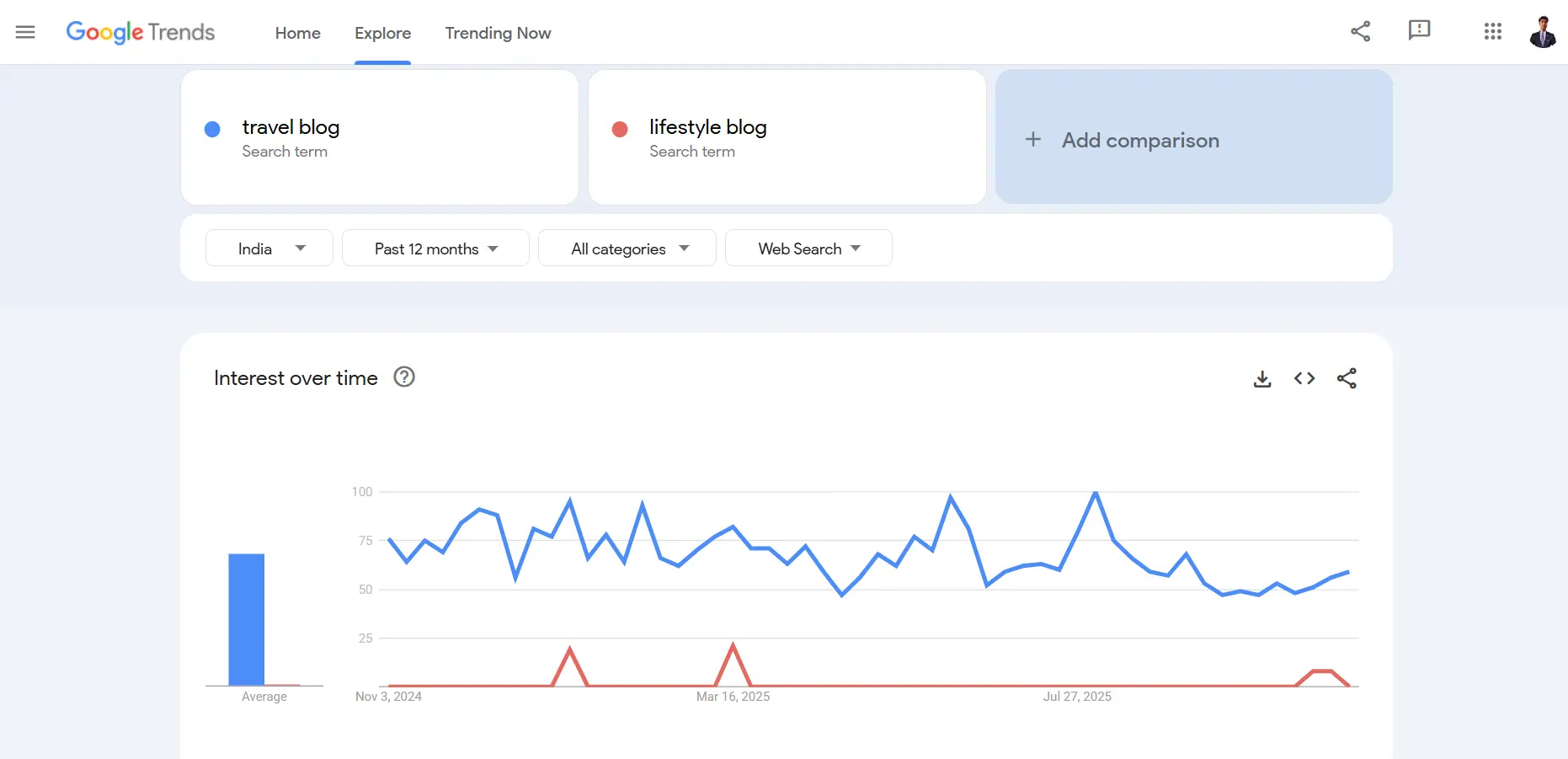
- make sure theme’s demand – look up your niche in Google, YouTube and Pinterest. it’s encouraging is you see a large number of people following related blogs or asking questions. we can get a rough idea about the demand using Google Trends and keyword tools.
- check monetization potential – Not all hobbies generate revenue , but with the correct strategy , any passion can turn a profit. Look for products or affiliate programs that fit your niche. you are walked in the right direction if they exist
Example niches to inspire you.
If you are wondering where to start , here are some popular beginner friendly niches for blogging:
- smart home and tech (great for affiliate marketing)
- travel and digital nomad lifestyle
- health , wellness and productivity
- personal finance and budgeting
- AI tools and future skills (perfect for long term growth)
Each of these niches has a loyal audience, monetization options and long term relevance .
Choose progress over perfection
The problem is that you don’t have to look for the “ideal” niche right now. all you have to do is begin. you will naturally improve your focus as you write , gain knowledge and discover what resonates once your blog is up and running
Remember , this is only the first real step in how to start WordPress blog website for beginners step by step – but it’s the most important one. get it right. and everything that follows (your design, posts and traffic) will align beautifully .
Choose the best hosting for your WordPress blog (fast , secure and affordable)
I had no idea how much of a difference web hosting could make when i first started learning how to start a WordPress blog for beginners step by step. I believed that hosting was “just a place where your site lives .” but here’s what i discovered – deciding on the best WordPress hosting can literally determine whether your blog expands quickly or struggles to stay up and running.
consider your hosting to be the cornerstone of your ideal house. nothing else matters if it’s weak , Google will ignore you , your site will load slowly and it will crash during times of traffic. but if it’s strong everything goes without a issue.
When choosing the best hosting for your website, it’s worth exploring reliable providers that ensure great performance and security, as discussed in the best website hosting for small business guide.
Why the right hosting matters (more than you think)
It’s worth taking a few minutes to learn why this decision is so important before you install WordPress.
- Speed = Readers Stay. Slow sites lose visitors fast. People won’t wait more than 3 seconds.
- Security = Peace of Mind. A good hosting provider gives you free SSL (that little lock symbol), daily backups, and malware protection.
- Support = Lifesaver. Especially when you’re just learning how to start a WordPress blog for beginners , having 24/7 support is priceless.
believe me, I have been there , looking through forums at two in the morning after my blog unexpectedly crashed. after that I realized paying a few dollars more for a reliable host was completely worth it.
How to choose the best hosting for WordPress blog
now here’s what to look for when picking your hosting plan:
- 99.9% Uptime Guarantee — You want your blog to stay online all the time.
- Free SSL Certificate — So your visitors see your blog as secure (and Google likes that too).
- Fast Server Performance (LiteSpeed or NVMe SSD) — This directly affects your SEO rankings.
- One-Click WordPress Installation — No technical setup needed.
- 24/7 Live Chat Support — You’ll thank yourself later for this one.
- Affordable Renewal Rates — Some hosts look cheap upfront but get expensive later — always check this.
Hosting providers I recommend (from my own experience)
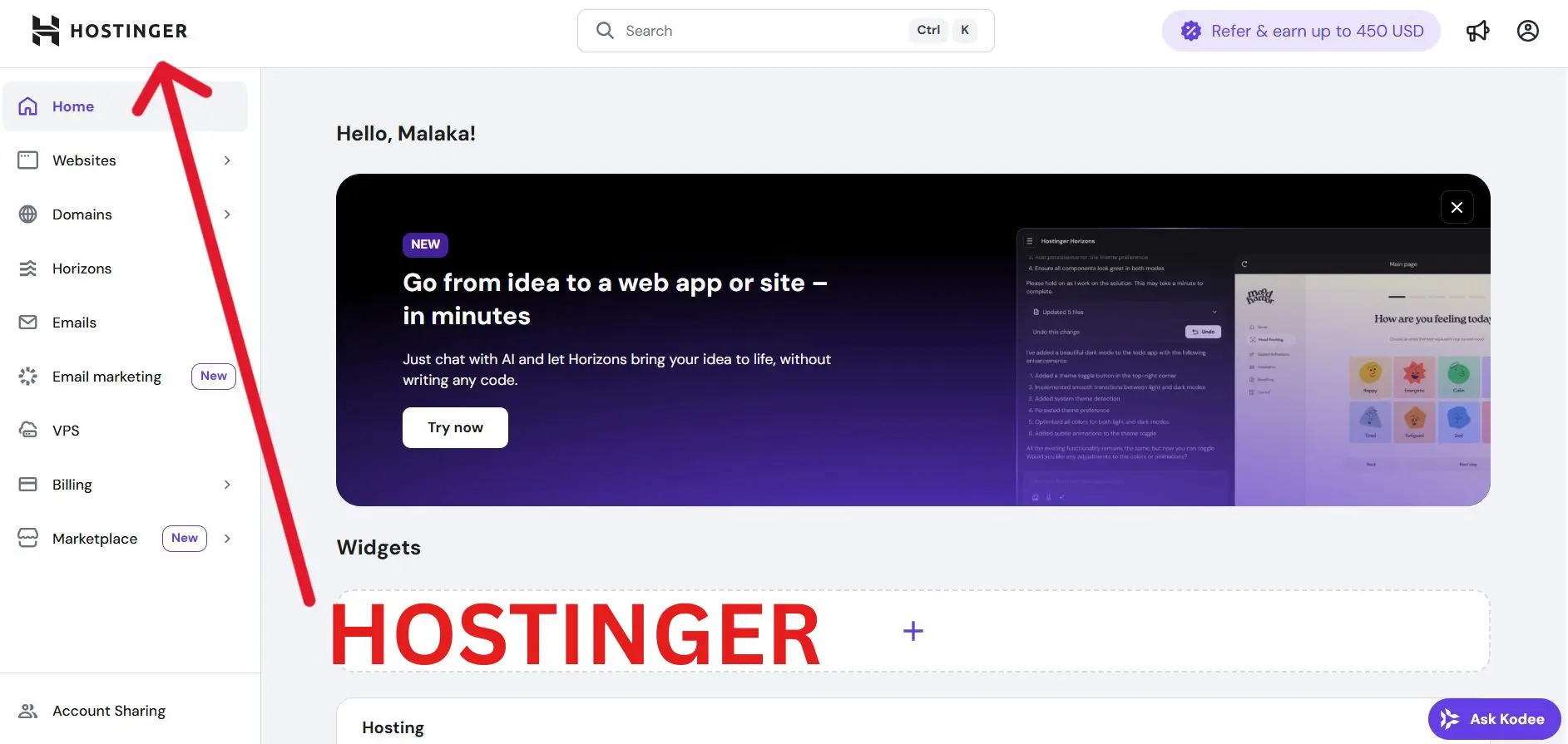
When I started my first blog , I tested a few different options . base d on my experience. here’s what i have found to work best for beginners.
- Hostinger – Great performance for beginners, affordable, and super easy setup.
- SiteGround – Excellent customer support and reliability.
- Bluehost – Officially recommended by WordPress, perfect for new bloggers.
if you want to dive deeper , I have already written a complete beginner friendly post comparing them – Best website hosting for small business (complete beginner guide)
Quick tips for beginners
Start small and work your way up when selecting a hosting plan. don’t overthink it, launching your blog is your primary objective at this time, not making it flawless. you can upgrade to a better plan or even a dedicated server as your traffic increases.
This is one of the biggest lessons I’ve learned while figuring out how to start a WordPress blog – start lean, then scale smart.
So, when picking the best hosting for WordPress blog, remember:
- Speed and security matter more than fancy extras.
- Choose a host with 24/7 support.
- Don’t go for the absolute cheapest plan — go for reliability.
Once you’ve got your hosting sorted, the next step is where things get exciting – setting up your actual WordPress blog!
Set up WordPress(Quick and easy)
Now that you are figured out your hosting. it’s time to setup WordPress, which is the exciting part where your blog really comes to life. I was both excited and scared when i first started writing how to start a WordPress blog for beginners step by step . It turned out to be much simpler than i had imagined. Regardless of my expectations that it would be extremely technical.
together let’s go over it step by step.
01 – Installing WordPress
Most hosting providers today make this process ridiculously easy. remember how we talked about choosing the best hosting for WordPress blog.? that’s where it pays off.
Here’s what usually happens once you login to your hosting dashboard ,
re’s what usually happens once you log in to your hosting dashboard:
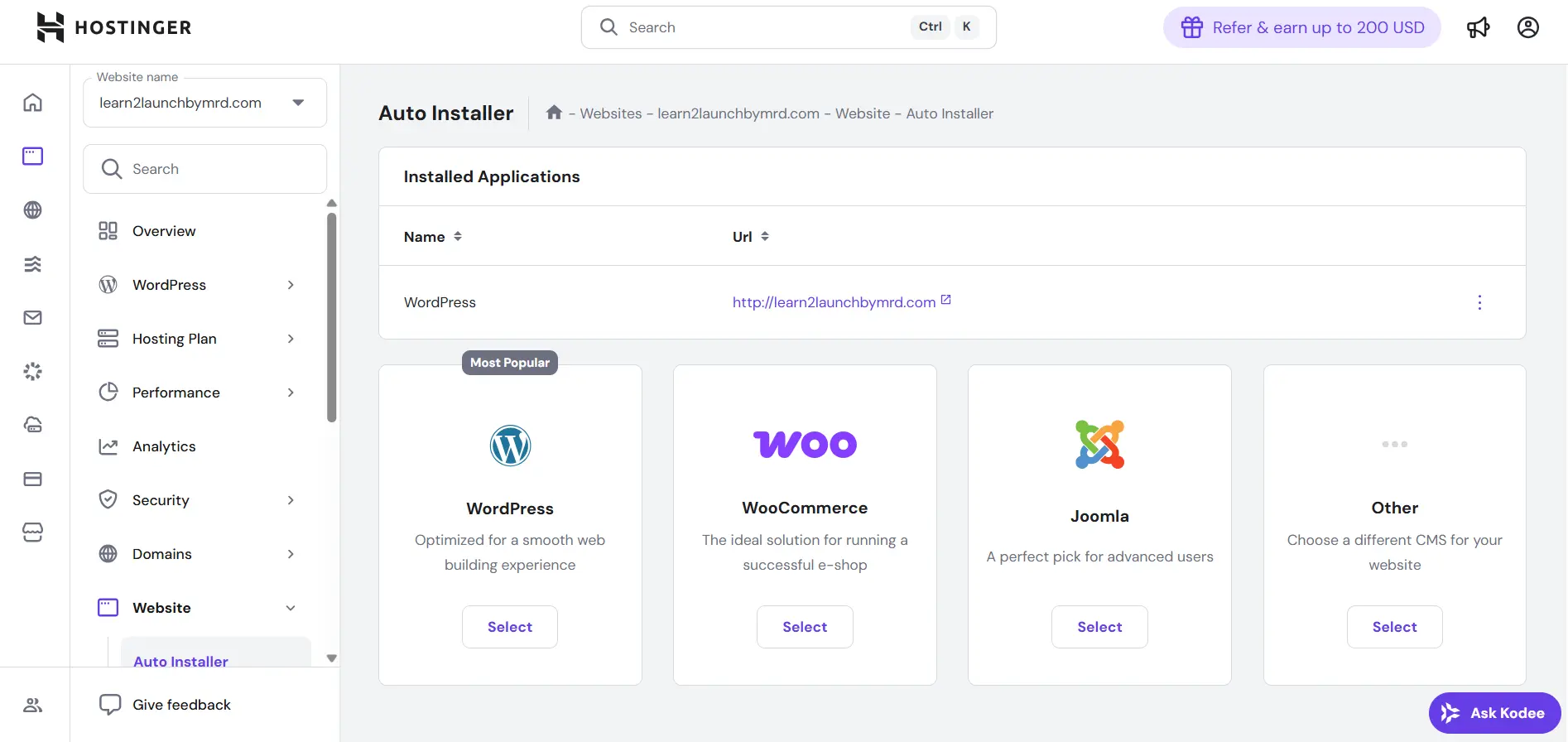
- Find the “Auto-Installer” or “WordPress” option.
- Click Install WordPress — and it sets everything up for you in under 60 seconds.
- You’ll get your login URL (something like yourdomain.com/wp-admin).
That’s it! You’re officially a blogger now.
02 – Choose a theme matches your vision
When your WordPress dashboard first loads , you will see a plain layout – nothing special yet. this is where your creativity starts to shine .
Click on Appearance → Themes → Add New.
Here, you can explore thousands of free and premium themes.
As a beginner, I recommend starting with a lightweight, fast, and customizable theme like:
- Astra – Clean, fast, and great for blogs.
- GeneratePress – Minimal design and SEO-friendly.
- Kadence – Stylish but easy to customize.
Later, when you go through my post The Ultimate WordPress Launch Checklist, you’ll see more about customizing themes and optimizing them before launch.
03 – Add essential plugins
Plugins are like apps for your WordPress site – they add new features . but here’s something I learned the hard way . Too many plugins = slow website
As you are still learning how to start a WordPress blog for beginners step by step , keep things minimal.
here are the must have plugins to install,
| Purpose | Recommended plugin |
| SEO optimization | Rank Math Yoast SEO |
| Website security | Wordfence security |
| Backups | UpdraftPlus |
| Speed optimization | WP rocket LiteSpeed cache |
| Contact forms | WP forms |
| Analytics | Site kit by Google |
| Page builder | Elementor |
Before you launch your blog , make sure to install the essential plugins in WordPress that boost performance ,security and SEO
04 – Adjust your site settings
Now, go to Settings → General in your WordPress dashboard.
Here’s what to do:
- Set your Site Title and Tagline (make it relevant to your niche).
- Make sure your URL uses https:// (for security).
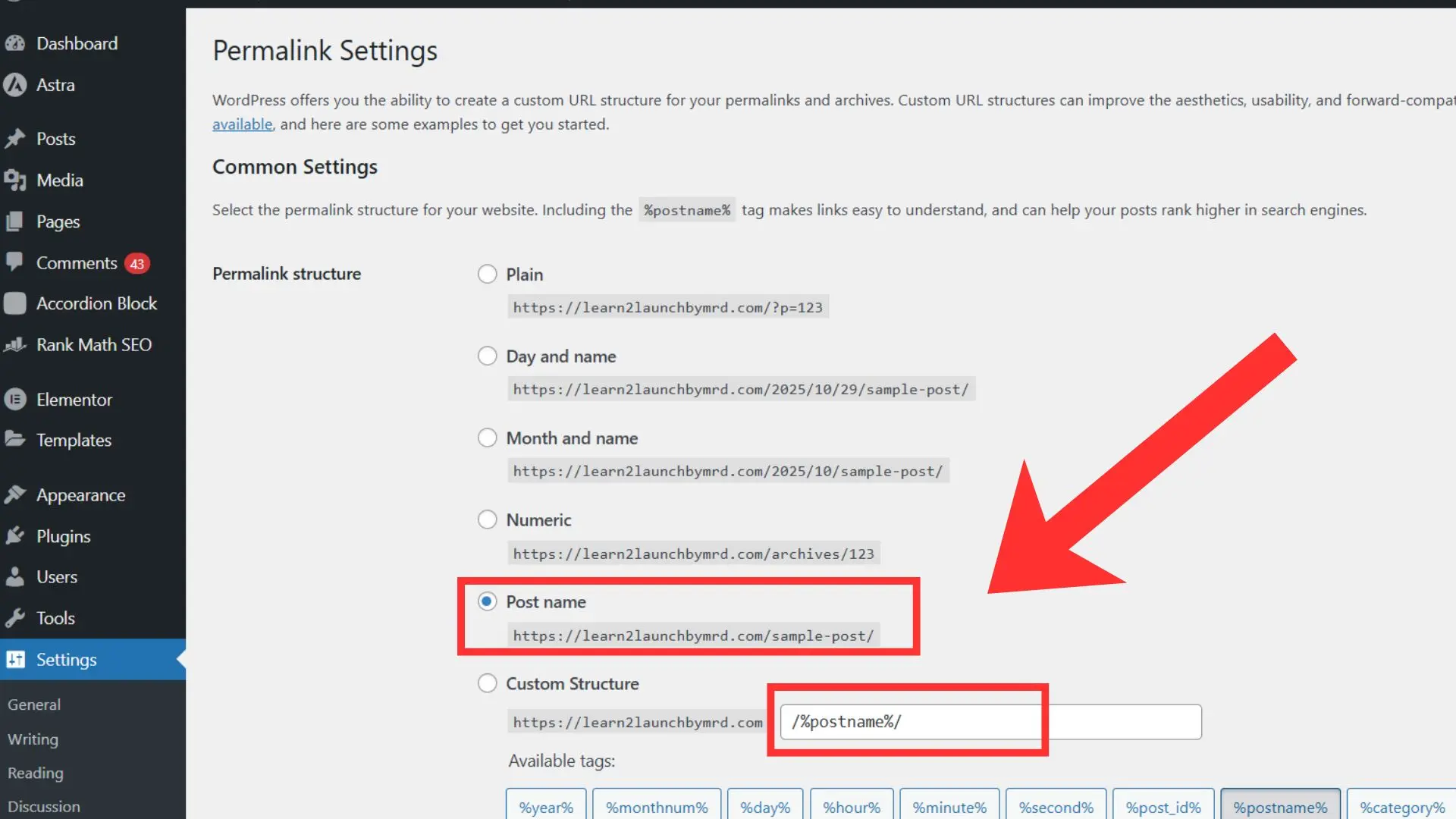
- Go to Settings → Permalinks and select Post name — this gives you SEO-friendly URLs.
Example:
yourblog.com/?p=123
yourblog.com/how-to-create-a-blog
That tiny change makes a huge difference for Google ranking.
Before moving forward with customization , make sure your site settings are properly configured. small tweaks – like those mentioned in quick settings after installing WordPress can significantly improve your site’s performance and visibility.
05 – Customize your site
Now comes the fun part – making your blog look like you.
Go to Appearance → Customize and you can:
- Upload your logo and site icon
- Change colors and fonts
- Add your menu and footer links
You don’t have to make it perfect right now – just make it feel personal.
Trust me, the “perfect design” will evolve as you write more.
when i first setup my blog , i spent days tweaking fonts and colors- instead of writing posts. Here’s the truth , your readers can’t care about design as much as they care about value.
So my advice ? get your design 70 % done and move on . your blog’s real beauty will come from your content. not the theme you choose
How to pick a niche for your WordPress blog
this is the real deal. now that your WordPress blog is up and running , it’s time to make the most crucial choice of all: deciding on your blog niche
this section nearly stopped me in my tracks when I first started learning how to create a WordPress blog for beginners step by step. “What if i choose the wrong niche ?” was a question I kept asking myself
“What if my writing is ignored ?”
“What if never brings in revenue? “
you are not alone if you have ever thought those things . all of todays successful bloggers were once in a similar situation . the reality is that you only need to find a niche that suits you ,not the “perfect” one.
What exactly is a niche ?
The niche is simply the specific topic your blog focuses on . instead of writing about everything . you focus on one main theme – whether it’s travel ,health , personal finance or whatever.
having a clear niche helps you,
- Attract the right audience who truly cares about your content
- Rank higher on Google for focused keywords
- Monetize your blog more easily (because your readers trust your expertise)
When I picked my first niche, I went too broad — I wrote about travel, fitness, and gadgets all on one site. The result? Confused readers and no traffic. Once I narrowed it down to one niche I loved, everything started to grow.
how to pick a niche for your WordPress blog
here’s my personal framework for finding a niche that you’ll actually stick with,
01 . What could you write about for a whole year?
Thinks about what excites you enough that you could write 50+ posts on it. if you can’t imagine creating that much content , it’s probably not the right niche.
02 . What do people already search for online?
Use tools like Google’s autocomplete or Ubersuggest to find what people are typing into search bars.
If there’s search demand, there’s opportunity.
03 . Can it make money?
Not all niches are equally profitable. if your long term goal is income, then explore how to create a blog that makes money to see which niches have real monetization potential.
04 . Does it match you?
This might be the most important one.
Ask yourself:
“Would I still enjoy writing about this topic even if no one paid me (yet)?”
If the answer is yes – that’s your sign.
Examples of profitable blog niches for beginners
If you are not sure where to start , here are a few niche ideas that work great for beginners ,
| Personal Finance | High traffic & strong affiliate programs |
| Health & Wellness | Evergreen, massive audience |
| Travel | Perfect for storytelling & affiliate marketing |
| Home Automation | Growing trend with tech products |
| Productivity & AI Tools | Future-focused and easy to rank for |
validate your niche before committing
Before you go al in , test your niche by-
- Writing 2–3 sample blog posts
- Checking keyword competition (use long-tail keywords like “best productivity tools for students”)
- Joining Facebook groups or Reddit communities to see what people ask about
If people are already discussing your topic and searching for it – you’ve hit gold.
When i was learning how to start WordPress blog for beginners step by step , I changed my niche twice and that’s ok – it’s part of the journey.
the turning point came when i realized,
“I don’t need to pick the most profitable niche – I just need to pick one i’ll actually enjoy showing up for.”
once you find that balance between passion and profit . blogging doesn’t feel like work anymore.
How to write your first blog post in WordPress
Now that you have chosen your niche and configured your WordPress blog, you are prepared to get started. writing your first blog post is an exciting moment for all newbies. I remember spending hours starting at a blank word document while i was learning how to launch a WordPress blog for beginners. I kept asking myself “what if nobody reads it? what if it’s awful”
The secret is that no first post is perfect. it’s important to begin and learn from the process. additionally, I’ll walk you through the process of writing you first blog post in WordPress in a simple, useful and human manner in this section
01 – Plan your post before you write
Even before opening WordPress , ask yourself,
- What problem am I solving for my readers?
- What questions are they asking online?
- How does this post fit into my blog’s niche?
02 – Structure your post like a pro
A strong structure keeps readers engaged. Here’s a simple framework I personally use:
- Catchy Introduction – Start with a question or story to hook your audience.
- Body Sections – Break content into clear headings with bullet points and subheadings.
- Actionable Tips – Include steps, examples, or screenshots.
Conclusion – Encourage action: subscribe, read the next post, or try a tip.
03 – keep it human and personal
Authenticity is valued by readers. Talk about your failures, successes, and lessons gained. For example, I always talk about my initial difficulties when learning the step-by-step process of starting a WordPress blog for beginners.
Try something like this instead of writing like a robot:
“I spent three hours perfecting the introduction when I first wrote my blog post with a niche focus. In the future, I should have just started writing, and I advise beginners to do the same today!”
04 – Write directly in WordPress
Once your plan is ready:
- Log in to your WordPress dashboard.
- Go to Posts → Add New.
- Add your title (make sure it includes your main keyword or a variation).
- Write your content in blocks, using headings (H2, H3) for clarity.
- Insert images, lists, and links (both internal and external) to make your post readable.
05 – Add SEO and publish
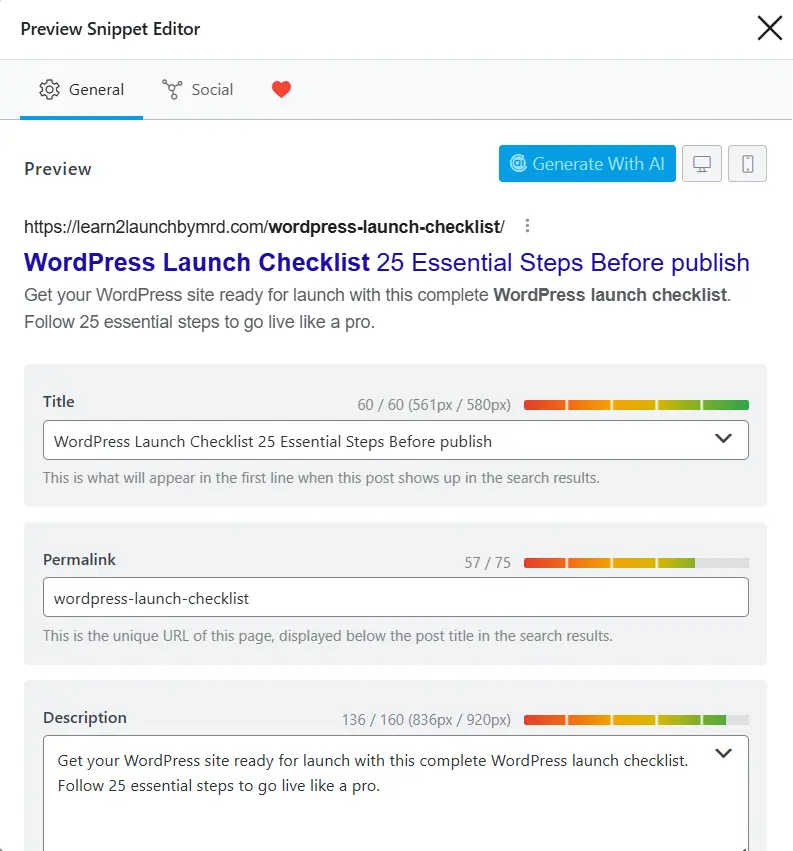
Before you hit “Publish”,
- Check your meta title and description.
- Use your primary keyword at least once in the intro, headings, or conclusion.
- Include secondary keywords like how to write your first blog post in WordPress naturally.
- Preview your post on mobile — most readers will see it there first.
Once you feel good about it, hit Publish. Congratulations — you’ve officially written your first blog post!
the first post is never perfect, and that’s okay. Writing consistently is what builds authority, experience and eventually traffic. when i first wrote mine , I linked it to my niche guide and my launch checklist – and it instantly gave readers more value while improving my internal SEO structure
Essential settings before you publish
Before you hit that shiny publish button, there is one last important step every beginner must do: fine tune your WordPress settings.
When i first learned how to start a WordPress blog for beginners step by step , I skipped this part – and my site ran into tiny problems that were completely avoidable.. don’t make the same mistake.
These settings will make your blog:
- Faster and more secure
- Easier for readers to navigate
- Search engine friendly (Google loves this!)
01 – Configure your general settings
Go to Settings → General in your WordPress dashboard.
Here’s what to focus on:
- Site Title & Tagline: Make sure it reflects your niche. (If you followed Step 4 – How to Pick a Niche for Your WordPress Blog, you’ll know exactly what to write here.)
- Timezone: Set it correctly so scheduled posts publish at the right time.
- Membership: If you plan to allow comments or registrations, toggle accordingly.
02 – Optimize permalinks for SEO
Permalinks are your blog post URLs. Default WordPress URLs look like this:
yourblog.com/?p=123
yourblog.com/how-to-write-your-first-blog-post-in-wordpress
To fix this:
- Go to Settings → Permalinks
- Select Post name
- Save changes
This small step makes your site more professional and helps Google understand your content better.
03 – Set up security basics
Even beginners need security:
- Make sure your host installed SSL (https://)
- Install a basic security plugin like Wordfence or iThemes Security
- Enable regular backups (UpdraftPlus is beginner-friendly)
These steps prevent disasters before they happen. When I skipped this early on, I spent hours fixing a minor crash – trust me, it’s easier to prevent problems than to fix them later.
04 – Configure reading and discussion settings
- Reading Settings: Decide whether your homepage shows your latest posts or a static page. Most beginners start with posts — it’s simple and fast.
- Discussion Settings: Moderate comments to prevent spam.
05 – Connect Google analytics and search console
Tracking your traffic from day one is crucial. It’s how you know what’s working and what’s not.
- Sign up for Google Analytics
- Connect your site via Site Kit by Google plugin
This is one of the smartest steps I took while learning how to start a WordPress blog for beginners step by step – it helped me understand my audience and improve my posts over time.
06 – Internal link and launch checklist
Before publishing , add internal links to your previous posts . Internal linking keeps visitors on your site longer, improves SEO, and creates a professional blog structure.
When i skipped thee settings on my first blog , my posts were harder to find , slow to load , and didn’t get much traffic. once i complemented them, everything improved- speed, rankings and even my confidence as a beginner blogger.
Never skip the essentials. they take minutes but save hours later.
Launch and promote your blog
Congrats ! you have successfully complete the first 6 steps in my step by step guide to starting a WordPress blog. your website is functioning , running , polished and ready for visitors. the problem is that just clicking “publish” is insufficient . If you want your blog to grow, you must launch and promote it strategically .
I believed that creating posts were sufficient when i first started my blog. as a spoiler it wasn’t . I needed to engage with my audience and actively share my content.
01 – Prepare for launch
Before you announce your blog make sure everything is ready
- All essential pages are live: About, Contact, Privacy Policy
- Your first 3–5 blog posts are published
- Internal links are set (like linking to Step 5 — How to Write Your First Blog Post in WordPress and The Ultimate WordPress Launch Checklist)
- Your SEO basics are complete (meta titles, meta descriptions, focus keywords)
Having multiple posts at launch gives new visitors more content to explore – it also shows Google that your blog is “serious” and not a single-post site.
02 – Share your blog on social media
Social media is one of the fastest ways to get your first readers. Share your posts on:
- Facebook Groups related to your niche
- LinkedIn if your niche is business, career, or professional development
- Instagram / Pinterest if your niche is visually driven (travel, food, lifestyle)
- Twitter/X for short updates and links
Don’t just drop links. Write a mini-story or ask a question that sparks curiosity.
For example:
“Ever wondered how beginners can start a WordPress blog that actually grows? Here’s my step-by-step guide that helped me get my first 500 readers!”
03 – Leverage internal linking
Now that your blog has multiple posts, interlink them naturally.
This keeps readers engaged, boosts SEO, and makes your site feel like a complete resource rather than scattered content.
04 – Build an email list from day one
Email marketing is a game-changer, even for beginners. Encourage visitors to subscribe by offering something valuable, like:
- A free PDF checklist of your launch steps
- A “beginner blogging tips” guide
From my own experience, email subscribers are often your most loyal readers. They’re the ones who will read your posts, share your content, and help your blog grow.
05 – Connect with other bloggers
Networking is one of the most underrated promotion strategies. Reach out to other bloggers in your niche to:
- Share guest posts
- Collaborate on content
- Exchange advice and growth tips
When I first started, a single collaboration led to over 200 new readers in one day. That’s the power of building relationships early.
06 – Keep learning and Iterating
Launching is just the beginning. After your blog goes live:
- Track traffic using Google Analytics
- Monitor what posts perform best
- Update older posts to keep them fresh
- Continue adding internal links to guide readers
Remember, blogging is a marathon, not a sprint. Every small step compounds over time.
The launch phase felt overwhelming to me when I learned how to start a WordPress blog for beginners step-by-step. However, I quickly gained momentum by breaking it down into manageable steps: share, connect, email, and track.
The main lesson is to avoid waiting for ideal traffic. Launch, advertise, and make improvements along the way.
related questions on how to create a WordPress blog
How do I start a WordPress blog for beginners?
Selecting a niche, selecting the best WordPress blog hosting, configuring WordPress, creating your first post, and publishing are the first steps. To make it simpler and quicker, follow to our comprehensive, step-by-step instructions.
How do I pick a niche for my WordPress blog?
Pick a topic you enjoy writing about consistently and that also has an audience searching online. For more guidance
Can I make money from a beginner WordPress blog?
Yes! Start with affiliate marketing, digital products, or ad networks once your blog gains traffic. Focus on creating quality content first, then explore monetization.
How do I promote my new WordPress blog?
Share your posts on social media, join niche communities, use email marketing, and link to your other blog posts
Well done! You’ve set up the foundation for a blog that can expand, draw visitors, and even bring in money by following this comprehensive guide on how to start a WordPress blog for beginners. Every step you’ve taken, from choosing the best WordPress blog hosting to creating your first blog post, advances your blogging objectives.
Remember that blogging is a process rather than a competition. Like you, every successful blogger began with curiosity, some hesitancy, and a willingness to learning. Action, patience, and consistency are crucial. Your readers are waiting for your voice right now, so don’t wait for the ideal opportunity.
To make sure your blog launch is flawless, check out my Ultimate WordPress Launch Checklist. it’s designed to help beginners like you avoid common mistakes.
action beats perfection. Start, learn, improve, and grow. Every post you write, every tweak you make, is a step toward building a blog you can be proud of.
Now it’s your turn. Take the knowledge, implement these steps, and make your WordPress blog a reality. Your future self will thank you.