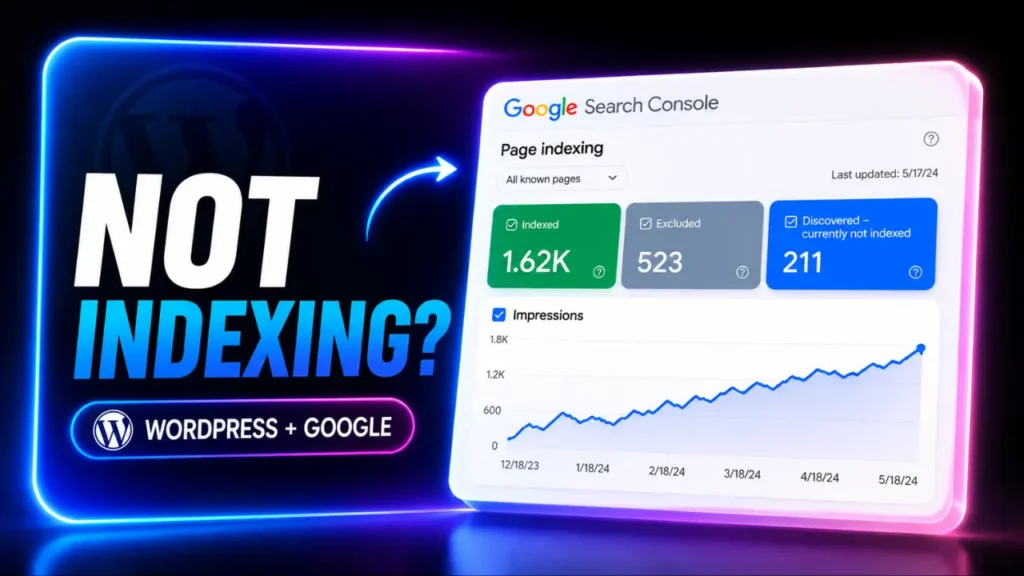

You’ve published your fifth post. You search the title on Google a few days later… and nothing shows up.
No homepage , No blog post , No indexed pages. Just silence
If you are wondering why your WordPress site not indexing on Google, You’re not alone. It’s one of the most frustrating moments for new bloggers- especially when you’ve already done the work, submitted your sitemap, and hit publish.
I remember hitting this exact wall with a new site. I kept checking Google every day, convinced I’d broken something. But in reality, nothing was broken. The pages were live. Google had simply discovered them… and hadn’t indexed them yet.
That’s a very common reality for new websites.
Many beginners search things like “Why is my WordPress blog not showing up on Google” or panic when they see “Discovered – currently not indexed” inside Google Search Console. It feels personal when it happens to your own site, but it usually isn’t a penalty.
It’s usually trust.
New websites have little authority, few backlinks, and limited history. Google needs time and the right technical signals to understand that your site deserves to be indexed.
That’s why inside my guide on how to start a one person AI blog, I always focus on building a technically clean foundation before worrying about traffic. I don’t believe in mass-producing content ; I use the AI orchestrator protocol to ensure every post I publish is designed to be indexed and authoritative from day one.
Because indexing comes before ranking.
And ranking comes before growth.
The good news?
You do not need hundreds of backlinks to fix this. You do not need to publish 50 more posts. You do not need to “wait and hope.”
You need a clear diagnosis.
In this guide, I’ll walk you through exactly how to get a new WordPress site indexed by Google, how to fix Google Search Console “Discovered- currently not indexed” and how to troubleshoot “Crawled – currently not indexed” WordPress pages step by step.
No guessing. No SEO jargon overload.
Just a practical Search Console checklist you can work through in under 15 minutes.
My recommendation :
“Stop trying to ‘force’ indexation with spammy indexing services. Google’s algorithms are designed to ignore unearned traffic. If your site is technically sound, the Indexing API should be a supplement to your structure, not a crutch for bad content.”
KEY TAKEAWAYS :
- Indexing is not a ranking : Your site being “in” Google doesn’t mean you’re on Page 1 – it just means the gate is open.
- Technical, not content : If you’ve posted 5+ high-quality articles and see nothing, the issue is almost always a technical block, not your writing.
- Patience + verification : Google’s crawl queue is real. You don’t need backlinks; you need a verified Sitemap and a clean GSC status.
- The AI-Orchestrator edge : We don’t just “hope” for indexing. We structure our internal links to force Google to crawl our pillar pages first.
Why is my WordPress blog not showing up on Google?
It’s one of the most frustrating moments for any one-person entrepreneur.
You spend hours writing a post, optimizing images, hitting publish… then you search site :yourdomain.com and Google shows nothing.
No homepage. No blog posts. No indexed pages
Before assuming your content isn’t good enough, it helps to understand what’s actually happening behind the scenes.
Google doesn’t index pages based on effort.
It indexes pages based on discovery, crawlability, and trust.
That means even a well-written article can stay invisible if Google can’t properly crawl it – or if your site hasn’t built enough trust signals yet.
The crawl queue VS. the trust barrier
When your WordPress site is brand new, Google has very little context about it.
No publishing history. Few or no backlinks. No established authority signals.
That doesn’t mean your site is being penalized.
It usually means Google is still evaluating whether your pages should move from “discovered” to “indexed”.
This is why many new bloggers open Google Search Console and see messages like:
- Discovered- currently not indexed
- Crawled- currently not indexed
Both can feel alarming at first. But they often mean Google knows your page exists – it just hasn’t committed to indexing it yet.
Sometimes that delay is completely normal. Sometimes it’s technical and that distinction matters.
What I have experienced in my early times :
In the early days of a blog, technical hygiene beats content volume every time. You cannot out-publish a broken sitemap. You cannot out-write a noindex tag. You cannot fix blocked crawl access by posting more articles.
Most of the time, the issue isn’t your content. It’s a small technical setting hiding in the background.
For example :
- Search engines accidentally blocked in WordPress Reading Settings
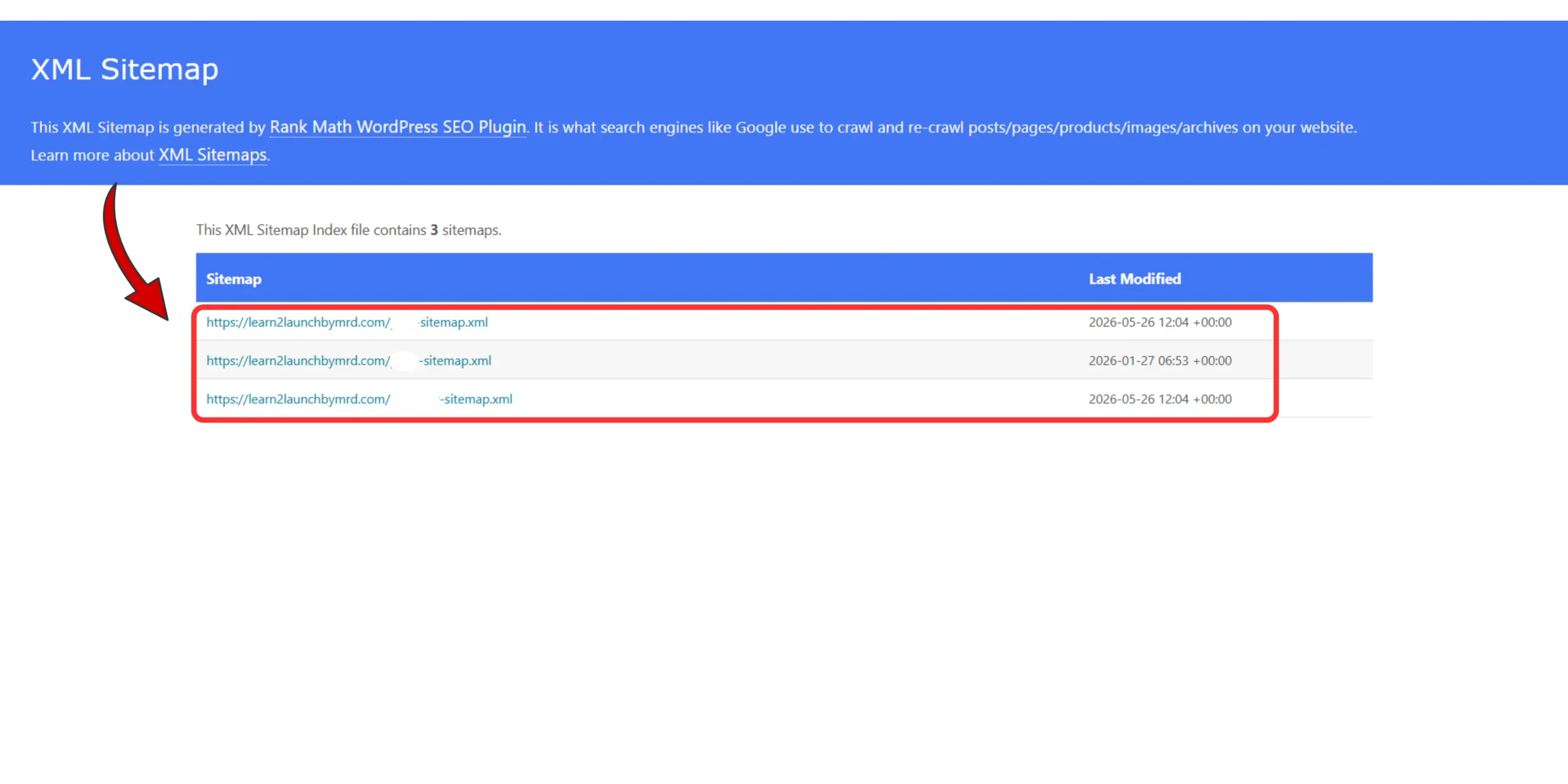
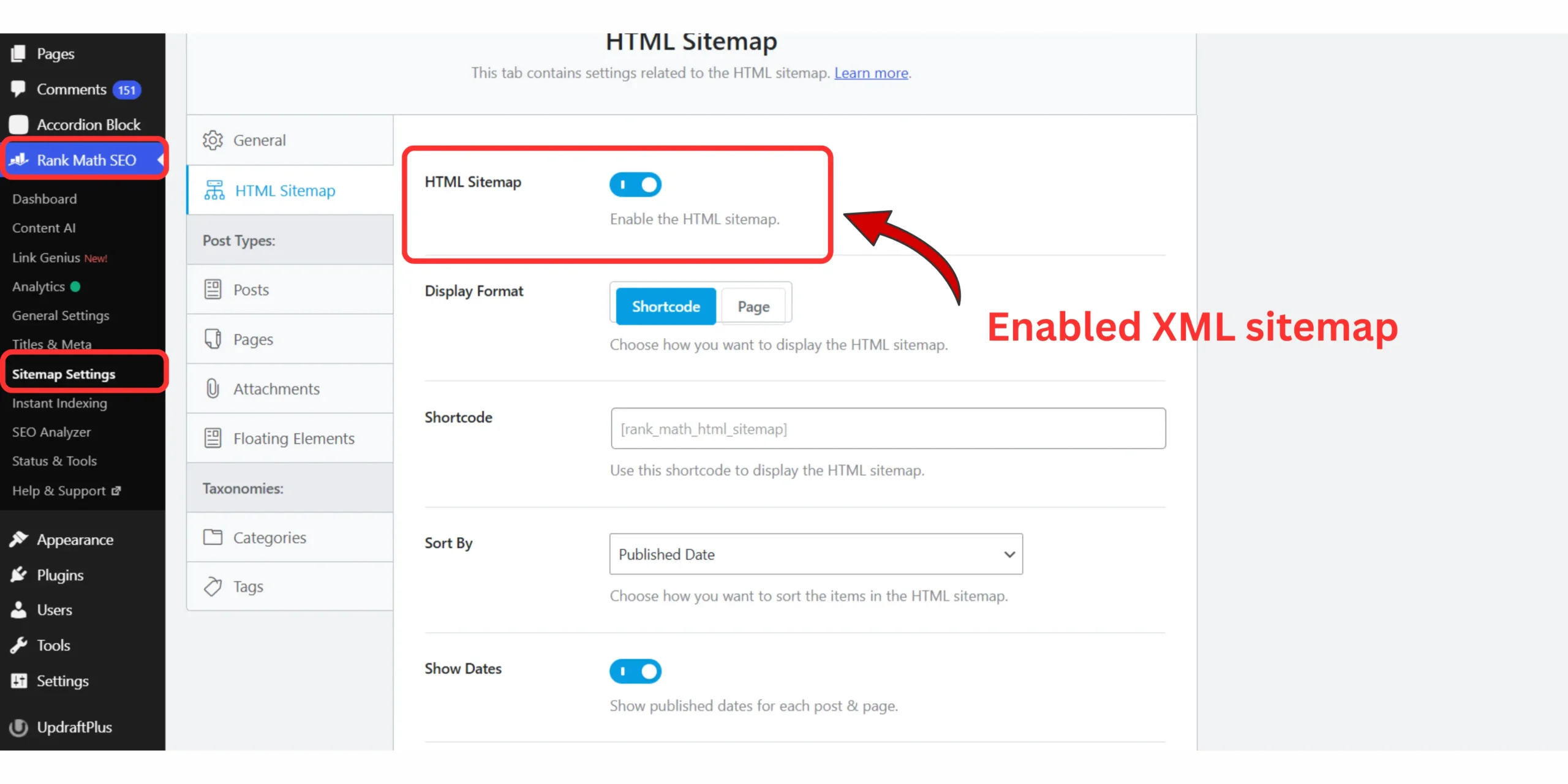
- Sitemap submitted incorrectly
- Pages marked as noindex by an SEO plugin
- Google discovering the page but not prioritizing it yet
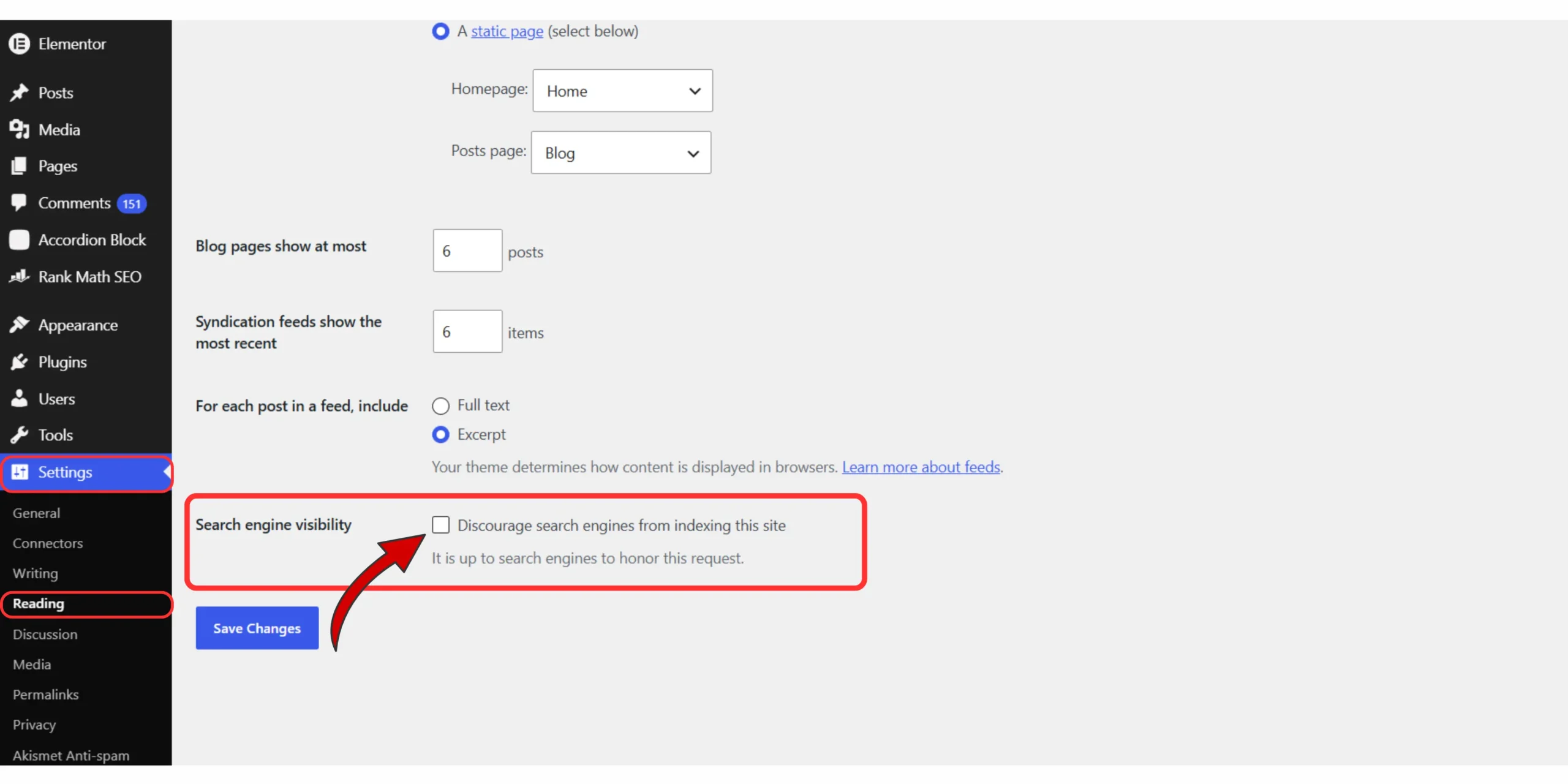
I’ve seen blogs stay invisible for weeks because of one checked box during setup. That’s why before publishing more content, it’s worth auditing the basics first.
If you haven’t reviewed your WordPress setup recently, I highly recommend checking my guide on 15 common WordPress mistakes beginners make and how to avoid them. Many indexing problems start there and the fix can take less than two minutes.
Once your settings are clean, the next step is simple. Stop waiting , Start verifying.
Let’s open Google Search Console and see whether Google has actually found your site or whether it’s running into a dead end before indexing even begins.
The hidden timeline : How long does it take Google to index a new WordPress site?
It’s the question almost every new blogger asks – usually late at night after checking Google Search Console for the tenth time:
“How long does it take Google to index a new WordPress site?”
You publish a post, Submit your sitemap , Request indexing, Then refresh Google the next day expecting to see your page live in search.
Sometimes it happens quickly, Sometimes…… nothing,
The honest answer?
There is no fixed timeline. Some new WordPress sites get indexed within 24–48 hours. Others take several days. Some pages can take weeks. That variation is completely normal.
It’s also why I wrote a deeper breakdown on how long it takes to rank on Google for a new blog, because indexing and ranking are related but they are not the same thing.
Indexing means Google has added your page to its database. Ranking means Google has decided where to place that page in search results.
A page can be indexed and still not rank well yet. And a page that isn’t indexed can’t rank at all. That distinction matters.
What many SEOs refer to as the “Google Sandbox” usually happens during this early stage – when your site exists, Google has discovered it, but your domain is still building trust and history.
” Google doesn’t have a “publish” button for your website. It has a discovery process. Your goal isn’t to force instant indexing overnight. Your goal isn’t to force instant indexing overnight.
- this site is active
- these pages are crawlable
- this content is worth revisiting
That usually happens through:
- a clean XML sitemap
- proper internal linking
- fast page speed
- no blocked indexing settings
- consistent publishing
And here’s something many new bloggers don’t realize: Google often indexes your homepage first. Your category pages may come next. Individual blog posts sometimes take longer.
That delay doesn’t mean something is broken. It usually means Google is still learning your site structure. If you’re stuck in that waiting period right now, try not to measure progress by how many times you refresh Google search results.
Measure it by signals. Is your sitemap submitted? Can Google crawl your pages? Does Search Console show the URL as discovered? Are internal links pointing to the page? Those are the indicators that matter. Indexing is rarely a single event. It’s a rolling process.
Googlebot revisits your site in waves-discovering pages, following links, understanding relationships between pages, and gradually deciding what belongs in the index. That waiting period can feel frustrating. But it’s not a failure. It’s simply part of building a new site inside a trust-based search ecosystem.
Diagnosing “Google Search Console : Discovered – Currently not indexed”
The first time I opened the page indexing report inside Google Search Console, my stomach dropped. I saw page after page labeled:
Discovered – currently not indexed
At first, it felt personal – like Google had reviewed my site and rejected it. But that isn’t what this report means. Over time, I learned something important:
Google Search Console is not grading your writing. It’s showing you a technical status. When you see “Discovered – currently not indexed” Google is essentially saying:
“We know this URL exists, but we haven’t crawled or indexed it yet. That’s a very different problem from “this page is bad.”
And it’s usually fixable.
Start here in Google Search Console
Open Google Search Console → Indexing → Pages
Then filter for:
Discovered – currently not indexed
These are pages Google has found-often through:
- your XML sitemap
- Internal links
- category archives
- backlinks from other pages
But Google hasn’t crawled them yet. That usually means the page is waiting in Google’s discovery pipeline. Sometimes that’s normal. Sometimes it points to a technical issue worth checking.
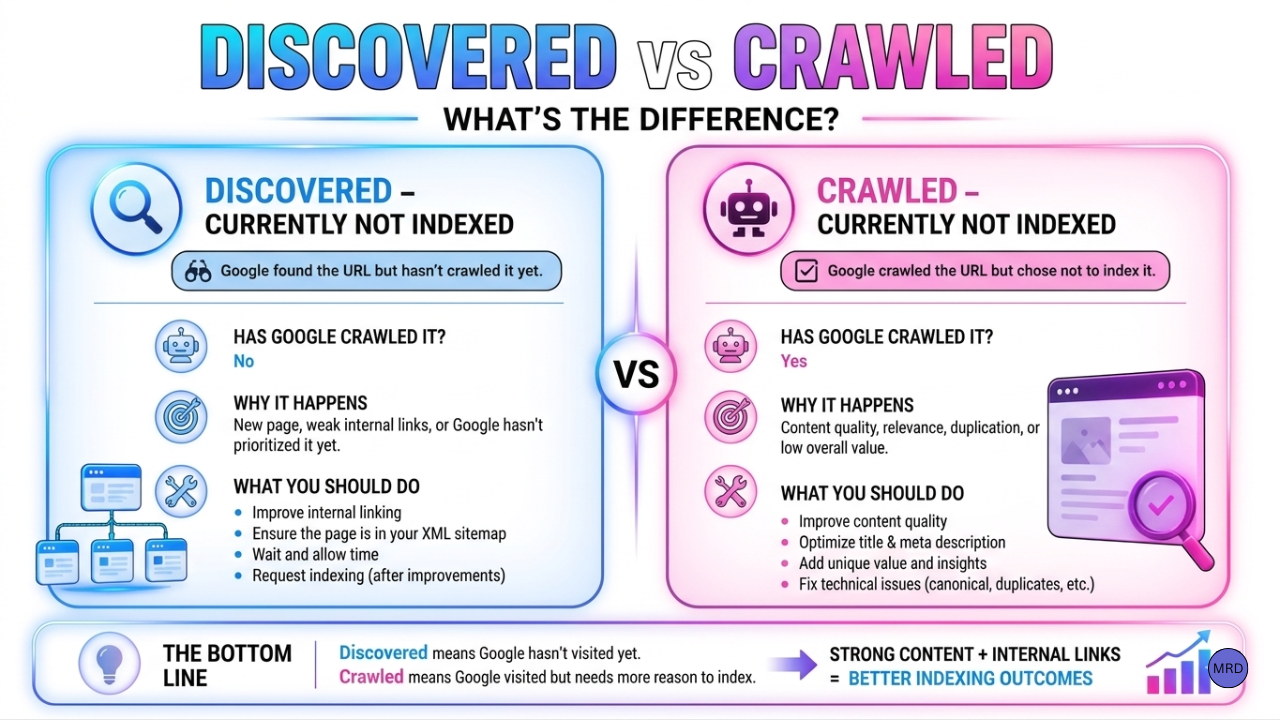
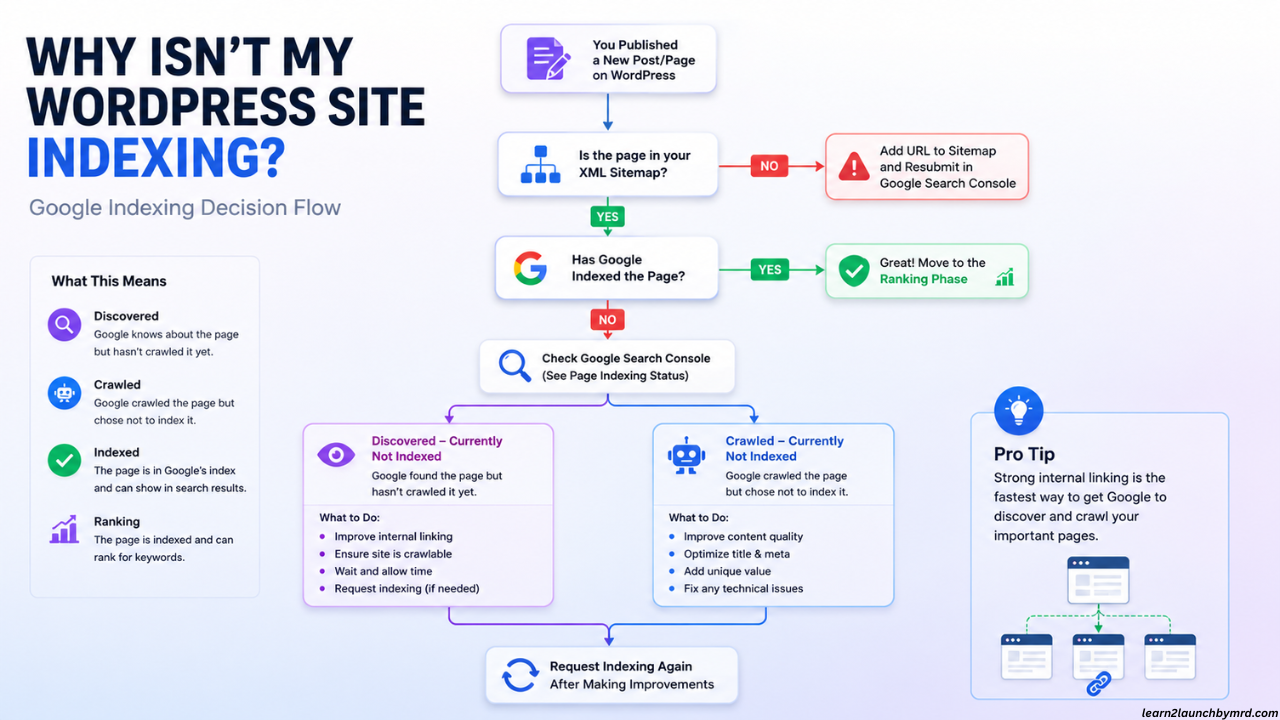
Discovered VS. crawled : What’s the difference?
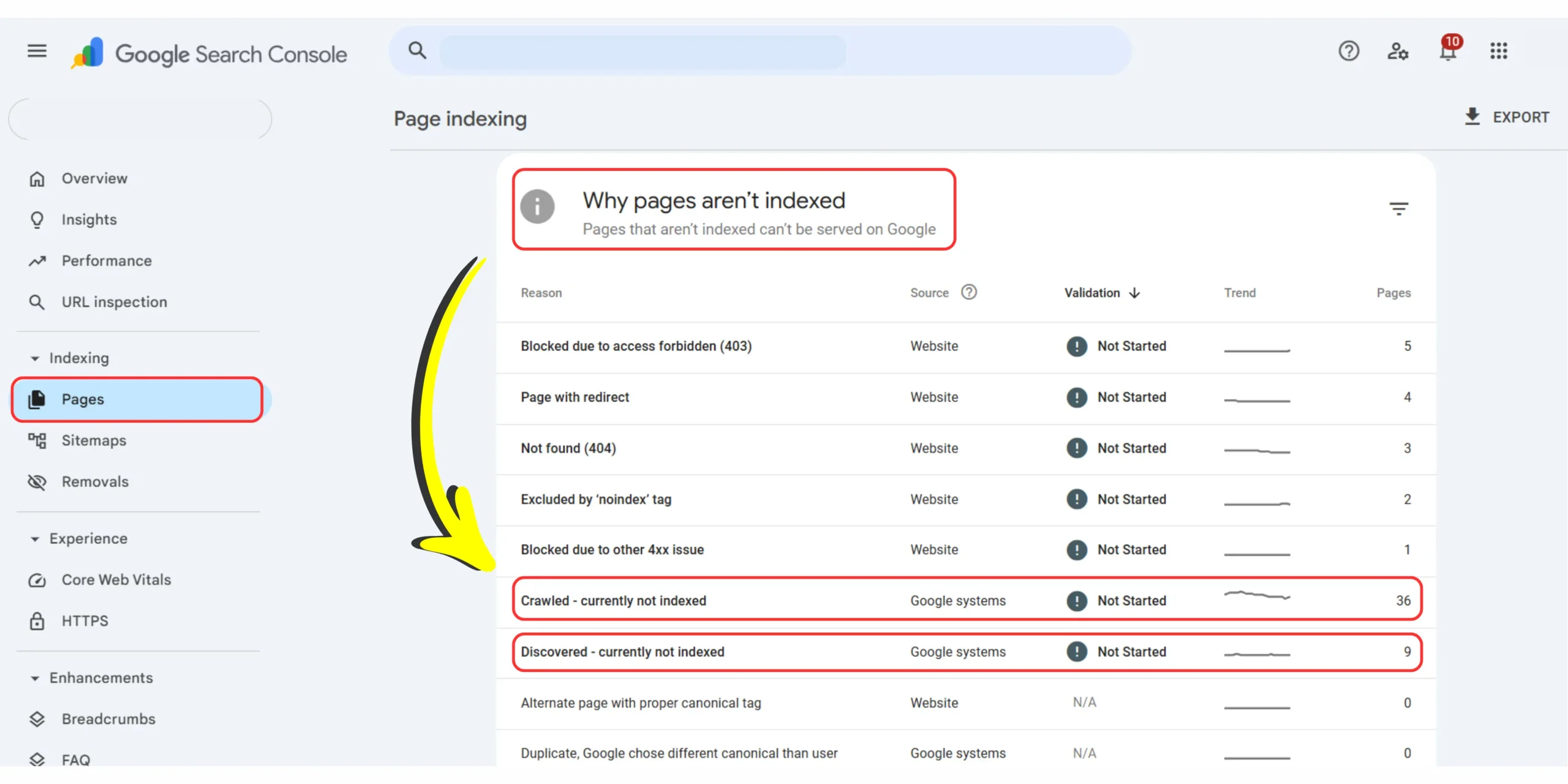
This is where many bloggers get confused. The two statuses look similar but they mean different things.
Discovered – currently not indexed
Google knows the URL exists. It found it. But it hasn’t crawled the page yet. Common reasons:
- new website with low trust signals
- weak internal linking
- recently published content
- sitemap submitted recently
- Google hasn’t prioritized crawling yet
Crawled – currently not indexed
Google has already visited the page. It fetched the page successfully. But the URL hasn’t been added to the index. Common reasons can include:
- duplicate or overlapping content
- weak internal relevance signals
- canonical conflicts
- thin content
- temporary indexing delays
Neither status automatically means your content is bad. It simply tells you where the process stopped. That distinction matters. If you are using AI to draft content, ensure you are injecting unique, human-led insights. Googlebot is smart enough to ignore pages that read like recycled, ‘thin’ search results.
What I check first
In my experience, when many pages are stuck in “Discovered – currently not indexed” the issue is often less about the individual post and more about the structure around it.
Can Google easily reach the page? Is it linked from your homepage? Is it linked from category pages? Is it linked from other relevant blog posts? Or is it technically published… but buried?
That’s why before resubmitting every URL one by one, I usually audit site structure first. If you haven’t reviewed yours yet, it’s worth reading my guide on how to structure a blog for beginners. A clear site hierarchy helps Google move naturally from your homepage → category → post without friction.
When your architecture is clean, indexing becomes easier. When the path is broken or hidden – Google may discover the page but delay revisiting it. And that’s often where indexing stalls. The goal is simple:
Make it easy for Google to find the page. Make it easy for Google to crawl the page. Make it easy for Google to understand where that page fits on your site. Once those signals are clear, indexing usually becomes much less mysterious.
The fix : How to get a new WordPress site indexed by Google
Once you’ve diagnosed the issue, the next step is fixing the friction. I’ve seen new bloggers spend days clicking “Request indexing” inside Google Search Console over and over – hoping that one more request will somehow force Google to index the page.
I’ve done it too. And in most cases, it doesn’t work-because the page itself still has unresolved signals. The goal here isn’t to trick Google into indexing your content. It’s to make indexing easy. Remove friction. Clarify signals. Make the page easy to crawl, understand, and trust.
Tactical steps to fix “Crawled-currently not indexed”
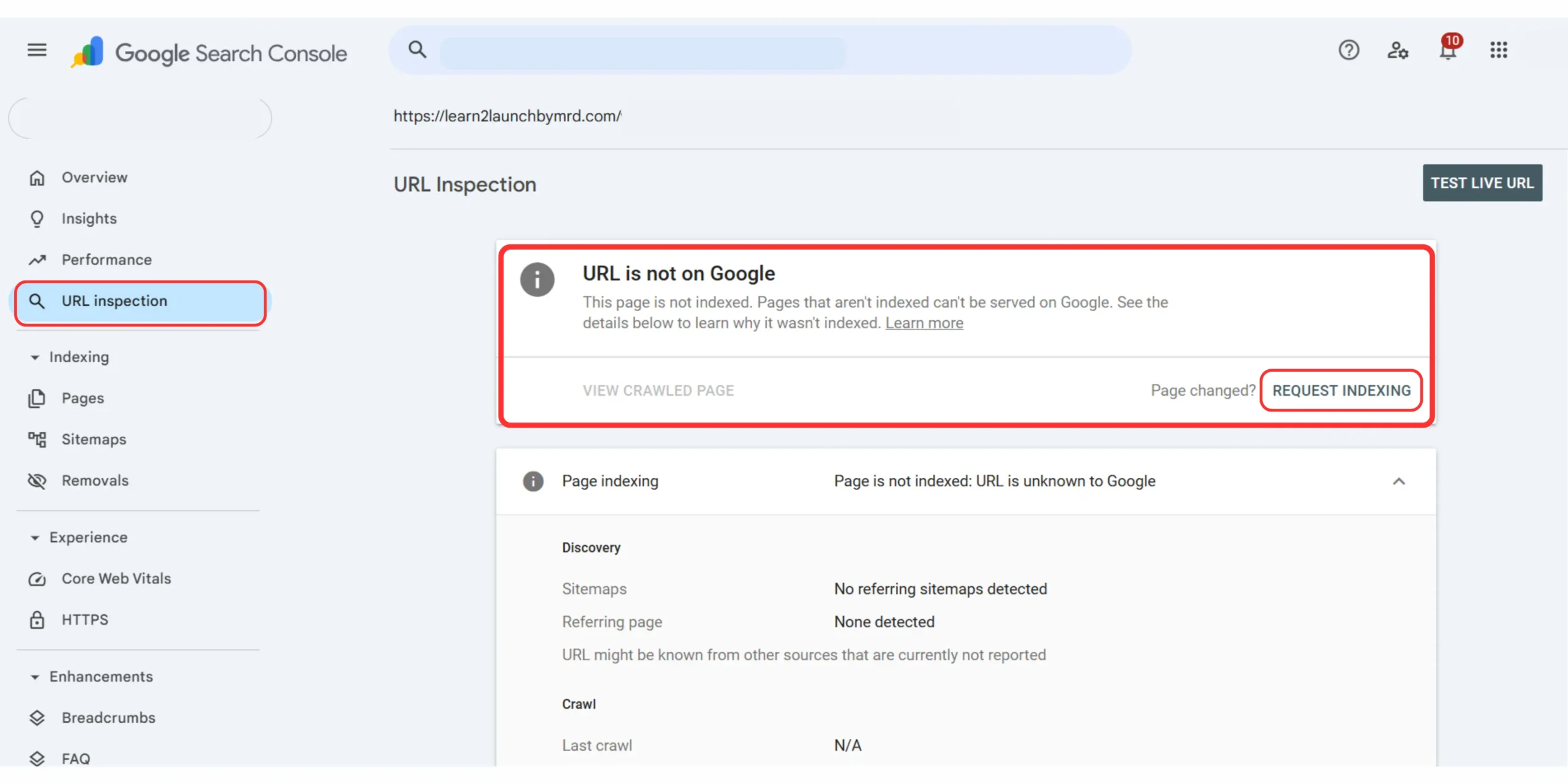
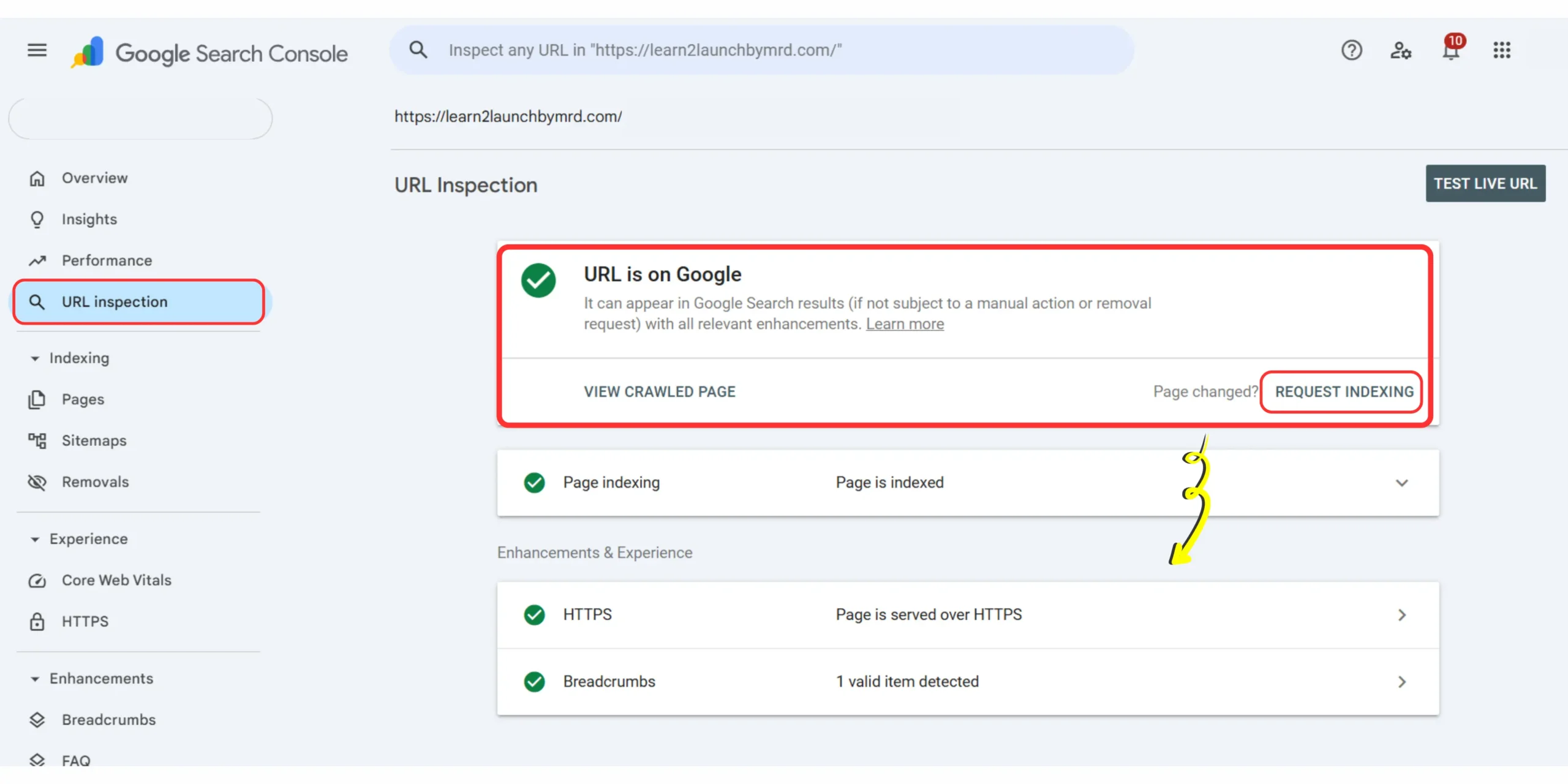
When Google has already crawled a page but it still isn’t indexed, I usually start with these checks.
01 . Audit the page for thin or low value content
Ask yourself:
Would this page give someone a reason to stay? Would it be worth indexing compared to what already ranks?
If the article feels repetitive, overly short, or doesn’t add anything beyond existing results, Google may delay indexing it. This doesn’t mean the content is “bad”. It usually means the signals aren’t strong enough yet. The fastest fix is often adding:
- clearer examples
- Screenshots
- first-hand experience
- stronger internal links
- better formatting
If you want a deeper walkthrough, check my guide on how to optimize blog posts for SEO beginners.
02 . Check canonical tags
This is one of those hidden WordPress issues that many bloggers never notice. Sometimes:
- SEO plugin settings
- theme settings
- pagination settings
can accidentally point a page’s canonical tag to the wrong URL. When that happens, Google may treat your page as duplicate or non-primary. And indexing can stall. I always check canonicals before doing anything else.
03 . Strengthen On page SEO signals
If Google has crawled the page but still hasn’t indexed it, weak page signals are worth reviewing. Check:
- Title tag
- Meta description
- H1 heading
- internal anchor text
- focus keyword placement
Make sure the page clearly communicates:
what it’s about? who it’s for? and why it deserves to rank? I break this down further in my guide on how to do on page SEO for blog posts.
04 . Give the page an internal link push
This is one of the simplest fixes and one of the most overlooked. If a post is stuck, link to it from:
- your homepage
- a category page
- a related older blog post
- your most trafficked indexed article
I’ve had pages sit unindexed for days, then get picked up shortly after adding two contextual internal links from older content. That doesn’t guarantee indexing but it often helps Google rediscover and re-evaluate the page faster.
My recommendation for you :
Pages rarely get indexed in isolation. If a page feels disconnected from the rest of your site, it’s harder for Google to understand how important it is. Internal links create context. They tell Google:
- this page matters
- this page belongs here
- this page supports the wider topic
That context can make a real difference.
My clean up workflow
When a page is stuck, this is the exact process I follow:
- Fix the technical issue
(canonicals, thin content, metadata, or internal linking) - Open URL inspection tool inside Google Search Console
- Click test live URL
- Confirm the page is crawlable
- Request indexing only after the issue is fixed
That order matters. Submitting a broken page again usually changes nothing. Submitting a cleaned-up page gives Google something new to evaluate. Once those signals are stronger, indexing becomes much more predictable.
And your site starts looking less like a collection of disconnected URLs and more like a structured, trustworthy resource Google can keep returning to.
Beyond indexing : Why your content still isn’t getting traffic
This is the part many new bloggers don’t expect: Indexing is not the same as ranking. And ranking is not the same as traffic.
Getting your WordPress site indexing on Google is a huge milestone, but it doesn’t automatically mean people will start finding your content tomorrow. Indexing simply means your pages are eligible to appear in search. It gets you into Google’s database. What happens next depends on:
- how competitive the keyword is
- how well the content matches search intent
- how useful the page is compared to existing results
- how well your content gets discovered beyond Google
That’s why fixing indexing issues can feel bittersweet. Your pages are finally visible. But traffic may still feel flat. That part is normal too. I’ve seen this happen with new blogs over and over. The technical issue gets fixed. Pages start indexing.
But impressions stay low or traffic barely moves. That usually means the next problem isn’t indexing anymore. It’s visibility. It’s positioning. It’s distribution. If you’ve been publishing consistently for months and still aren’t seeing momentum, it’s worth stepping back and asking a harder question:
Is this an indexing problem? Or is it a content-market fit problem?
I break that down in more detail in why your blog is not getting traffic after 06 months, because in many cases the issue isn’t whether Google can index the page – it’s whether the page is targeting the right topic, right audience, or right search intent in the first place. And sometimes, the answer isn’t “wait for Google”.
It’s to build traffic from somewhere else while Google catches up. That’s why I treat SEO as one growth channel-not the only one. For newer blogs especially, I rely heavily on visual discovery platforms like Pinterest to get early clicks while search traffic is still building.
Pinterest can help bridge that waiting period. If you want a practical system for doing that, my guide on how to drive website traffic from Pinterest walks through the exact process. Because ultimately:
Indexing gets your content into Google. Traffic gets your content in front of people. And for a one-person blog, both matter.
Scaling without burnout : The “AI Orchestrator” advantage
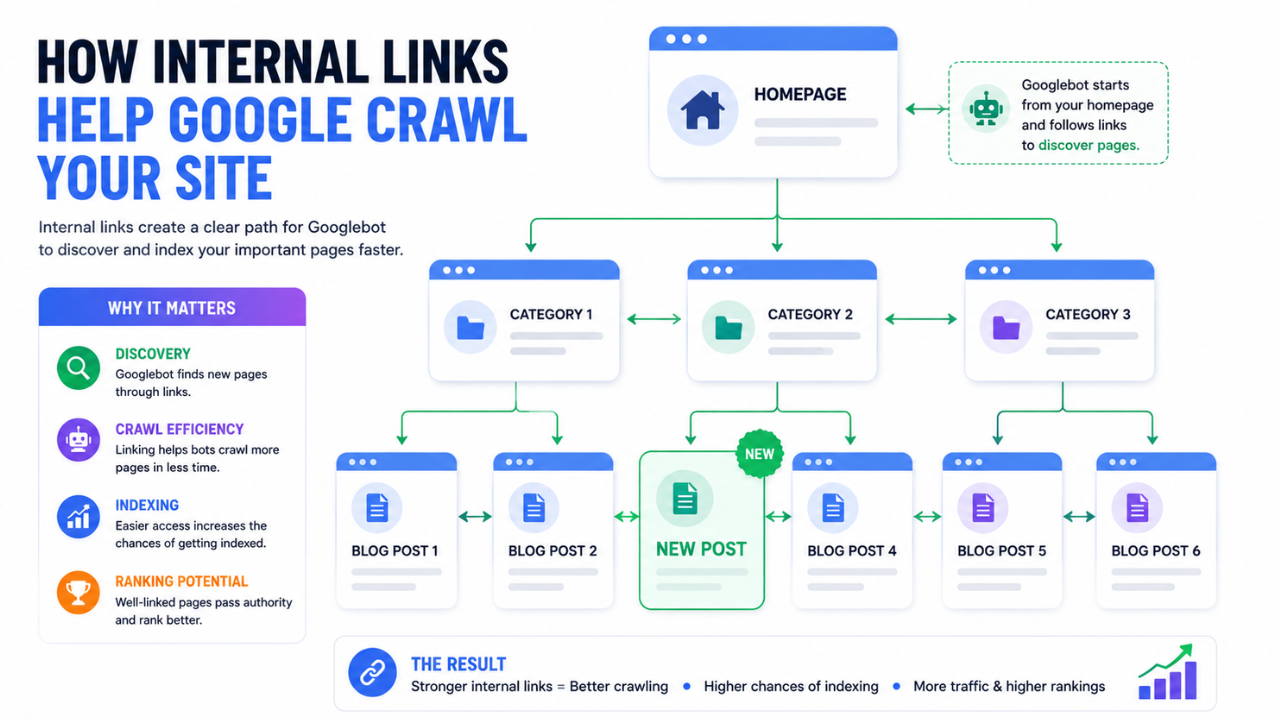
If you’re manually troubleshooting every indexing issue, writing every draft from scratch, and trying to keep up with publishing at the same time- it gets exhausting fast. I learned that early. What drained me wasn’t the writing itself. It was repeating the same decisions over and over:
What should I write next? Did I target the right keyword? Why isn’t this page indexing? Should I rewrite it? Should I wait?
That loop burns people out. And it’s one of the biggest reasons one-person blogs stall before they ever gain momentum. That’s why I stopped treating blogging like a content treadmill. I started treating it like a system. I call that system the AI Orchestrator protocol.
For me, it’s the difference between publishing randomly and building intentionally. Instead of guessing what might work, I build around a repeatable workflow:
- topic research
- keyword clustering
- AI-assisted drafting
- human editing and experience layering
- internal linking
- search optimization
- traffic distribution
Every piece has a job. Every post supports another post. Every article strengthens the wider ecosystem. That shift changed everything for me. Because scaling a one-person blog isn’t about producing more content. It’s about producing the right content- without burning yourself out in the process.
That also means knowing how to take AI-generated output and turn it into something genuinely useful. Something human. Something worth indexing. Something worth ranking. That’s why I spend so much time adding examples, first-hand observations, screenshots, edits, and context to every draft.
AI can help you move faster. But experience, structure, and editorial judgment are what create trust.
If you want to go deeper on that process, I’ve written more about why you stop doing blogging completely (unless you use the AI orchestrator protocol), how to add value to AI generated blog posts so they feel original and useful, and how to start high quality blog on a budget without overcomplicating the setup.
My advice is simple : Don’t just publish. Build systems. Don’t just create content. Create infrastructure. That’s how a one-person blog scales without becoming a full-time content factory.
Frequently asked questions on WordPress site not indexing on Google
How long does it take for a new WordPress blog to get indexed by Google?
A new WordPress blog usually gets indexed within a few days to 4 weeks. Some pages appear faster, while newer domains often take longer as Google builds trust.
If nothing is indexed after a month, check your sitemap, indexing settings, and internal links inside Google Search Console.
Does “Discovered- currently not indexed” mean my content is low quality?
No. It means Google knows the page exists but hasn’t indexed it yet. This is usually a crawling or prioritization issue, not automatically a quality problem. On newer sites, improving internal linking and site structure often helps move these pages into the index.
Should I keep manually requesting indexing in Google Search Console?
Usually no. Repeatedly requesting indexing rarely helps unless something has changed on the page. I only request indexing after fixing a technical issue, updating the content, or improving internal links.
Can I use AI to write blog posts and still get indexed?
Yes – AI-assisted content can absolutely get indexed if it adds original value. The key is editing it with human insight, examples, screenshots, and first-hand experience. Publishing raw AI output without adding value is where problems usually start.
What is the fastest way to get Google to re-crawl an unindexed page?
Internal linking is usually the fastest method. Link to the page from an already-indexed post, category page, or your homepage. Then check the page in Google Search Console and request indexing after the update if needed.
Take control of your indexing strategy
If you started this guide feeling frustrated because your WordPress site is not indexing on Google, I hope you see the situation a little differently now. This usually isn’t a failure of your writing. And it usually isn’t a sign that your blog is “broken”. More often, it’s a technical hurdle and one you can work through. Indexing rarely comes down to luck. It comes down to clarity.
When your sitemap is submitted correctly, your canonical tags are clean, your pages are internally connected, and your site structure makes sense, Google has a much easier job understanding what you’ve built.
And that changes everything. You stop refreshing Google every hour hoping your post appears. You stop guessing. You stop treating indexing like a mystery. You start treating it like a process. And that shift matters.
Because the goal isn’t just to fix one “Discovered – currently not indexed” page. The real goal is to build a site Google can reliably crawl, understand, and return to over time. If you’re still stuck, keep it simple:
- Audit the basics – review your sitemap, indexing settings, and Google Search Console reports
- Build the path – strengthen internal links so pages aren’t isolated
- Scale intentionally – build systems that support growth without burning yourself out
One of the fastest ways to strengthen indexing and visibility is by creating a connected library of content not isolated posts published at random. If you want to go deeper on that, read how to rank blog posts faster using internal links. Internal linking is often the missing bridge between “published,” “indexed,” and “actually ranking”.
You already have the roadmap. Now it’s time to stop wondering why your WordPress blog is not showing up on Google and start building a site Google can crawl, understand and trust.