
For beginners, starting a blog can seem overwhelming. The entire process, from brainstorming to writing long posts, frequently seems complicated and confusing. If you’ve ever spent hours writing a single post or experienced writer’s block, learning how to use ChatGPT to write blog posts for beginners can completely change your workflow .
Many new bloggers struggle with similar difficulties like ,
- Finding ideas that actually engage readers
- structuring posts in a readable format
- Maintaining consistency without getting stuck
These challenges are why tools like ChatGPT for content creation are so helpful . By using AI, you can generate outlines , create section drafts and even refine your writing without losing your personal touch . It also makes step by step AI content writing achievable for anyone , even if you have no prior experience .
This guide will teach you ,
- How to generate blog ideas using AI
- How to structure posts for readability and SEO
- Tips for editing and humanizing AI-generated content
If you’re just setting up your blog, you might also find it helpful to check out How to start a WordPress Blog for Beginners step by step or How to create a website with WordPress for a smooth start .
By the end of this post , you’ll be able to write professional , SEO – friendly blog posts efficiently using how to write articles with ChatGPT and other AI tools .
Table of Contents on how to use ChatGPT to write blog posts for beginners
What is ChatGPT and why beginners should use it?
An AI language model called ChatGPT was created to generate text that looks like that of a human according to your instructions. It serves as a virtual writing assistant for beginner bloggers, offering immediate assistance with outlines, draft paragraphs, and blog idea suggestions.
Using how to write articles with ChatGPT , even new writers can structure their content efficiently without spending hours brainstorming . ChatGPT is easy to use , requires no coding knowledge and works for a variety of blog formats , from tutorials to listicles.
Why it’s powerful for Chat GPT for content creation
The ability of ChatGPT to simplify content creation is its true strength. It helps you overcome writer’s block, saves time, and lets you focus on giving the piece a unique voice. ChatGPT can be used by beginners for:
- Generating blog post ideas quickly – One of the reasons ChatGPT is so powerful is how fast it helps you generate fresh content topics – even when you feel stuck . If you’re just starting out and want a simple process to come up with endless ideas , I’ve also written a guide on how to find content ideas for beginners , which walks you through practical methods to never run out of topics again .
- Creating structured outlines for step – by – step guides
- Drafting sections with natural , readable flow
- Editing and rephrasing content efficiently
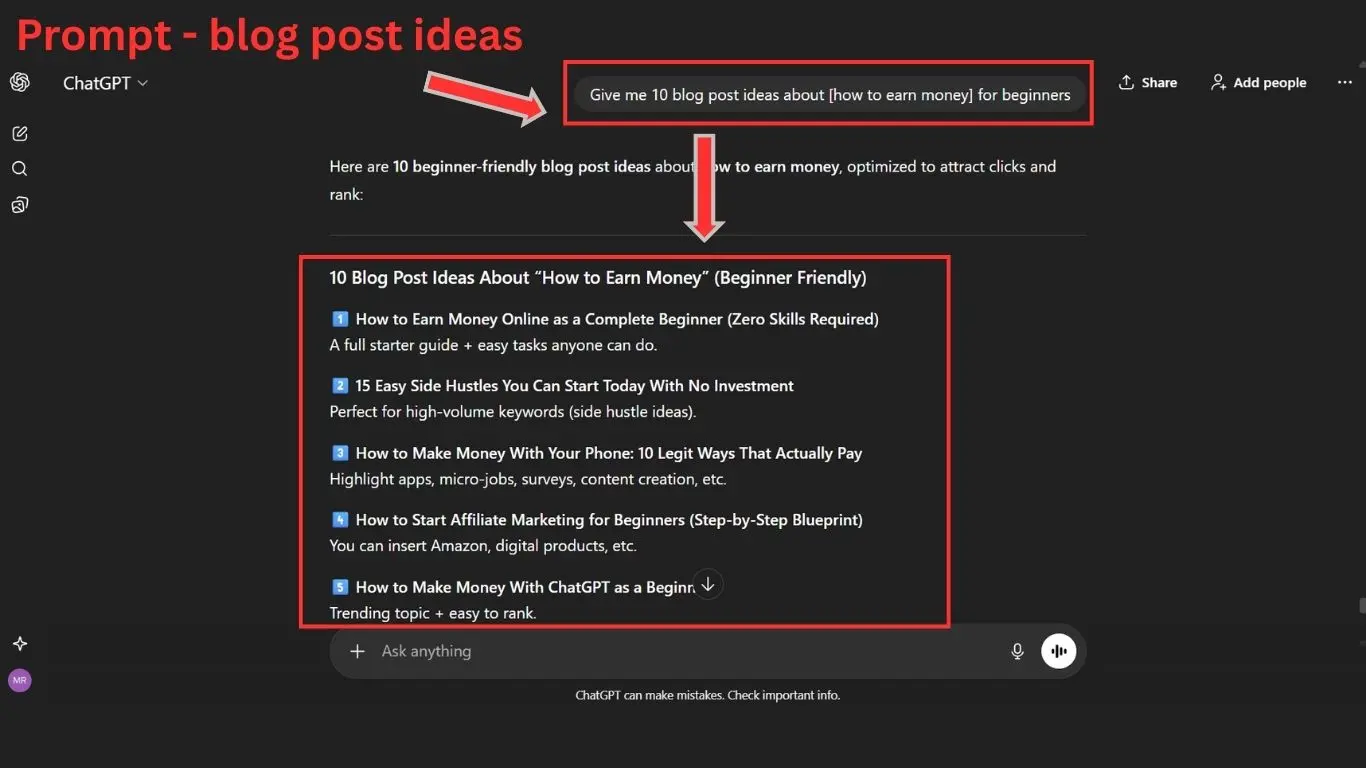
With ChatGPT for content creation , even beginners can produce professional – quality posts that engage readers while following SEO best practices . It turns complex content creation into a manageable , repeatable process and makes step by step AI content writing accessible to everyone
Before you start – setup and requirements
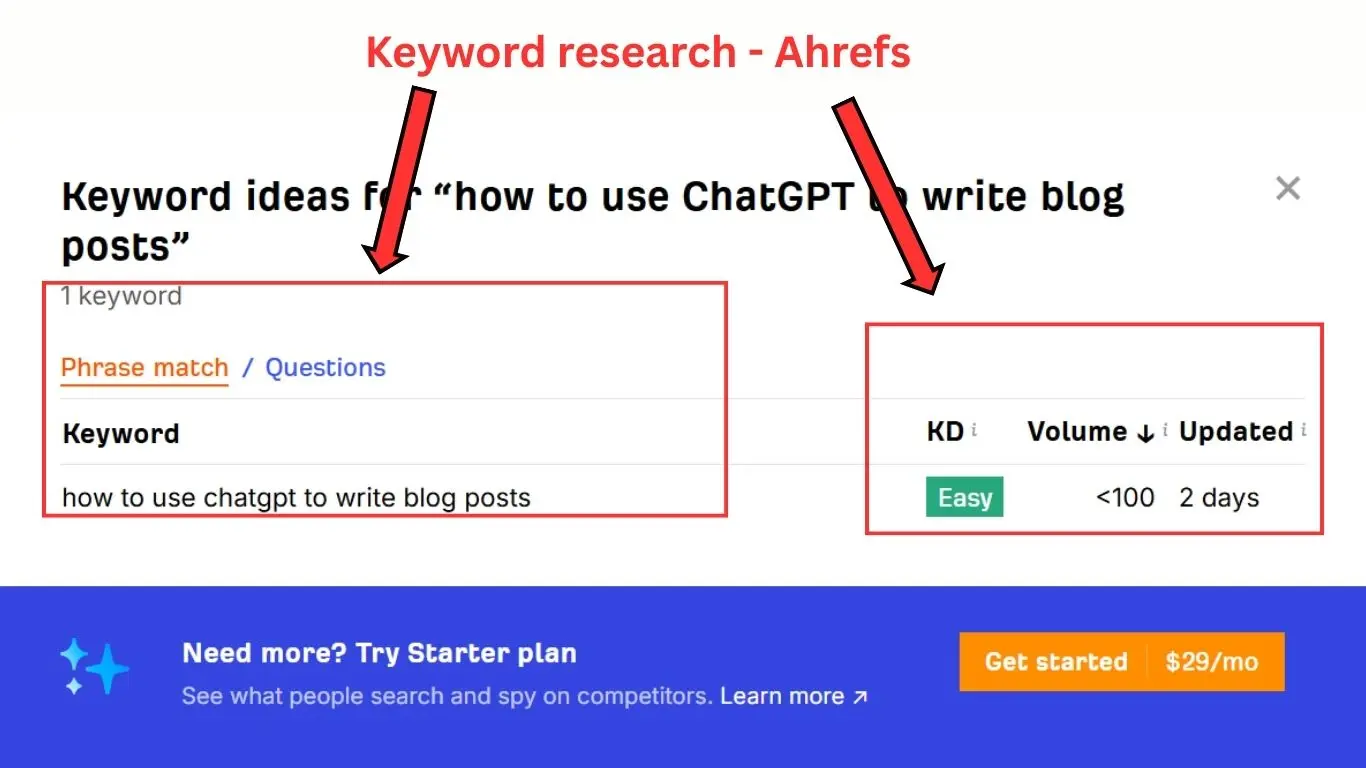
Tools you need – keyword research + blog editor
Before using ChatGPT for content creation, it’s important to have the right tools ready . You’ll need ,
- A keyword research tool to find high – potential topics
- A blog editor like WordPress or Google Docs to draft posts
- A simple content organization system, such as Notion or Trello
These tools make how to use ChatGPT to write blog posts for beginners much more efficient . If you haven’t setup your blog yet , then explore how to build a WordPress blog that makes money and common WordPress mistakes beginners make and how to avoid them
Why prep matters when using AI for blogging
Your AI-generated content will be consistent with your objectives if you are prepared. Knowing your target audience, defining the topic, and having keywords ready helps you generate more accurate and actionable output. Additionally , planning allows for proper step by step Ai content writing , making editing and optimization easier. Beginners should also think about email capture and promotion, Then explore deeply about How to Build an Email List for Your Blog to maximize reach and impact.
Step by step Workflow- how to use ChatGPT to write blog posts for beginners
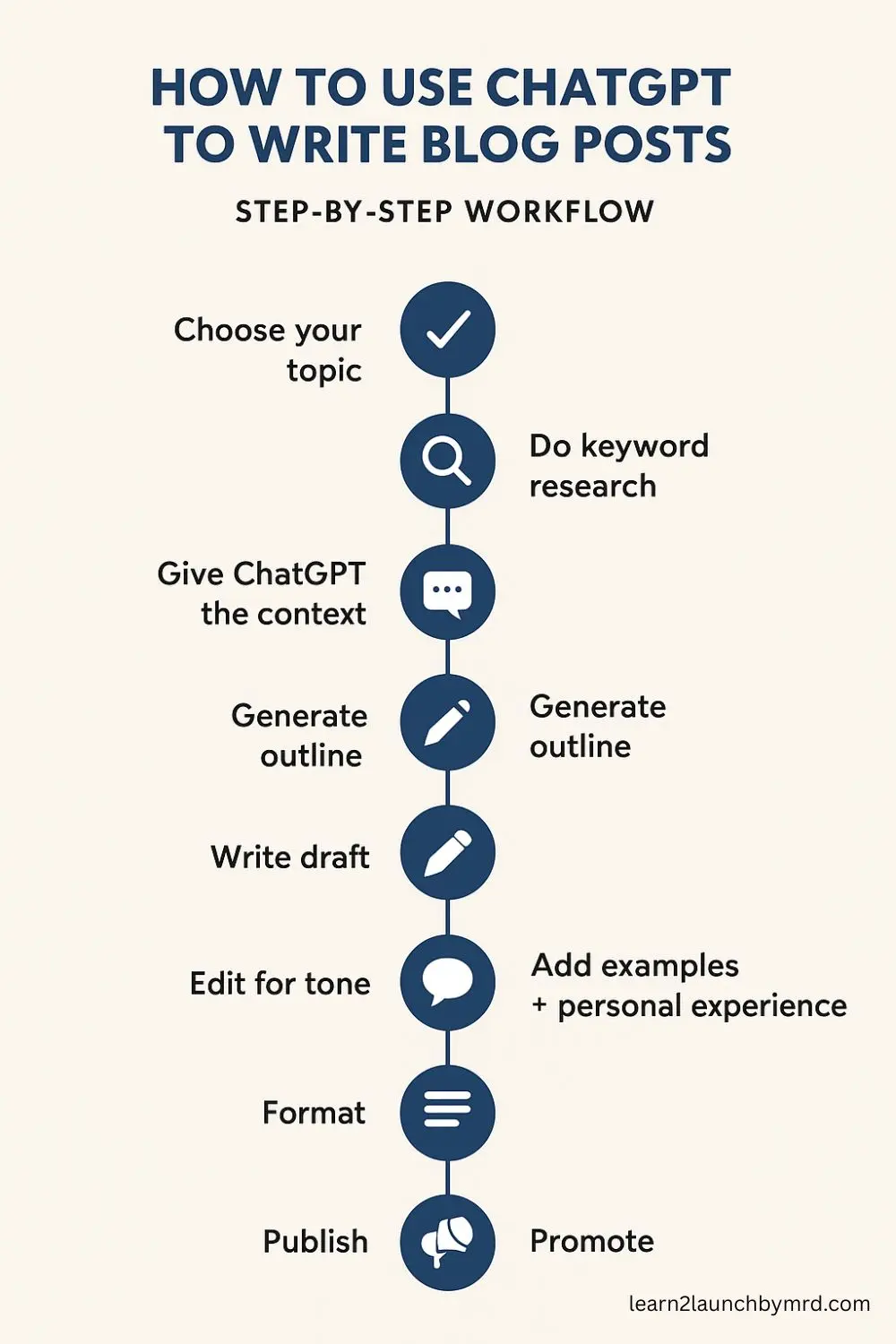
Creating a blog post with AI doesn’t have to be complicated. By following a structured workflow, beginners can efficiently generate high-quality, engaging content. Here’s a complete step by step AI content writing process using ChatGpt
Step 01 – Choose topic + keyword research
Start by choosing a subject that fits your objectives and target audience. Your main keyword , How to se ChatGPT to write blog posts for beginners should guide your topic choice. Use tools like Google Keyword Planner or Ubersuggest to identify search volume and related terms .
Consider ,
- Audience interest and pain points
- Competitor posts for similar keywords
- Long – tail variations to increase discoverability
For more guidance, check out how to choose perfect blog niche for beginners or how to rank well in search engines.
Step 02 – Generate outline using AI
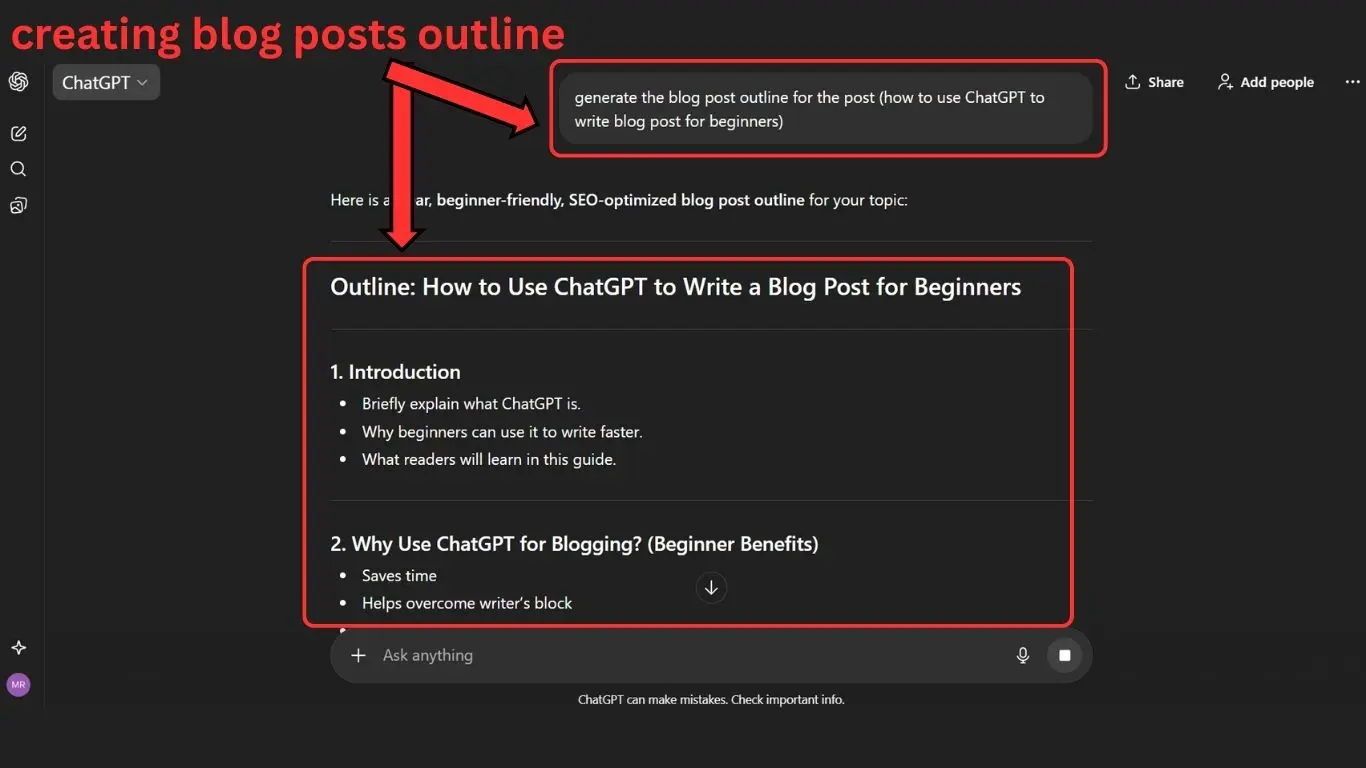
Once your topic is ready , ask ChatGPT to generate a structured blog outline . This helps organize H2 and H3 headings , subpoints and section flow . Using prompts tailored for how to write articles for ChatGPT ensures clarity and readability .
Tips for creating outlines,
- Include an intro , key points and conclusion
- Plan examples , bullets and SEO – focused headings
- Keep sections concise and scannable
For formatting guidance , see How to write your first Blog Post for beginners for SEO to align your AI-generated outline with search engine best practices .
Step 03 – Write sections using prompts
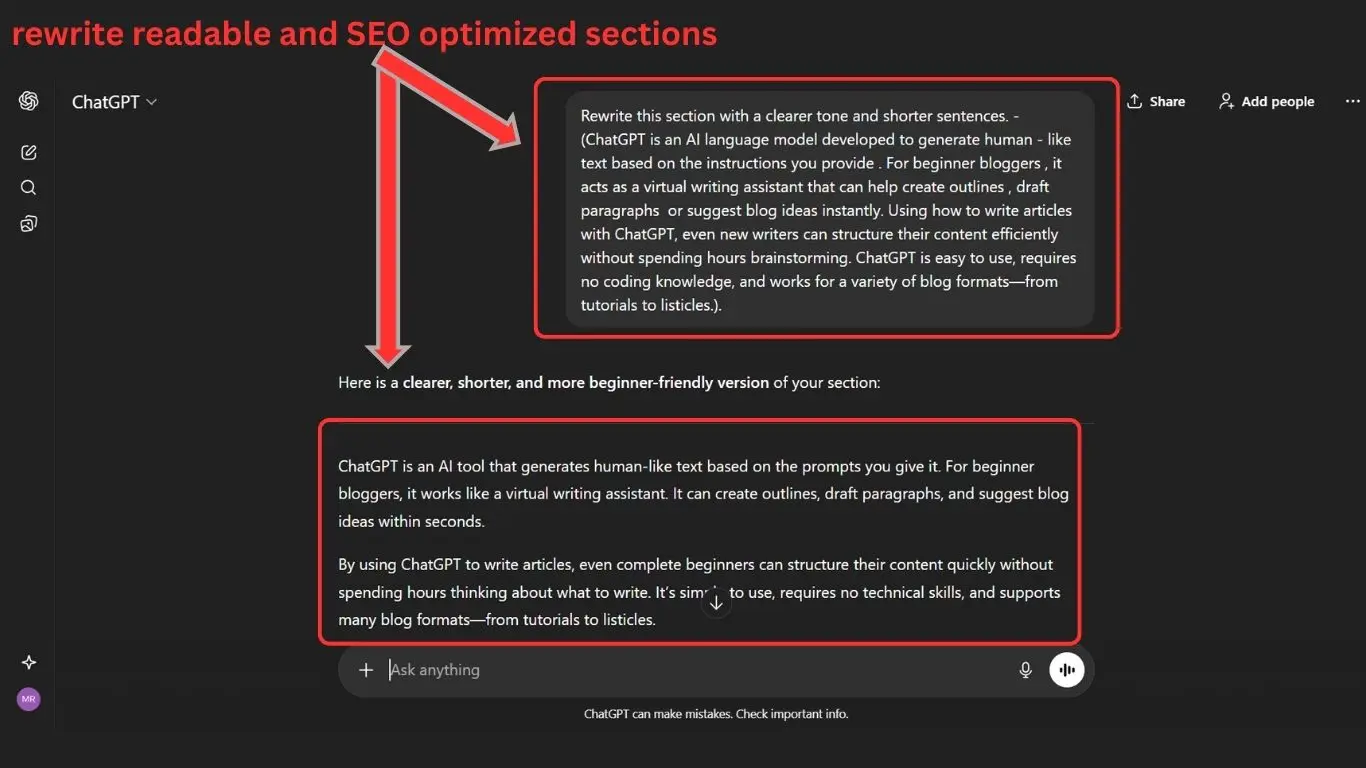
Instead of asking ChatGPT to write the entire post at once, generate each section separately. This allows better control of tone, word count, and keyword placement.
Example approach ;
- Write the introduction first, include main keyword naturally
- Expand H2 headings into detailed paragraphs
- Include lists , tips or step – by – step instructions for clarity
Always adjust the end result to fit with your style. For more guidance on drafting, check blog writing tips for beginners. Breaking the work i to smaller sections also prevents AI from producing generic content and keeps you post structured and engaging .
Step 04 – Add your voice + real examples
The structure can be provided by AI, but the authenticity comes from your own voice. Add examples, anecdotes, or mini-case studies to illustrate points. This step is often overlooked by beginners, but it sets your post apart from generic AI content.
Strategies,
- Share your personal experience or lessons learned
- Include sample prompts or results from ChatGPT
- Add screenshots or short visuals if possible
For more on maintaining authenticity , check How to Be Authentic In Content Creation. This ensures your content feels human , relatable and trustworthy while leveraging AI efficiency .
Step 05 – Edit and fact – check
Even the best AI output requires careful review. Check for tone, grammar, and clarity. Fact-check any statistics or claims AI generates, as ChatGPT can produce inaccuracies.
Editing checklist ,
- Verify all data and links
- Rewrite awkward or robotic sentences
- Ensure main and secondary keywords are naturally included
For additional guidance on improving quality , see How to Improve Writing Quality as a Beginner . Remember , AI supports the draft , but human oversight ensures professionalism and trustworthiness .
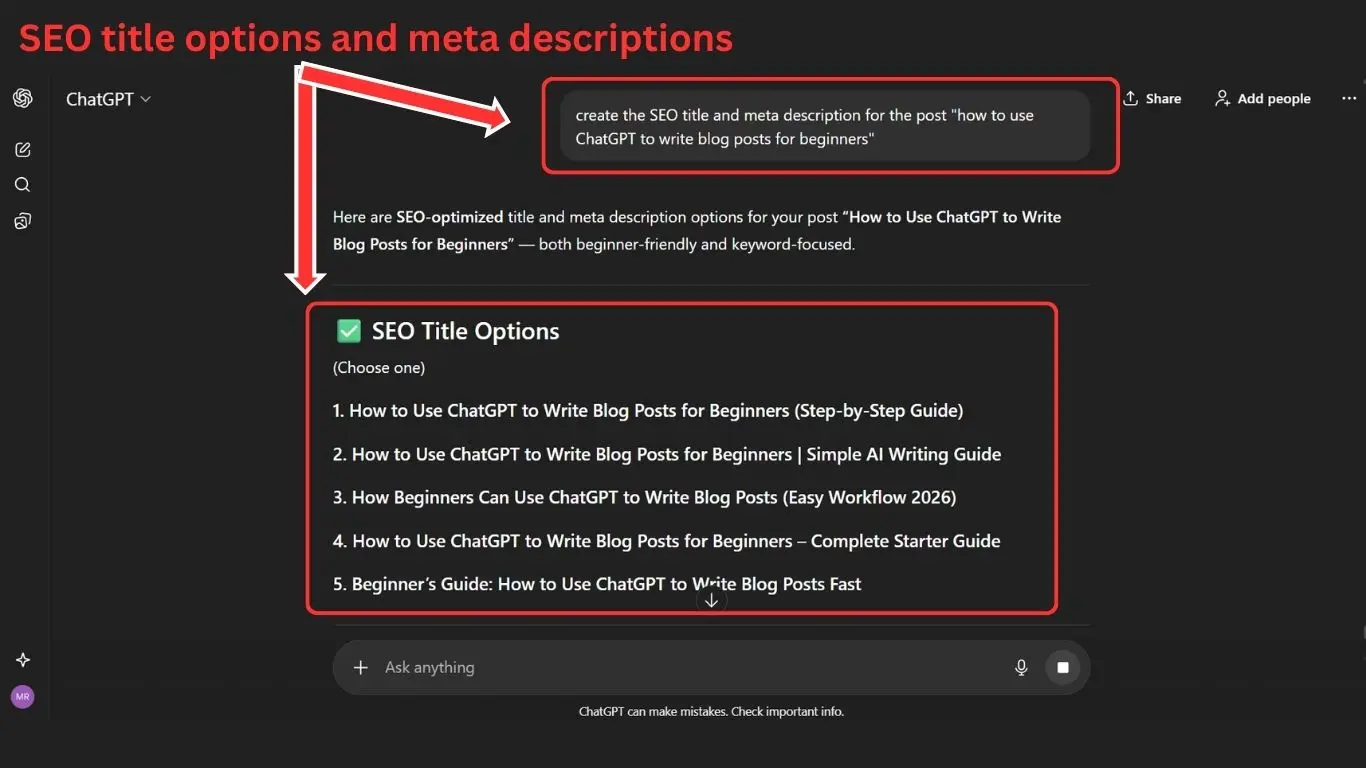
Step 06 – Formatting and SEO with step by step AI content writing
Formatting improves readability and SEO. Use short paragraphs, bullets, H2/H3 hierarchy, and bold key points. When appropriate, include alt text for images and internal links. Don’t overdo it when integrating your keywords.
Helpful resources ,
- On-Page SEO Checklist
- SEO for beginners
Proper formatting combined with step by step AI content writing ensures your posts are visually appealing, easy to read and optimized for search engines.
Step 07 – Publish and promote
When your post is ready, share it with your audience by publishing it on your platform. Promotion strategies include,
- Sharing on social media platforms – Sharing on social media platforms (How to Post Blog Content on Social Media) Once your blog post is live, the next step is to make sure it reaches the right audience. The easiest way to do that is by sharing your article all over social platforms where your readers already spend time. If you want to learn how to use social platforms more effectively, you can check out my guide on how to use social media to grow your online business for a deeper explanation.
- Creating Pinterest pins for traffic – (How to Create Pinterest Pins for Traffic)
- Sending newsletters to your email list
Promoting your post maximizes visibility and engagement , ensuring your AI-assisted content work more effectively for your blog.
Ready to copy ChatGPT prompts for blog writing
This section gives you plug-and-play ChatGPT prompts you can use immediately to create content faster , especially if you’re a beginner blogger learning how to write blog posts with AI. These prompts are also great for planning content , improving writing flow and scaling your publishing schedule – an easy win if you’re focusing on SEO – based blog articles and long – form content. You can also expand these prompt frameworks further by mixing them with keyword research , personal experience and brand voice .
If you want even more inspiration, I’ve shared a full list of ChatGPT blog writing prompts in another post that might help you generate ideas faster .
Prompts for blog topic generation
Use these once you have no topic ideas and want fast guidance.
Copy and use prompts –
- Give me 10 blog post ideas about [your niche] for beginners.
- Generate topics with low competition keywords related to [keyword].
- Suggest trending blog topics I can write using ChatGPT + SEO
Prompts for outlines
These prompts facilitate the rapid creation of structure for articles that are long.
Use these inside ChatGPT,
- Create a detailed SEO blog outline for the keyword “[keyword]” (H2 + H3 levels).
- Rewrite this outline with better flow, logic, and depth.
- Expand the outline into talking points with bullet sections.
When creating SEO-friendly H2 and H3 sections, these outline prompts make it simpler to transform ideas into structured long-form articles. As you refine the flow and expand bullet points into full talking notes, having a clear outline becomes the backbone of your post – something that connects well with learning how to write your first blog post for beginners or even exploring more prompts for content creators if needed
Prompts for SEO optimization paragraphs
These prompts make ChatGPT write human – style content with keywords , transitions and clarity , helping you with AI assisted blogging workflows
Try these for paragraphs + full sections
- Write a conversational SEO paragraph for “[keyword]” that sounds human, adds examples, and avoids repetition.
- Rewrite my paragraph to improve clarity, tone, and readability.
- Expand this section into 120 words with sub-points, facts, and actionable takeaways.
Common mistakes beginners make when using AI for blogging
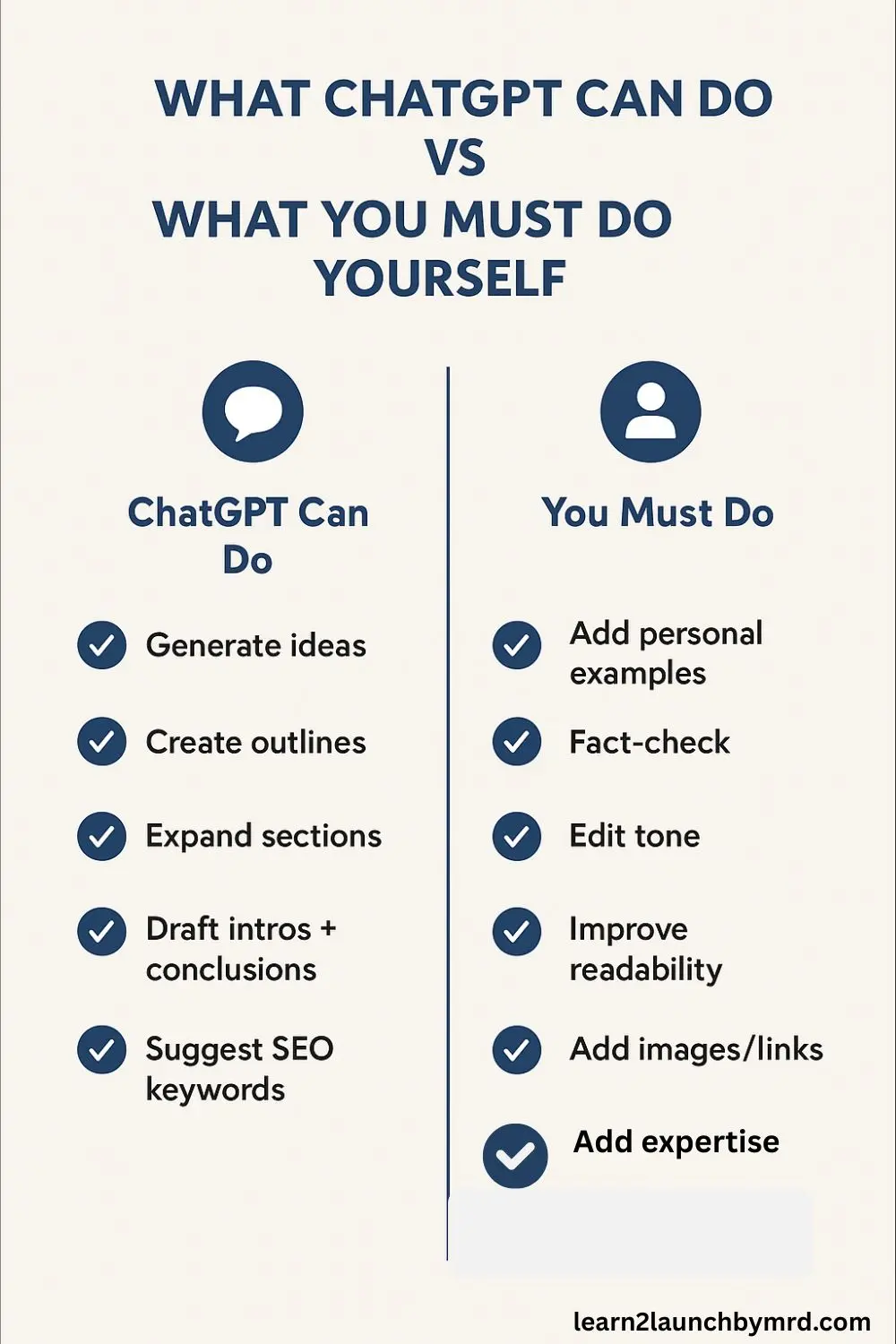
Even though AI makes writing easier many beginners struggle when using ChatGPT to write blog posts because they rely on AI too heavily or skip basic content principles.These errors cause blog posts to appear generic rather than useful, slow down growth, and lower ranking potential . Below are the main problems new writers face using ChatGPT for blog content, followed by simple fixes you can apply instantly
The top mistakes
Most new bloggers make the following mistakes when working with AI tools,
- Relying only on ChatGPT without adding real examples or personal experience .
- Publishing content without structure, depth, or SEO optimization
- Forgetting to check facts, credibility, or outdated information
- Using long , repetitive paragraphs instead of skimmable formatting
- Skipping keyword research and topic intent
- Not editing tone, making the content sound robotic
Many beginners fall into similar traps when using AI – relying on ChatGPT alone without adding real examples , publishing content with weak structure , ignoring SEO or skipping fact – checking and keyword research . Formatting also gets overlooked , leading to long , repetitive paragraphs that aren’t skimmable . These issues are easy to fix when you focus on clarity, depth , reader intent and tone – principles closely aligned with how to write your fist blog post for beginners and how to use keywords the right way , especially as you refine your workflow and editing process.
Quick fix solutions
You can avoid these mistakes easily by,
- Adding your voice + personal stories
- Editing for clarity + formatting
- Doing light keyword research before writing
- Fact – checking everything before publishing
These quick fixes keep your content cleaner and more reliable – add your own voice , format for clarity , research keywords and verify facts before publishing . The same mindset applies when learning common WordPress mistakes beginners make and how to avoid them especially for beginners building confidence .
SEO tips to rank AI – written blog posts
Even if you know How to use ChatGPT to write blog posts for beginners, ranking them requires applying SEO consistently. Search engines don’t rank content just because it’s long – they rank posts that provide value, answer user intent, and are structured properly. Using the right keywords, formatting, and updates can help AI-written articles perform just like manually created posts (or even better). Below is a simple SEO framework you can apply to every article you publish .
Keyword placement checklist
To boost visibility, place your main keyword + secondary keyword in ,
- SEO title (H1)
- First 100 words of introduction
- 1–2 H2 headings naturally
- Meta description
- Image alt-texts & captions
- URL slug if possible
- Within the content every 150 – 200 words – organically , not keyword stuffing
You can link here to your How to get traffic to a new blog post, as optimization and traffic growth go hand-in-hand .
Multimedia ,Internal linking and update posts
Search engines reward fresh , structured , and multimedia rich posts , so enhance your content by ,
- Adding images, infographics, or short videos
- Including internal links to relevant guides
- Updating content every few months to keep it fresh
- Using external authoritative links when needed
Enhancing your content with images, infographics, short videos, and useful internal links helps create posts that stay fresh and engaging. Updating articles every few months also signals relevance to search engines , especially when paired with helpful supporting resources. This is where topics like how to build an email list for beginners and creating infographics for blog posts connect naturally , since both strengthen long-term reader engagement and overall content performance
Frequently asked questions on how to use ChatGPT to write blog posts for beginners
Can beginners really use ChatGPT to write blog posts?
Yes. Beginners can easily learn how to use ChatGPT to write blog posts , even without writing experience . With the right prompts , structure and SEO formatting , AI helps you write faster while still producing helpful content.
How do I write articles with ChatGPT step-by-step?
Follow this workflow , Choose topic + keyword , Generate outline , Expand each section using prompts, Add your own examples & voice , Edit + SEO optimize before publishing
This is the simplest process for how to write articles with ChatGPT as a beginner.
Will AI – written content rank on Google?
Yes – if optimized correctly. Google ranks helpful content , whether written by humans or AI . To improve ranking , include internal links , keywords , multimedia and update posts regularly .
How do I use ChatGPT for content creation without sounding robotic?
Add your voice, storytelling, real experiences, and examples . AI gives structure and speed, but personality makes content unique. Keep your tone natural and conversational for better engagement.
Is using AI for blogging good for SEO?
Absolutely. AI helps speed up outlining, research, and drafting. When paired with keyword placement, good formatting, and fact-checking, it becomes a powerful tool for SEO-friendly writing.
How much time can ChatGPT save in blog writing?
A full post that normally takes 3 – 5 hours can be completed in 45 – 90 minutes . With practice , your AI content workflow becomes faster , more structured and easier to scale.
Next steps for beginners
Learning how to use ChatGPT to write blog posts for beginners is the fastest way to start publishing consistently, build confidence, and improve your writing workflow . You now have the full step – by – step AI process – from topic selection to SEO formatting – so you’re not just writing faster, you’re writing smarter . With time , creativity and practice , your content will feel more natural, more helpful, and more valuable to readers and search engines.
Quick recap of workflow
Here’s what you’ve learned today,
- Research keywords + topics
- Generate outlines with ChatGPT
- Write in structured sections
- Add examples + human tone
- Edit, format & optimize for SEO
- Publish and promote confidently
Following this simple system makes content creation easier every single week – especially when you want to blog consistently .
If you’re ready to go further , your next steps are simple – keep practicing and improving your SEO foundation . Start refining your posts , test different prompts and learn how to grow traffic steadily over time . You can explore more guides to continue your journey , like Affiliate marketing for beginners, or follow How to Build a Blog That Ranks in Google for long-term growth strategies.