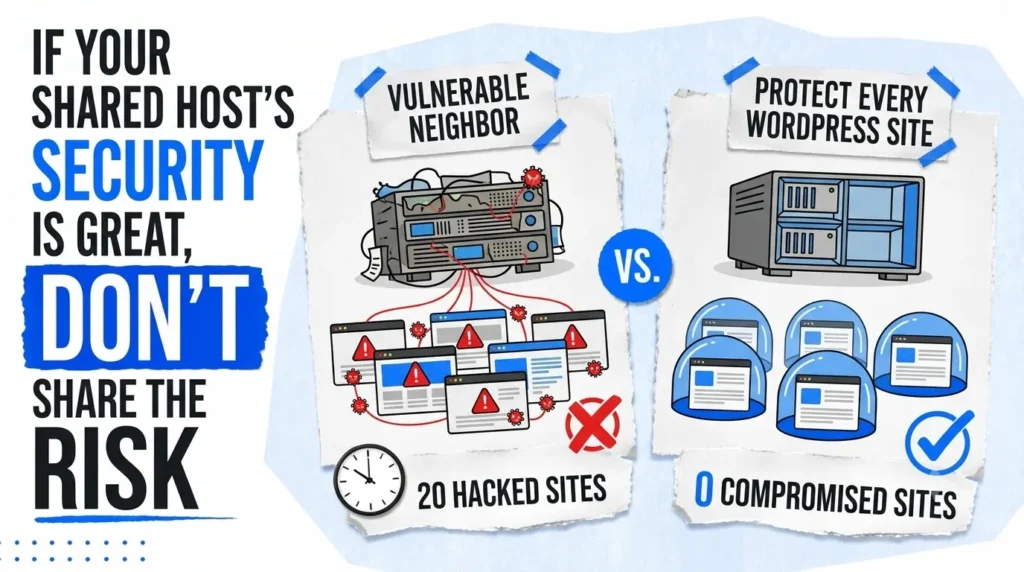

Three months into running two WordPress blogs on the same shared hosting account, both sites disappeared from Google overnight.
Not one site. Both.
I didn’t understand how to isolate WordPress sites on shared hosting at the time. A vulnerability in one site, an outdated plugin I hadn’t updated – gave an attacker file system access to my entire cPanel account. Both WordPress installations were compromised within hours of each other because they shared the same server space, the same file paths, and critically, access to each other’s wp-config.php files.
This guide sits inside the No-Code WordPress Hosting & Domain Setup Architecture, the complete framework for building a secure WordPress foundation before you publish a single post. If you’re setting up hosting for the first time, how to install WordPress on Hostinger in 2026 walks through the technical installation steps but this post covers the security layer that comes before and around that installation.
For anyone building their first blog from scratch, this is part of our complete no-code website with WordPress resources covering everything from domain selection to launch-ready security.
I will explain exactly what I got wrong, what it cost, and the precise framework I now use to make sure it never happens again.
How cross contamination spreads via WordPress addon domains – Why your safest site is only as secure as your weakest one
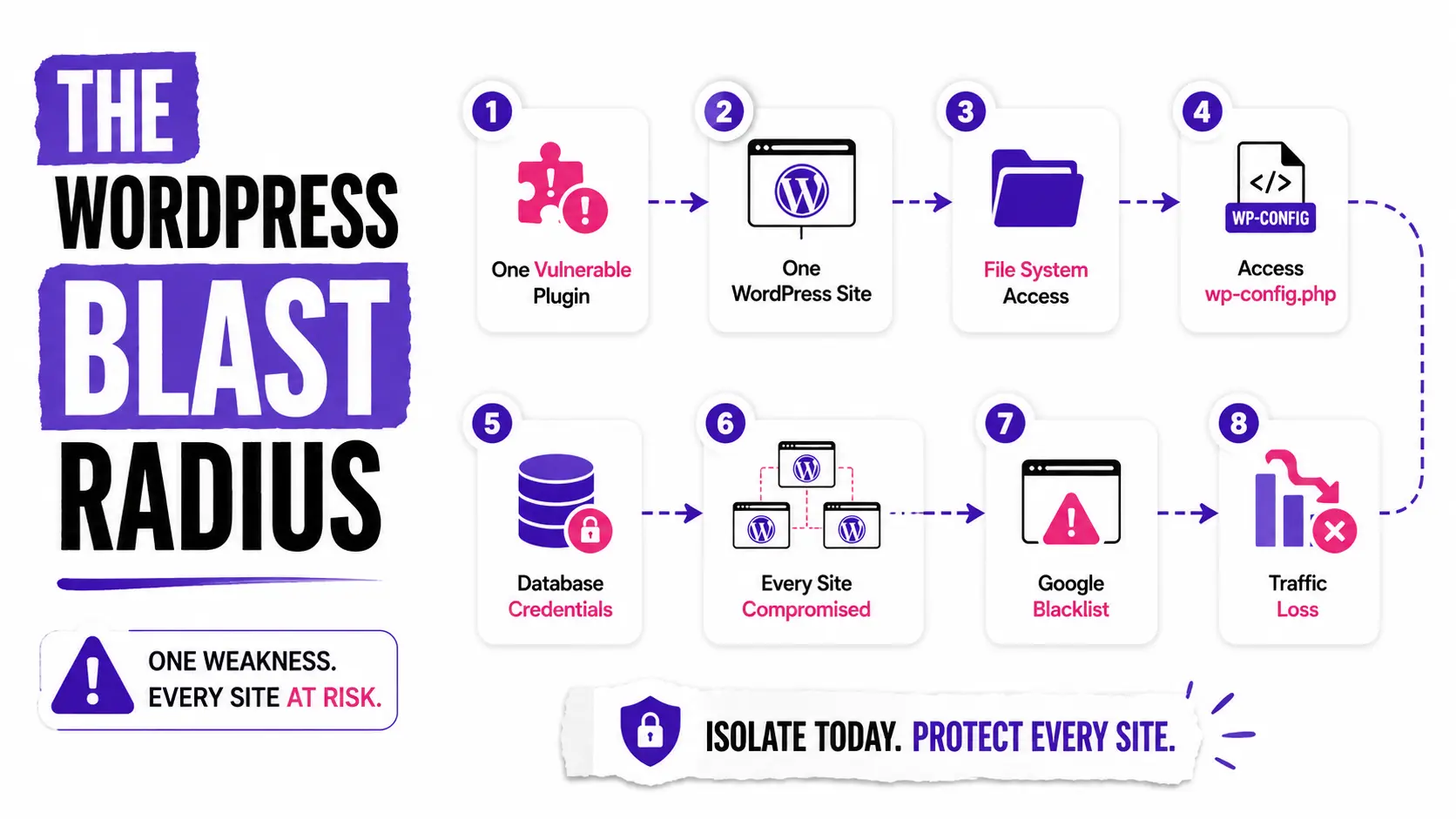
How cross contamination spreads via WordPress addon domains happens because addon domains under the same cPanel account share the same file system, the same user permissions, and the same database access scope. If an attacker compromises any one site on the account, they gain read access to every other site’s files, including wp-config.php files containing your database credentials.
This is the shared hosting security reality almost every beginner misses entirely.
If one compromised account can write into another site’s path, hardening inside WordPress is not enough. A hacker with file system access can see the contents of your wp-config.php file and therefore your database credentials for every site under the same hosting account are immediately exposed.
Most bloggers think about security at the individual site level. They update plugins, install Wordfence, set strong passwords and it’s completely important to learn ,best WordPress plugins as a beginner blogger to make the process secure and to make it efficient.
What they don’t think about is the account-level blast radius.
When you use cPanel’s addon domain feature to host multiple WordPress sites under one account, every domain shares the same root-level file permissions. How cross contamination spreads via WordPress addon domains is straightforward: the attacker doesn’t need to breach each site separately. They breach one, gain file access, and every other site under that cPanel login becomes readable and in many cases, writable.
Before adding any domain to your hosting account, understanding the security implications of that choice matters as much as the domain name itself. How to choose a domain name for a blog that gets traffic covers the strategic side of domain selection but the hosting structure you pair it with determines your security exposure from day one.
WordPress addon domain security risks on shared hosting that most beginners never think about
The primary WordPress addon domain security risks on shared hosting are shared file system access across all addon domains, exposed wp-config.php credentials when any site is compromised, cross-account malware spreading through shared PHP execution, and database user privileges that often cover multiple WordPress installations simultaneously.
The data behind this threat is not theoretical.
The WordPress ecosystem saw 11,334 new vulnerabilities in 2025 – a 42% year-over-year increase and malicious file uploads nearly tripled in Q4 according to Patchstack’s State of WordPress Security in 2026. That’s not a statistic about poorly maintained sites. That’s the baseline risk every WordPress installation faces regardless of how carefully you manage it.
The specific WordPress addon domain security risks on shared hosting that hurt beginners most:
- Shared PHP execution environment – PHP scripts on one addon domain can, in misconfigured setups, read files from sibling domains under the same account
- Common database user scope – Many beginners use the same database user across multiple WordPress installations, meaning one compromised database exposes all others
- Shared session storage – PHP session files stored in the same temporary directory across addon domains create lateral movement opportunities for malware
- Unprotected wp-config.php – The default WordPress installation places wp-config.php inside the public directory, readable by any script with file system access to the account
Which Shared Hosting Configurations Create the Biggest Security Risk?
Not every shared hosting setup carries the same level of exposure. This comparison shows how small configuration decisions can dramatically increase—or reduce—your WordPress security blast radius.
| Hosting Configuration | Security Risk | Recommended? | Why It Matters |
|---|---|---|---|
| One database user shared across every WordPress site | 🔴 Very High | Not Recommended | A single compromised database credential can expose every WordPress installation using that shared database user. |
| Unique database user for each WordPress installation | 🟢 Low | ⭐⭐⭐⭐⭐ | Limits database access to one site, dramatically reducing lateral movement after a compromise. |
| wp-config.php stored inside public_html | 🟠 High | Needs Improvement | Makes sensitive configuration files easier to target during file system attacks and directory traversal exploits. |
| wp-config.php moved above the document root | 🟢 Low | ⭐⭐⭐⭐⭐ | Keeps your most sensitive WordPress configuration file outside the publicly accessible web directory. |
| Multiple addon domains inside one cPanel account | 🔴 Very High | High Risk | If one site is compromised, attackers may gain access to every sibling WordPress installation sharing that account. |
| Separate hosting accounts for high-value websites | 🟢 Lowest | ⭐⭐⭐⭐⭐ | Provides true account-level isolation, keeping your most valuable websites protected even if another site is compromised. |
When you use shared hosting, your website sits on the same server as hundreds of other sites. If one of those websites gets hacked, the attacker might try to use that access to target your site. Google often blacklists infected sites, meaning you lose your search engine rankings and your visitors see a giant red warning screen.
Two compromised sites. Both blacklisted. That was my exact experience and it took eleven weeks to recover both rankings.
If you’re evaluating which hosting platform reduces these risks from the infrastructure level, the best website hosting for small business compares providers specifically on account isolation features, including which hosts use CloudLinux to enforce hard boundaries between accounts on shared servers.
And for the complete picture of what can go wrong during and after WordPress setup, how to secure your WordPress website covers the full hardening checklist that works alongside the isolation framework in this guide.
How to prevent cross site contamination WordPress – The 4-layer isolation framework
To prevent cross site contamination WordPress, implement four layers of isolation simultaneously: move wp-config.php above the document root, create a unique database user per WordPress installation, set strict directory permissions (755 for directories, 644 for files, 600 for wp-config.php), and where budget allows, separate high-value sites into individual hosting accounts.
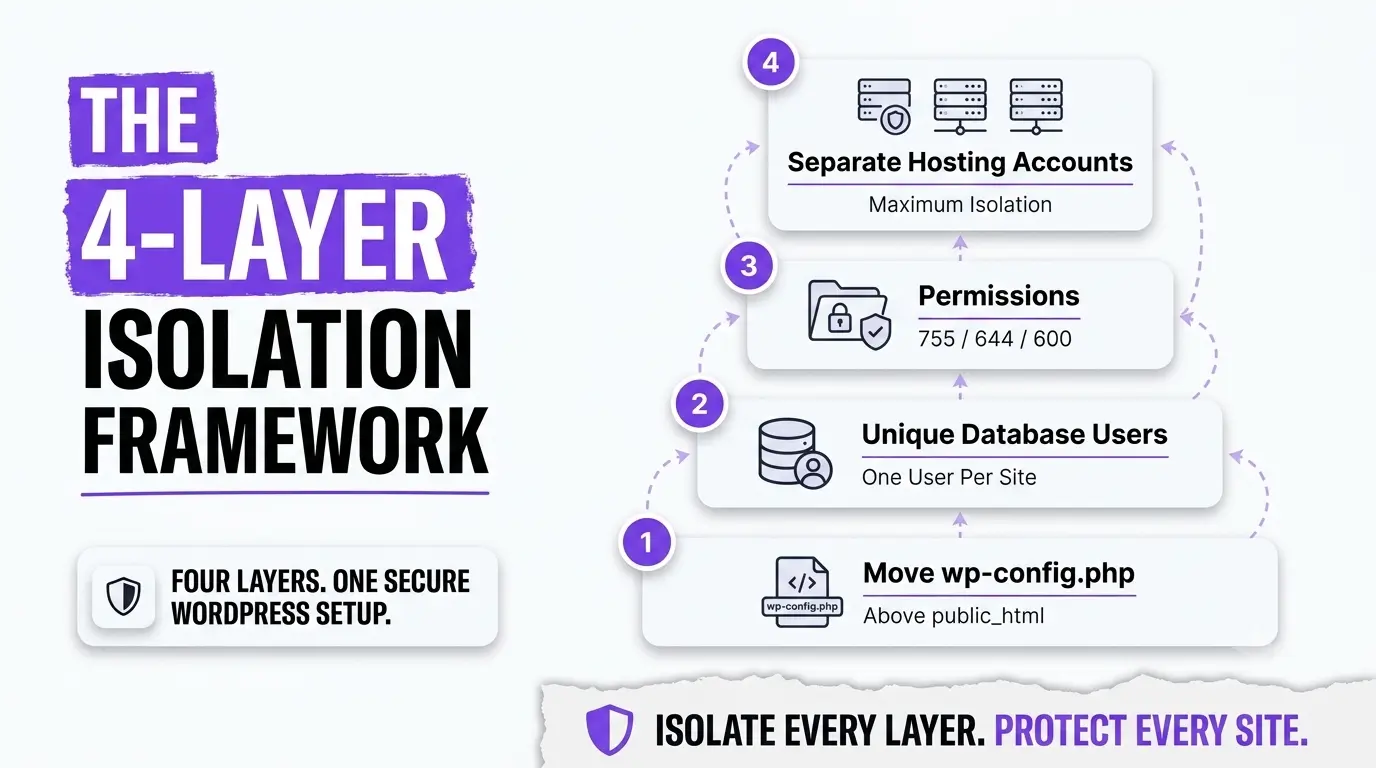
I call this the 4-Layer WordPress Isolation Framework, the exact structure I rebuilt my hosting setup around after losing both sites.
Most security guides cover one or two of these layers in isolation. None of them connect all four into a sequenced implementation. Here is how each layer works and why all four are needed:
Layer 01 – wp-config.php file isolation
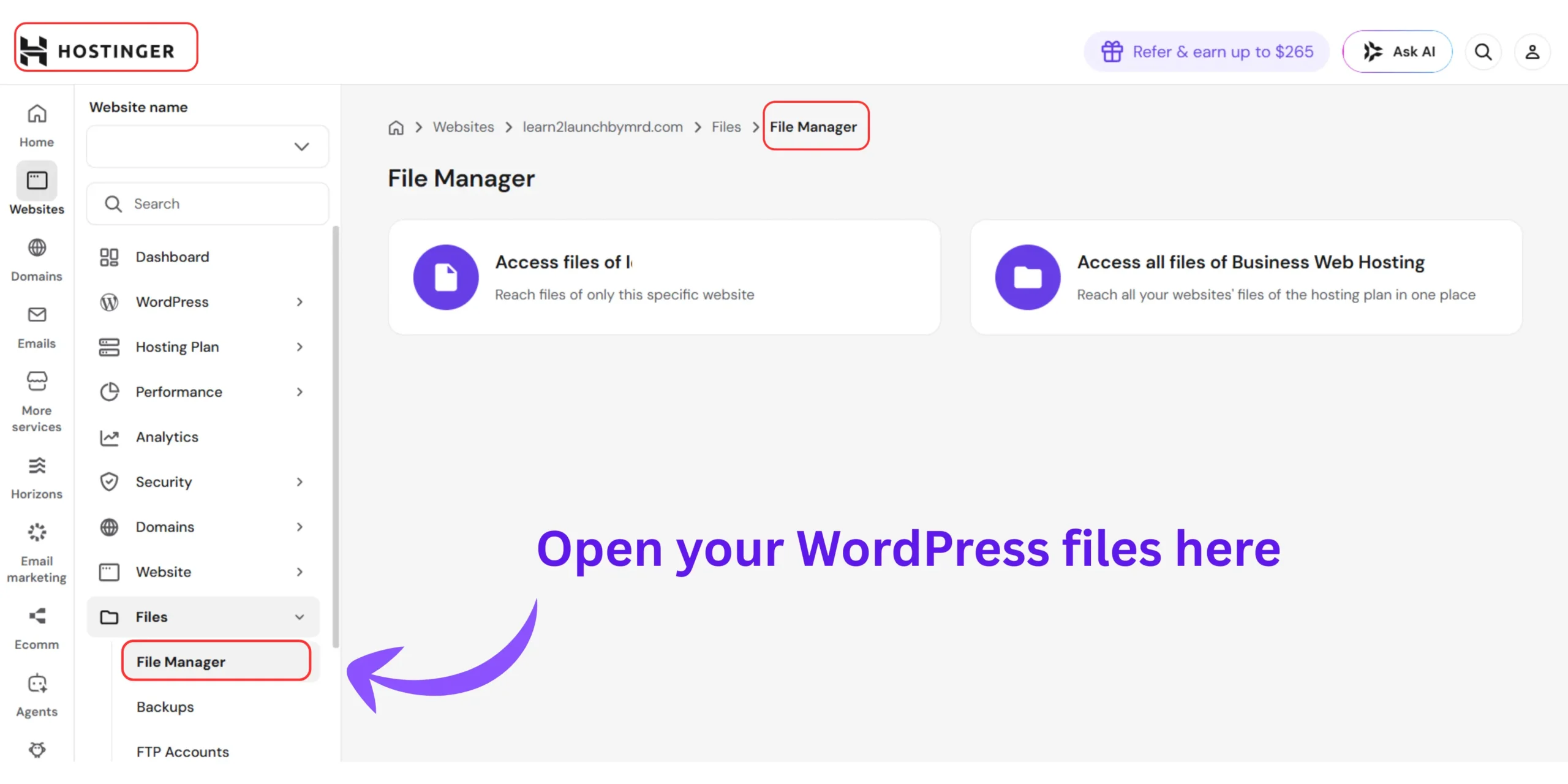
Move your wp-config.php file one directory level above your public_html folder.
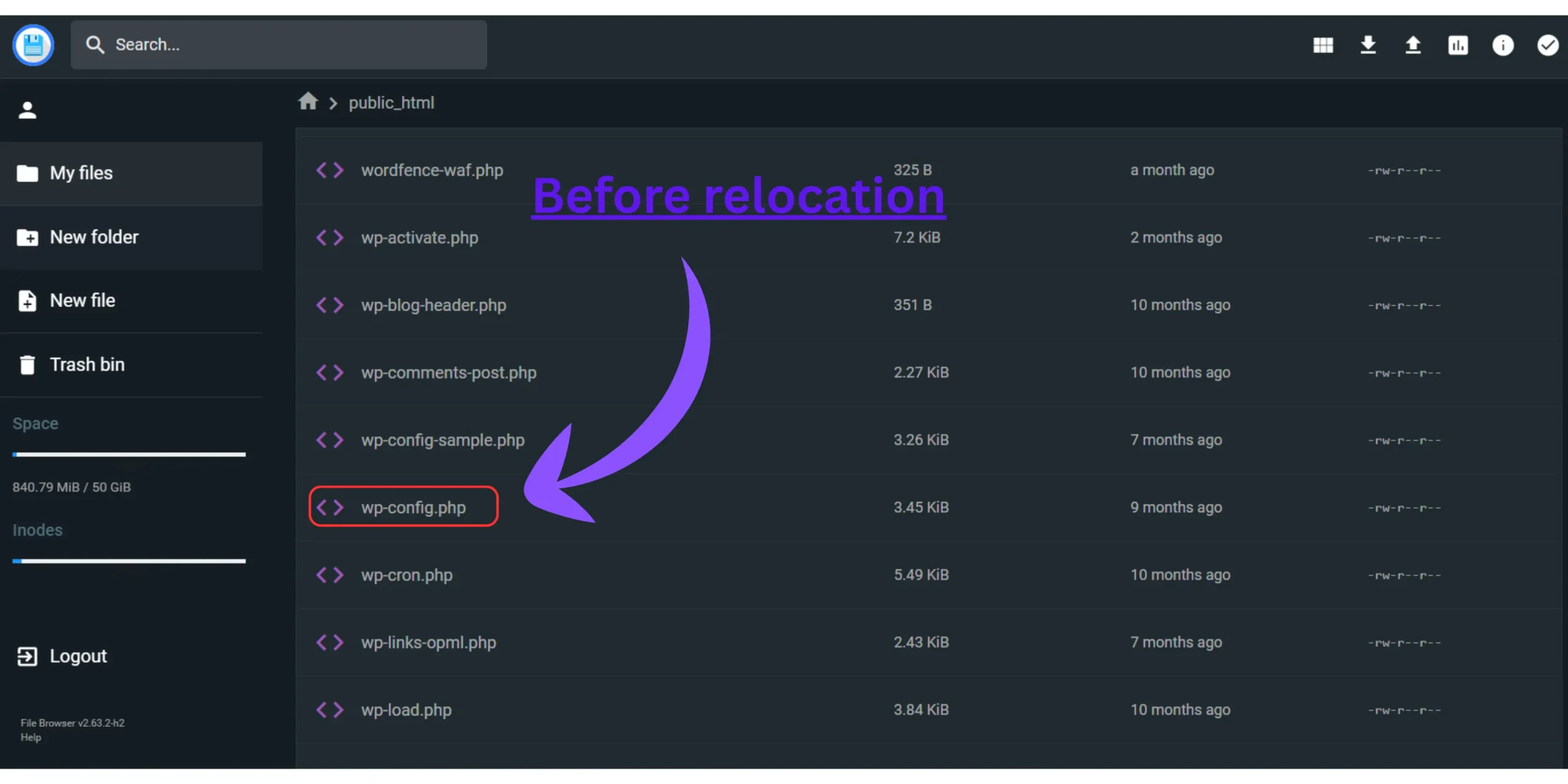
WordPress looks for wp-config.php in the parent directory automatically if it cannot find it in the installation root. Moving it above public_html means it sits outside the web-accessible directory entirely, making it unreadable via browser requests and significantly harder to access through file traversal vulnerabilities.
This single change removes the most commonly exploited attack vector in shared hosting WordPress compromises.
After completing this step, running quick settings after installing WordPress ensures your core dashboard configuration works correctly with the relocated config file before you publish anything.
Layer 02 – Unique database user per installation
Create a dedicated database user for each WordPress installation with the minimum permissions required: SELECT, INSERT, UPDATE, DELETE on that site’s database only.
Never use the same database user across two WordPress installations. If an attacker gains database credentials from one compromised site, unique users ensure the blast radius stops at that single database, not every database across your account.
In cPanel: navigate to MySQL Databases → create a new user for each site → assign minimum required privileges only.
Layer 03 – Directory permission hardening
Set permissions explicitly on every WordPress installation:
- Directories – 755 (owner can write, group and others can only read and execute)
- Files – 644 (owner can read/write, others can only read)
- wp-config.php : 600 (only the owner can read or write — no group or public access)
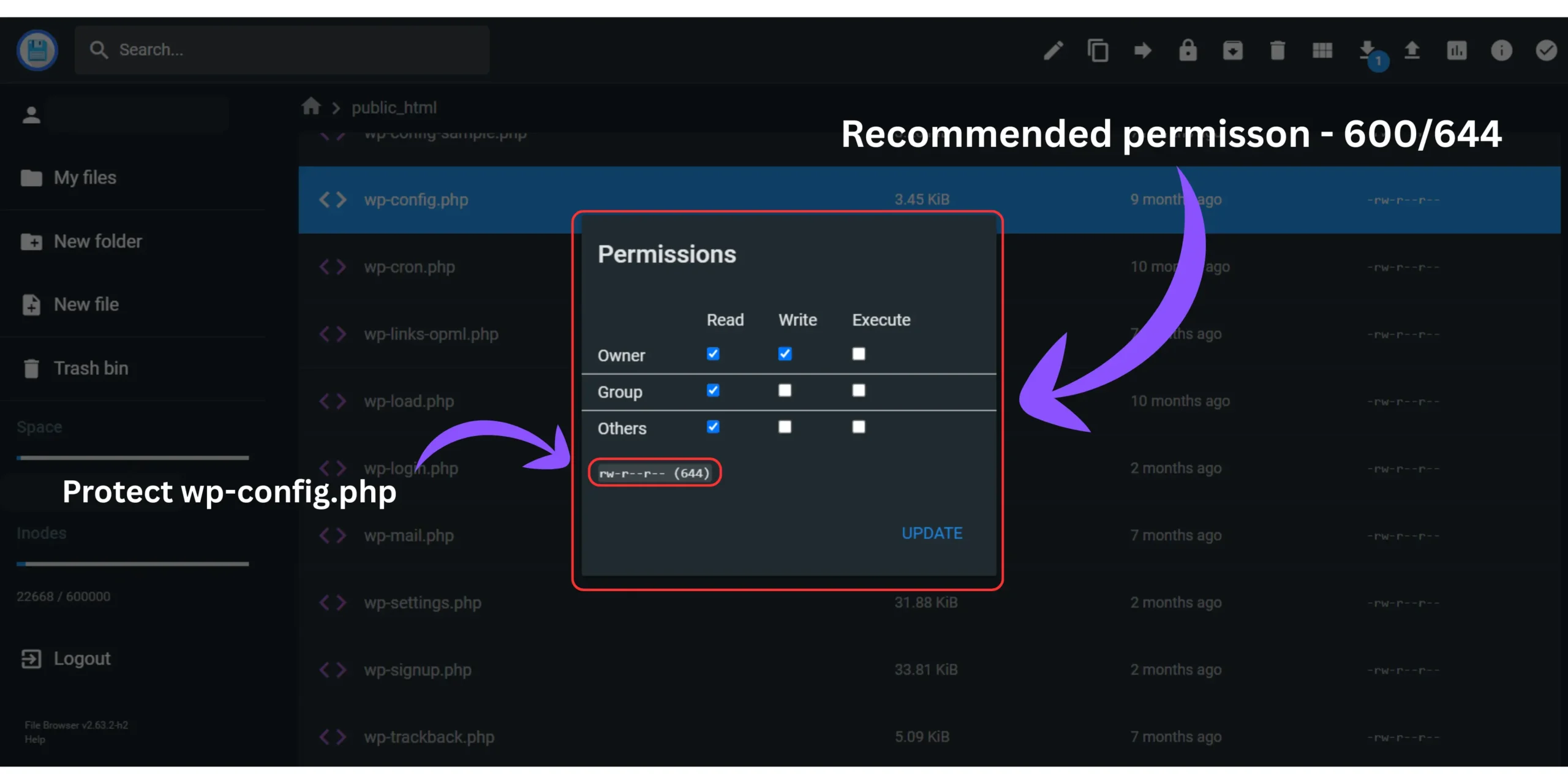
Default WordPress installations often leave wp-config.php at 644, which means any other process under the same user account can read it. Changing to 600 removes that vulnerability immediately.
For anyone building their first WordPress site from the beginning, how to create a website with WordPress walks through the foundational setup, including file structure decisions that directly affect how cleanly these permission settings can be applied.
Layer 04 – Hosting account separation for high-value sites
When you host websites independently, you limit your risk of cross contamination. Reseller hosting accounts are affordable and let you easily segregate your website hosting into separate accounts while keeping all management under the same umbrella account.
If you run multiple WordPress sites and any one of them generates income or holds sensitive reader data, that site should be on its own hosting account, not an addon domain under a shared account.
The cost difference between addon domain hosting and a separate basic shared hosting plan is typically $2-5 per month. That cost buys complete file system isolation. It is the highest-value security investment available to a beginner blogger.
5 WordPress Isolation Mistakes That Leave Shared Hosting Accounts Vulnerable
Most shared hosting compromises happen because of a few avoidable configuration mistakes. Review this checklist before launching another WordPress website.
- Using one MySQL database user for every WordPress installation.
- Leaving wp-config.php inside the public web directory with default permissions instead of moving it above the document root.
- Hosting multiple important websites under a single cPanel account.
- Forgetting to disable the WordPress built-in file editor.
- Believing a security plugin alone can prevent account-level cross-site contamination.
One of the most persistent 15 common WordPress mistakes beginners make is treating all sites as equally low-risk and bundling them all into one account for convenience. The security reality of shared hosting makes that decision significantly more expensive when it goes wrong than the few dollars saved monthly.
Should You Isolate Your WordPress Sites?
Not every website requires the same level of isolation. Use this quick guide to determine whether implementing the full isolation framework is the right choice for your hosting setup.
Recommended For
- ✅ Affiliate marketing websites
- ✅ Multiple niche blogs
- ✅ Client WordPress websites
- ✅ Small business websites
- ✅ Websites generating revenue
May Not Be Necessary
- • One personal hobby blog
- • A temporary testing website
- • A single low-value personal project
Secure wp-config setup before installing WordPress files – The step that protects everything else
Secure wp-config setup before installing WordPress files means moving the file above the document root, setting file permissions to 600, adding a secret key salt, changing the default table prefix from wp_ to a custom string, and disabling file editing from the WordPress dashboard — all before your site receives its first visitor.
Most WordPress security tutorials tell you to harden wp-config.php after installation.
Here’s the thing: waiting until after installation means your site has been publicly accessible with default settings for whatever time elapsed between installation and hardening. For sites on shared hosting, that window is when risk is highest.
The secure wp-config setup before installing WordPress files sequence:
- Step 01 – Generate fresh secret keys Before connecting wp-config.php to your database, replace the placeholder secret keys with fresh ones from the WordPress secret key generator at api.wordpress.org/secret-key/1.1/salt/. These keys encrypt authentication cookies, default or reused keys are known to attackers.
- Step 02 – Change the database table prefix Change $table_prefix = 'wp_'; to a custom string like $table_prefix = 'mrd7_';. The default wp_ prefix is targeted by automated SQL injection scripts that assume the default is in place. A custom prefix blocks those automated attacks immediately.
- Step 03 – Disable WordPress file editing Add define(‘DISALLOW_FILE_EDIT’, true); to wp-config.php. This disables the theme and plugin file editors in the WordPress dashboard, removing a common attacker escalation path if they gain admin access.
- Step 04 – Move wp-config.php above document root As covered in Layer 1 – do this before your first login, not as an afterthought.
How to choose the best WordPress themes for your website is where most beginners focus their early setup energy. The visual layer matters but the security layer underneath it determines whether that theme investment is protected long-term.
How to isolate WordPress sites on shared hosting – The pre-launch security checklist
Before making any WordPress site on shared hosting publicly accessible, complete five isolation checks: wp-config.php moved above document root, unique database user created for this installation only, file permissions set to 755/644/600, table prefix changed from the default wp_, and file editing disabled in wp-config.php. These five steps reduce the shared hosting blast radius to the absolute minimum possible on standard shared infrastructure.
Running through this checklist on every WordPress installation before launch is the practice that separates a secure hosting setup from a vulnerable one.
Before going live on any new site, the ultimate WordPress launch checklist covers the complete pre-publish verification process, security hardening, performance settings, SEO configuration, and the technical checks that prevent launch-day problems.
Every one of these security steps belongs inside that pre-launch window. Not after you’ve published content. Not after you’ve started building traffic. Before the first page goes live.
What nobody tells you about shared hosting security – The blast radius problem
Here is the information gap that every shared hosting WordPress security guide misses and it is the concept that would have saved me eleven weeks of recovery work.
Most guides tell you to secure your WordPress site. Nobody tells you to calculate your blast radius.
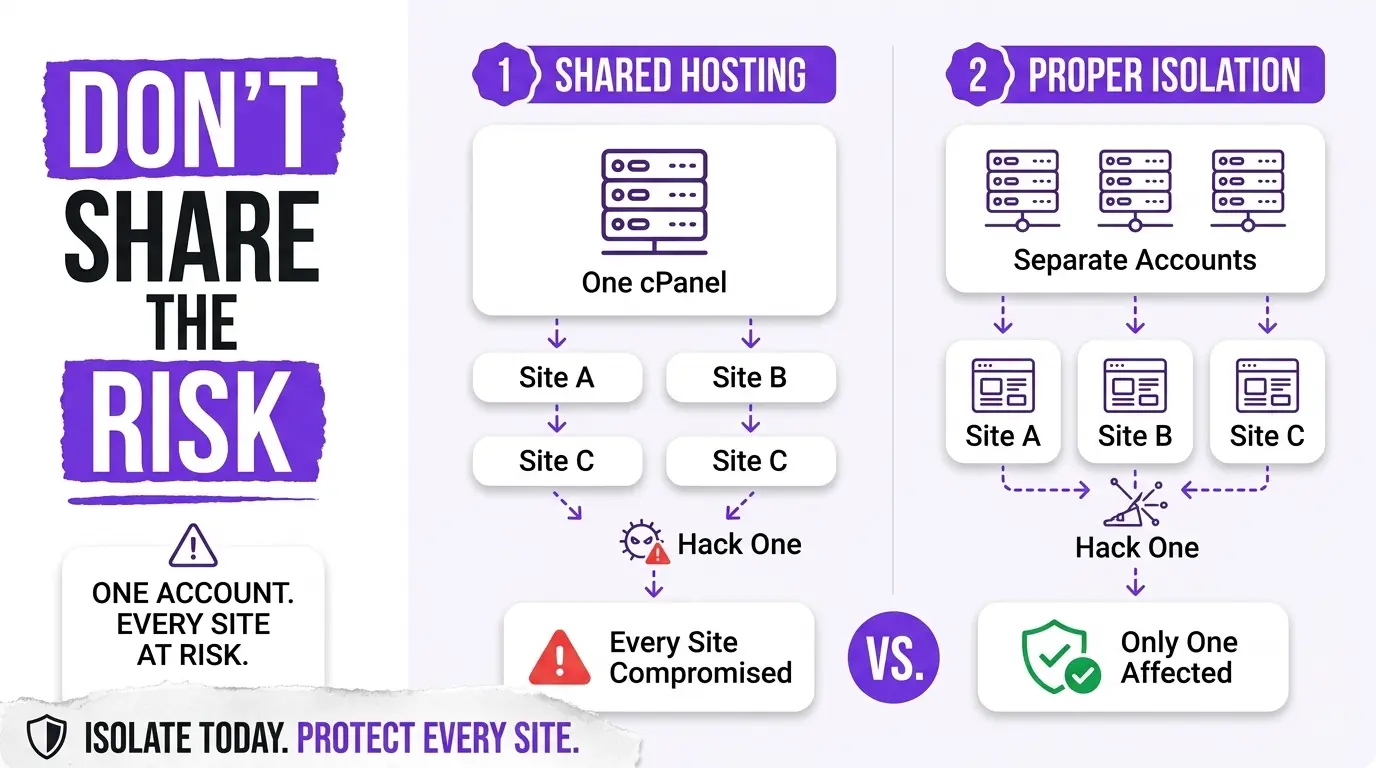
The blast radius is a simple concept: if any single WordPress installation on your hosting account were compromised right now, how many other sites would immediately become accessible to the attacker?
For a beginner with three addon domains under one cPanel account, using the same database user across all three installations, with default file permissions, the blast radius is three. Every site falls the moment one does.
For a blogger who has implemented the 4-Layer WordPress Isolation Framework, separate database users, 600 permissions on wp-config.php, and high-value sites on separate accounts. The blast radius of any single compromise is one.
That is the actual security question shared hosting bloggers should be asking before they add their second domain to an account. Not “is my security plugin up to date”, but “if this site falls, what else falls with it?”
Security breaches on shared hosting do not just destroy the compromised site. They destroy your SEO performance across all affected sites simultaneously. Why your new WordPress site is not indexing on Google covers several indexing failure causes, but a Google blacklisting from a security breach is one of the hardest to recover from and the one most preventable through isolation.
The SEO cost of a shared hosting breach also extends to existing content. How to safely change a live WordPress post URL without losing rankings is one of the most technical SEO recovery tasks a blogger faces and doing it while simultaneously cleaning a compromised site makes an already difficult process significantly harder to manage without losing accumulated search equity.
Related questions on how to prevent cross site contamination WordPress
Can two WordPress sites on the same hosting account infect each other?
Yes – two WordPress sites under the same cPanel account share the same file system. If one is compromised, an attacker gains access to every other site’s files and database credentials simultaneously.
This is called cross-site contamination and it’s the most underestimated risk in shared hosting. One outdated plugin on one of my sites took down both blogs on my account overnight. Individual site security plugins don’t prevent it — account-level isolation does.
Do I need a separate hosting account for every WordPress site I run?
Not always, but any site generating income or holding reader data should have its own isolated hosting account. Addon domain setups are acceptable for experimental sites, not for anything where downtime or data loss causes real damage.
The cost difference between an addon domain and a separate basic hosting plan is typically $2–5 per month. On shared hosting, that small monthly cost buys complete file system separation, the highest-value security investment available at the beginner level.
Is it safe to run multiple WordPress sites using addon domains on shared hosting?
It’s acceptable for low-stakes sites, but addon domains share file system access across every domain under the same cPanel account. Any single compromised site immediately exposes all others, making addon domain setups structurally higher risk than separate hosting accounts.
Research shows 13,000 WordPress sites are compromised daily, and the WordPress ecosystem recorded 11,334 new vulnerabilities in 2025 alone. On addon domain setups, a vulnerability in any one site becomes a vulnerability in all of them at once.
How do I check if my wp-config.php file is properly secured on shared hosting?
Check three things: confirm wp-config.php sits above your public_html directory, verify its file permissions are set to 600 not 644, and ensure the default table prefix has been changed from wp_ to a custom string.
In cPanel File Manager, navigate to wp-config.php and right-click to inspect permissions. If it shows 644, change it to 600 immediately. If it sits inside public_html, move it one directory level up, WordPress locates it automatically without any additional configuration.
What happens to my other WordPress sites if one gets hacked on shared hosting?
Without isolation, a hacker who gains file access to one WordPress installation can immediately read wp-config.php files from every other site under the same cPanel account, exposing database credentials and potentially granting full database access across your entire account.
The severity depends entirely on your isolation level. Without the 4-Layer Isolation Framework, the blast radius covers everything you own on that account. With proper separation – unique database users and wp-config.php above the document root, damage stops at the compromised installation only.
Build the isolation layer before you need it – Not after
Knowing how to isolate WordPress sites on shared hosting is not an advanced security topic. It is a foundational hosting decision that every blogger running more than one WordPress site needs to make before they add their second domain to an account.
The 4-Layer WordPress Isolation Framework – wp-config.php isolation, unique database users, directory permission hardening, and account-level separation for high-value sites, reduces your blast radius from “everything I own” to “the minimum possible exposure.”
Understanding how to isolate WordPress sites on shared hosting properly means understanding that the threat model on shared hosting is not just about your site’s own vulnerabilities. It’s about what becomes accessible the moment any site in your account is compromised.
Spend thirty minutes implementing the four layers before your next site launch. That thirty minutes is the security investment that protects every hour of content work you’ve done and every hour you’ll do going forward.
How many WordPress sites are you currently running under the same shared hosting account and have you calculated your blast radius?