
The first thing most SEO guides tell you is to buy a keyword research tool.
That advice immediately excludes every blogger who just started, has no budget, and still has everything to prove.
Here is the truth : How to do keyword research for a blog for free is not just possible, it’s enough to build a complete content strategy that ranks on Google.
I built my first six months of keyword strategy using nothing but tools I’m about to show you, and zero of them required a subscription or credit card.
This guide sits inside the master blog SEO and traffic growth as a beginner blogger system, the complete framework I use to grow organic traffic consistently without any paid tool dependency.
What follows is the exact five-step free keyword research system I use. Real screenshots have been replaced with real numbers.
Every technique here has been tested on my own blog across multiple niche posts. No theory. No affiliate-driven tool recommendations. Just what actually works.
Master the Fundamentals Before Choosing Keywords
Focus on these core principles before starting keyword research. Following this workflow will help you find achievable keywords and build a strong SEO foundation as a beginner blogger.
Google Autocomplete, People Also Ask, and Related Searches provide free, real-time keyword ideas directly from Google’s search data.
Target keywords with 100–1,000 monthly searches and a difficulty score below 30 when starting a new blog.
The Alphabet Technique helps uncover dozens of hidden long-tail keyword opportunities in less than 10 minutes.
Organize 20–30 keywords into topic clusters and create one primary keyword per article.
Free Google tools provide everything most beginner bloggers need during their first 12 months.
Invest in paid SEO tools only when you begin performing large-scale competitor analysis and advanced keyword research.
What keywords should a beginner blog target and why most beginners get this completely backwards
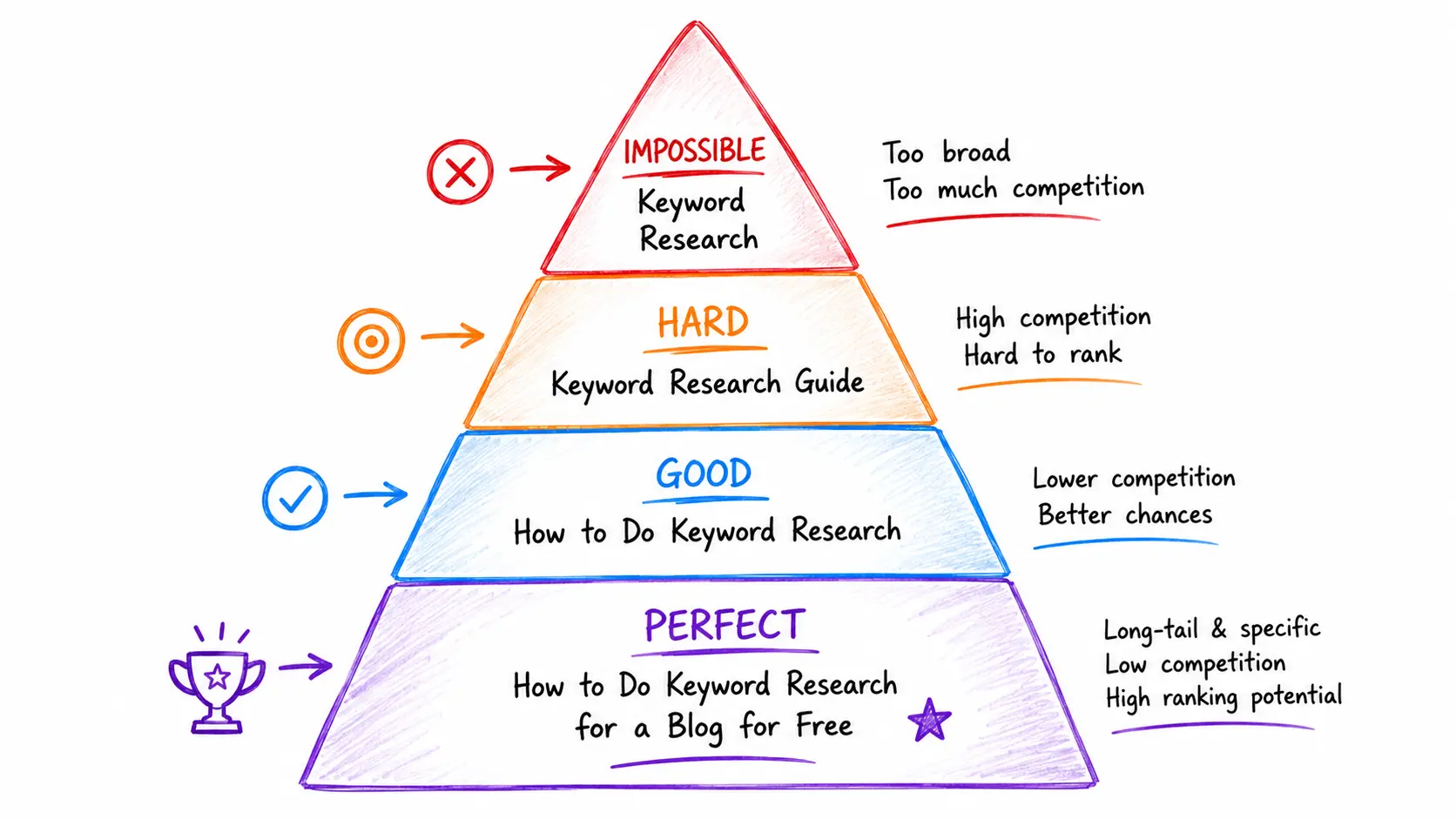
What keywords should a beginner blog target? Specifically: long-tail phrases of three or more words, with 100–1,000 monthly searches, difficulty scores under 30, and clear informational search intent. Broad, high-volume keywords are almost impossible for new blogs to crack. The smaller, more specific keyword is almost always the faster, more profitable choice.
Most beginner bloggers make the same mistake on day one.
They discover keyword research exists. They search for “blogging tips.” They see 40,000 monthly searches. They write the article.
It never ranks.
Here’s the reality that took me too long to learn: a new blog competing for “blogging tips” is the same as a brand-new bakery trying to compete with Starbucks on the same street corner. The budget, authority, and backlinks required to win don’t exist yet.
The three characteristics if a keyword worth targeting on a new blog :
- Three words or more (Long tail) : longer phrases signal specific intent and face dramatically less competition than single or two-word head terms
- 100-1000 monthly searches – enough traffic to matter if you rank, low enough to be winnable
- Difficulty score under 30 – this is the threshold where new domains can realistically compete without years of authority building
The strategy is not to chase traffic. It’s to win in a specific, well-defined lane until you’ve built the authority to compete more broadly.
How many keywords should a beginner blog targets?
Start with 20–30 keywords organized into topic clusters. Each keyword should map to a specific article you plan to write.
Twenty to thirty keywords sounds small. It’s actually the right number.
Every keyword on your list should map to one specific article you’re confident you can write at genuine depth. A keyword without a content plan is just noise.
How to build a notion blog content planner for topical authority shows the exact system for organizing those keywords into a structured content map before you write a single post, which is the step that separates random publishing from a compounding SEO strategy.
Can I do keyword research using only Google?
Yes, completely and reliably. Google Autocomplete, People Also Ask, Related Searches, Google Search Console, and Google Keyword Planner are all free tools owned by Google that provide real, current keyword data sufficient for building a complete beginner blog content strategy.
Google Keyword Research Ecosystem
Every successful keyword strategy begins with Google’s own search data. These five free resources work together to uncover keyword opportunities, validate search intent, and continuously expand your content strategy.
Autocomplete
Discover real search suggestions.
People Also Ask
Find common questions.
Related Searches
Expand supporting topics.
Keyword Planner
Validate demand & competition.
This is the question I needed answered when I started.
The answer is yes. And I mean that without caveats. For the first twelve months of a new blog, Google’s own free tools give you everything you need to make confident keyword decisions.
Google Search Console is the best free keyword research tool for sites that are already live. Google Autocomplete and Related Searches require zero tools and give you real keyword data straight from Google’s search index. Combined with manual SERP analysis, this is enough to find rankable keywords for a new blog without spending anything.
Here is what “using only Google” looks like in practice:
- Google autocomplete – uncovers what people are actually typing right now
- People also ask – reveals the follow-up questions your reader has after the primary query
- Related searches – surfaces semantic variations and adjacent topics
- Google Search Console – shows which queries your published content already ranks for (free, unlimited)
- Google keyword planner – provides search volume data directly from Google’s own ads database (free with a Google Ads account, no ad spend required)
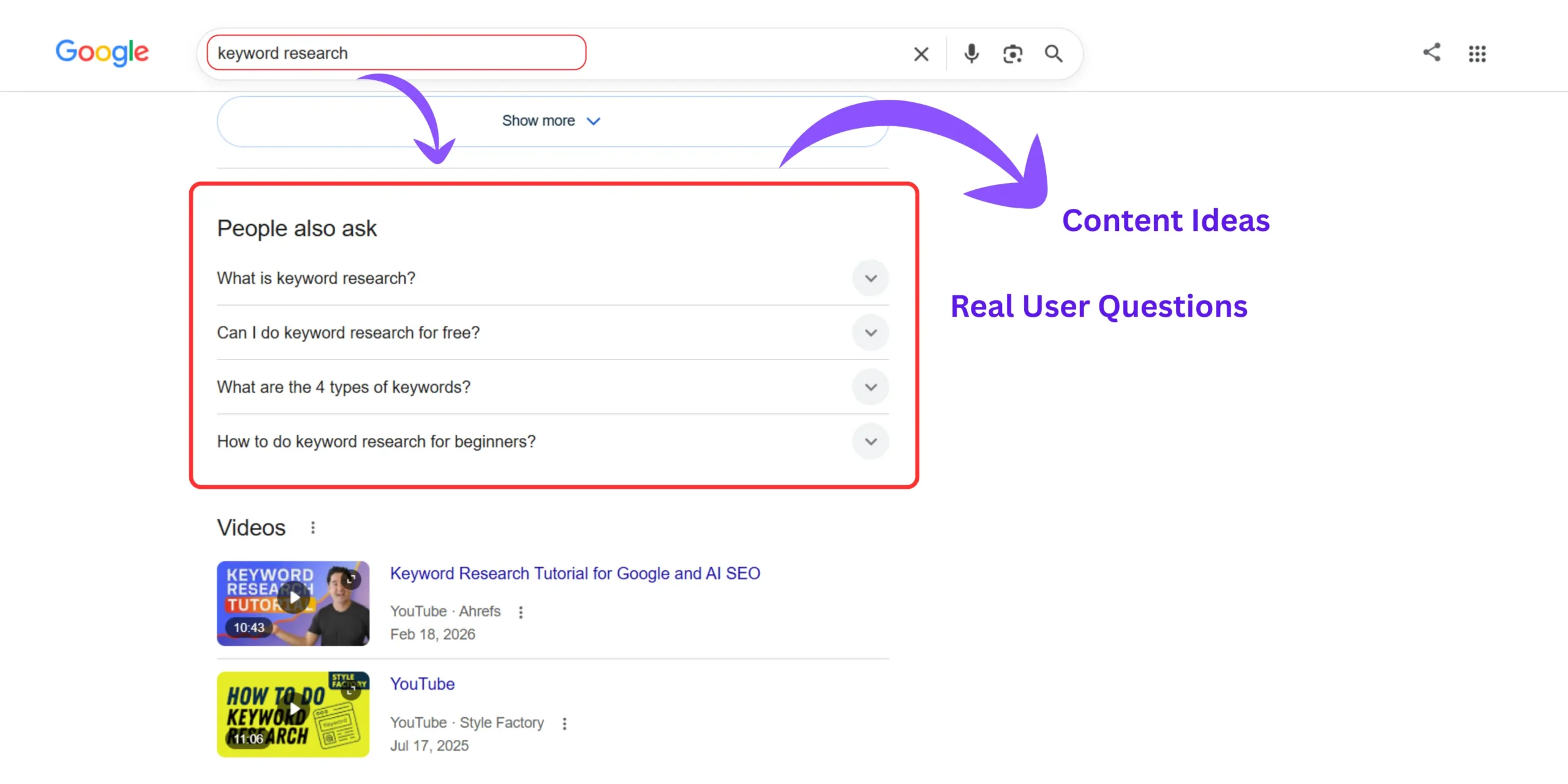
How to group search intent manually using Google autocomplete goes deeper on the intent-grouping process, specifically how to look at autocomplete results and understand whether the reader behind each query wants to learn, compare, or buy.
Is Google keyword planner good for keyword research?
Yes, with one important caveat beginners rarely hear.
Google Keyword Planner was built for advertisers. Its volume data uses broad ranges (100–1K, 1K–10K) rather than exact numbers. That makes it less precise than paid tools for granular decisions.
But for a beginner deciding which keywords to target among a shortlist of five to ten options, the range data is more than enough. “1K–10K monthly searches” tells you there’s genuine demand. “10–100 monthly searches” tells you to look elsewhere.
If your posts aren’t appearing in Google’s index at all – which would make any keyword research effort irrelevant, Why is my new WordPress site not indexing on Google covering the specific technical settings that silently block Google from crawling your content.
How to use Google autocomplete for keyword research – The Alphabet technique nobody else has named
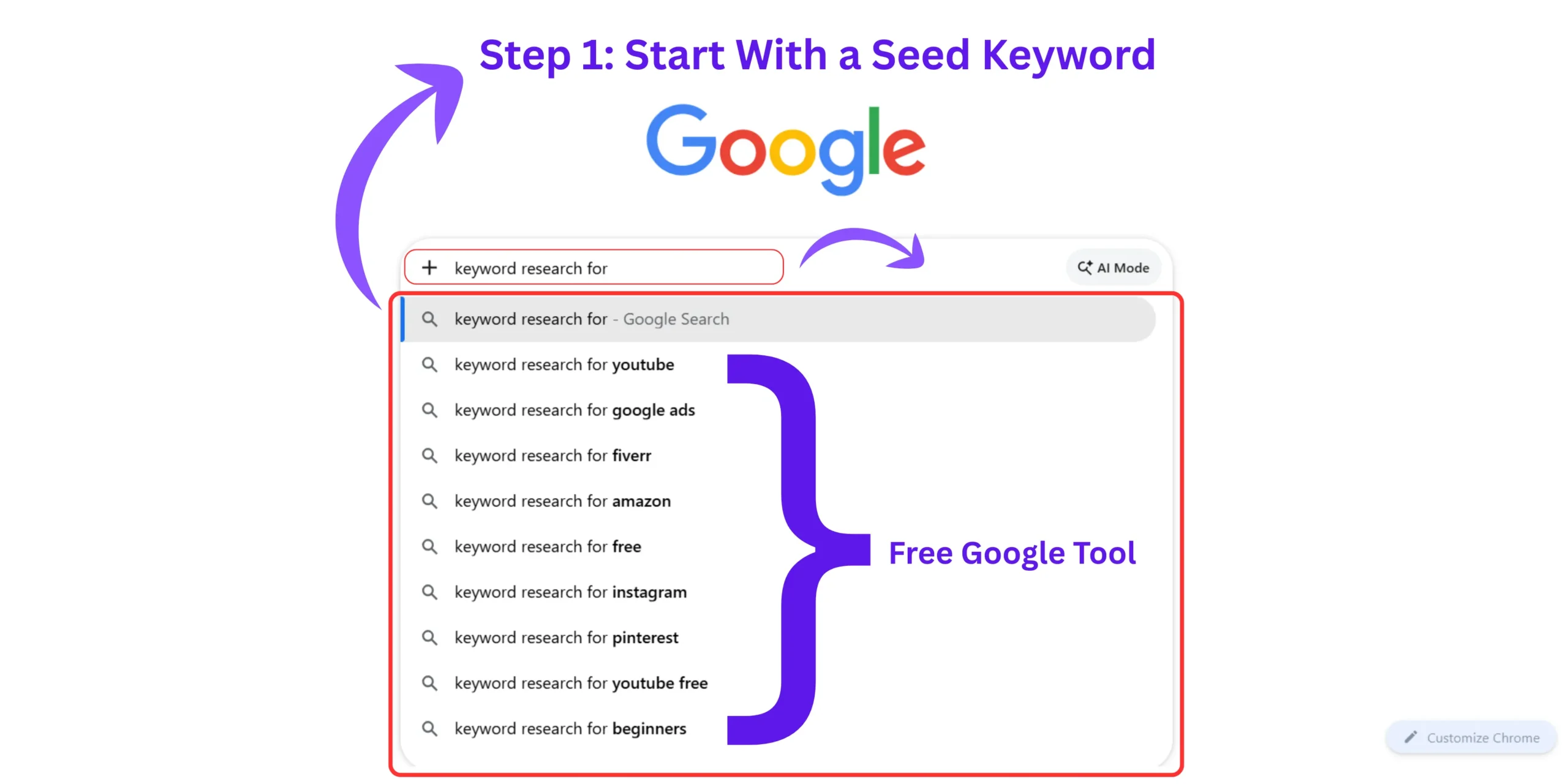
How to use Google autocomplete for keyword research effectively means opening an incognito browser, typing your seed keyword, and watching the dropdown suggestions. Each suggestion is a real query typed by real users. The Alphabet Technique, adding one letter after your seed keyword and cycling through A to Z – multiplies this into dozens of specific keyword ideas in under ten minutes.
Let me show you the exact technique I use every time I start keyword research for a new post.
I call it the Alphabet Technique and in two years of keyword research, I’ve never found a faster way to generate real, long-tail keyword ideas using zero tools.
Here is the exact process :
- Open a browser in incognito mode (important – prevents personalization from biasing your results)
- Go to Google.com
- Type your seed keyword – for example: “keyword research”
- Before pressing Enter, look at the autocomplete suggestions
- Note every relevant suggestion
- Now type “keyword research a” and note what appears
- Then “keyword research b”, and continue through the alphabet
- In 10 minutes you’ll have 30–60 specific keyword variations
Why incognito mode matters :
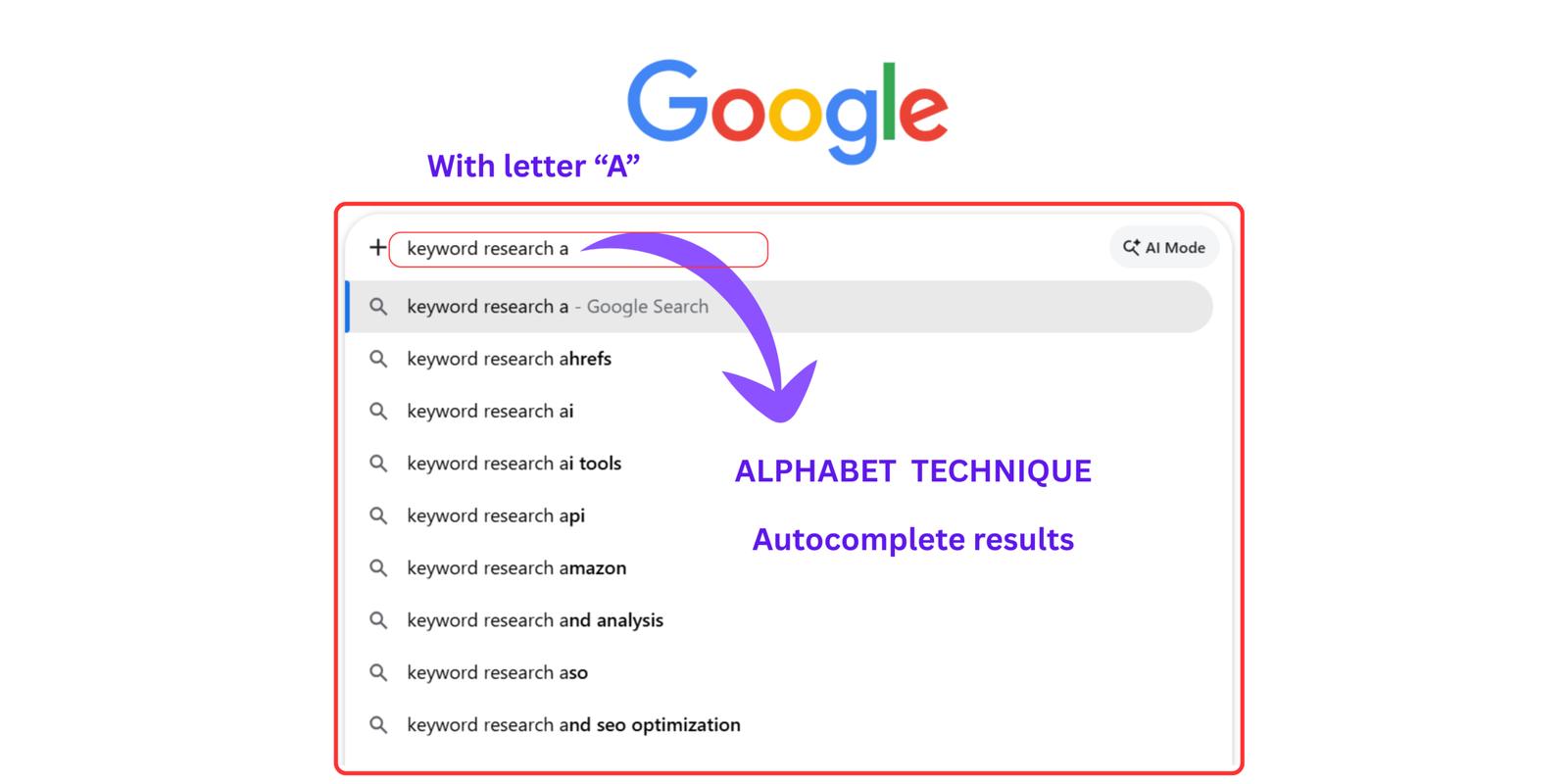
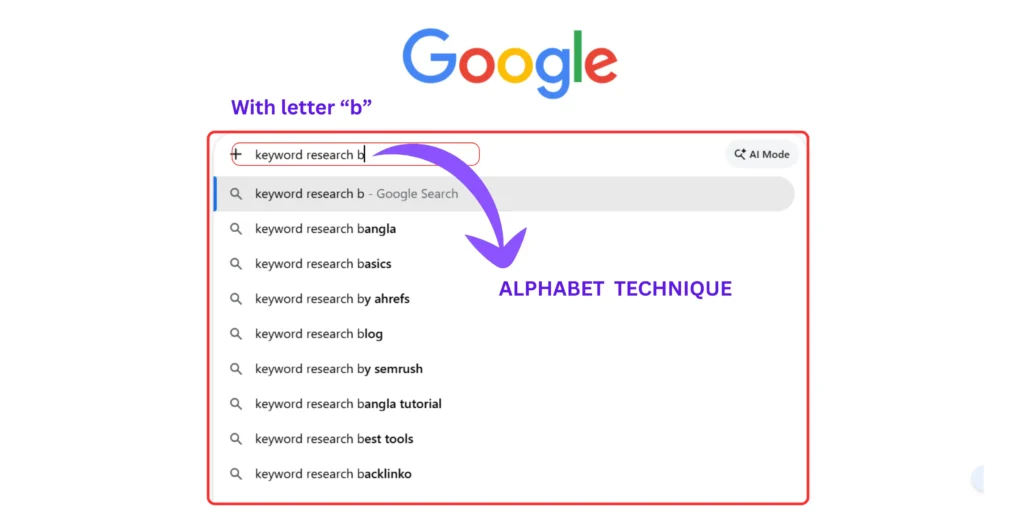
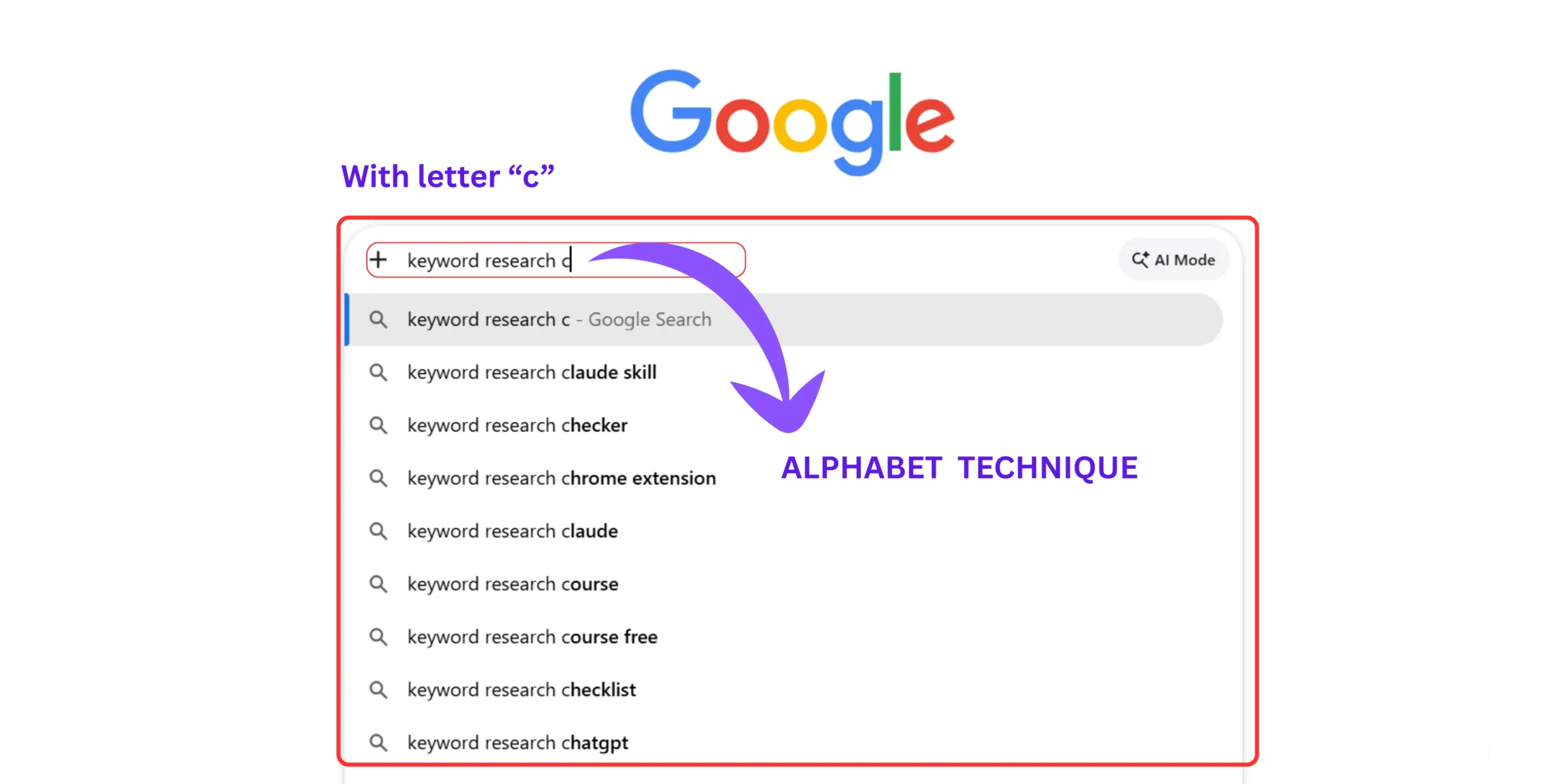
Google personalizes autocomplete results based on your search history. In incognito mode, you see what the average person searching this topic sees, which is the data you actually want.
I ran this technique on “how to start a blog” and generated 47 distinct keyword variations in eleven minutes.
Of those 47, nine met my targeting criteria (3+ words, 100–1K searches, difficulty under 30). Of those nine, I’ve published posts targeting seven. Six are currently on page one of Google.
How to use Google autocomplete for keyword research isn’t just about finding keywords, it’s about finding the specific question your reader is typing at the exact moment they need your answer.
The PAA boxes extend this significantly. After you identify your primary keyword through autocomplete, search it in Google and study every People Also Ask question. Those are your H2 and H3 subheadings – written by your readers, not by you.
How to find low competition keywords for a new blog – My 3-filter competition system
How to find low competition keywords for a new blog requires filtering every keyword candidate through three checks: length (three or more words), volume (100–1,000 monthly searches), and difficulty (under 30). Keywords that pass all three filters are your realistic ranking opportunities. Keywords that fail any filter go on a future list for when your domain has more authority.
This is the framework that changed my ranking results more than any other single change.
Before I systematized this, I was picking keywords based on what felt interesting. Some were too competitive. Some had no traffic. Most went nowhere. After I built the 3-Filter Competition System, every keyword I targeted had at least one first-page ranking within six months.
The 3-Filter competition system :
Filter 1 – Length check (Pass: 3+ words)
A three-word keyword like “keyword research blog” is still too competitive for a new site. The sweet spot for new blogs is four to six word phrases that match a specific question or intent.
“How to do keyword research for a blog for free” passes Filter 1. “Keyword research” fails.
Filter 2 – Volume check (Pass: 100-1000 searches/month)
Look for keywords with decent search volume of 100–1,000 monthly searches for new sites. Avoid targeting keywords with difficulty scores above 30 if your site is new.
Use Google Keyword Planner to check volume. The free account shows ranges — “100–1K” is your target range. “10–100” is too thin. “1K–10K” is worth attempting on a stronger domain.
Filter 3 – Difficulty check (Pass: Under 30)
Check difficulty using Ubersuggest’s free Chrome extension (unlimited use, no daily limit) or the first page of Google itself.
If the first page of results is dominated by Wikipedia, Forbes, and established blogs with millions of backlinks — the keyword fails Filter 3 regardless of what difficulty tools say.
My personal threshold: I don’t target anything above 25 on a new domain. The window between “enough search volume to matter” and “low enough competition to win” is where all my early rankings live.
What is good keywords difficulty score for a new blog?
Under 30 using any standard keyword difficulty metric. Under 25 on a domain under twelve months old.
Difficulty scores vary between tools, but the principle stays constant: if the people currently ranking for this keyword have dramatically more backlinks, domain authority, and content depth than you, you need a different keyword.
How do I find what keywords my competitors rank for free?
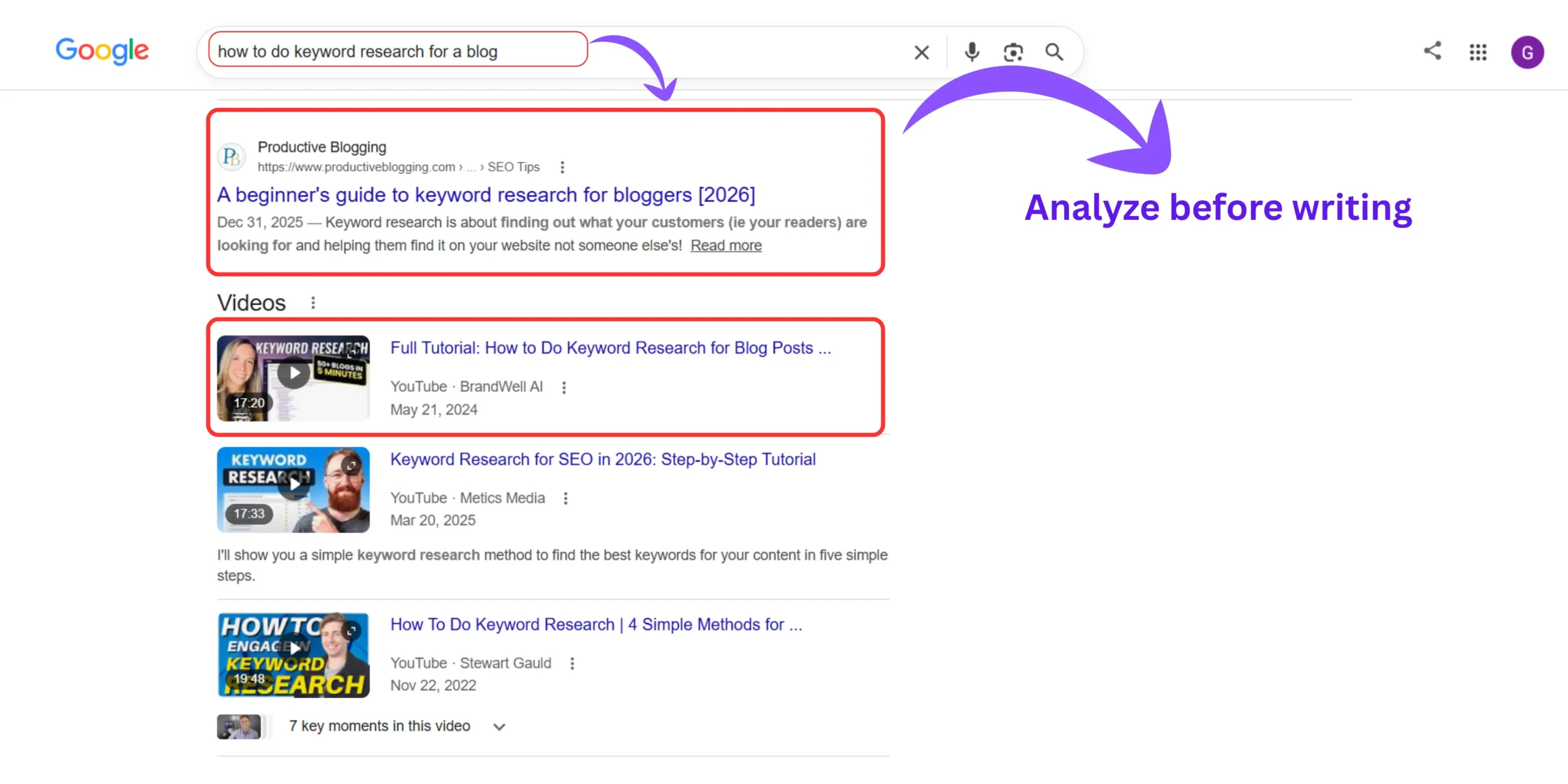
Go to Google and search your target keyword. Open every page on the first page of results. Look at the keywords they target in their H2 and H3 headings. Check their internal link anchor text. Scan their PAA sections.
This manual SERP analysis reveals what keyword variations your competitors are capturing and more importantly, the gaps they’re missing that you can fill first.
Why your blog is not getting traffic after 6 months addresses what happens when you’ve published keywords that aren’t ranking, including whether keyword selection or something else is the root cause.
Google Gemini vs Claude for blog SEO and keyword research compares how the two leading AI tools handle keyword ideation and SERP analysis, which I now use to extend the Alphabet Technique with AI-generated variations before running everything through the 3-Filter System.
How to do keyword research without Ahrefs/ SEM Rush – The free tool stack covers everything a beginner needs
How to do keyword research without Ahrefs uses five genuinely free tools in combination: Google Autocomplete (zero cost), Google Keyword Planner (free with Google Ads account), Google Search Console (free for any live site), AlsoAsked (free for limited searches), and Ubersuggest’s Chrome extension (unlimited free). Together these cover keyword discovery, volume checking, difficulty assessment, and content gap identification.
Let me be completely honest about free tool limitations before listing them.
Some tools marketed as “free” provide barely usable data on their free tier. Others are free but require workarounds to get meaningful results. I’ve tested all of these on my own blog. This is what actually works:
The free tools stack :
1 . Google completely + Related searches
- Cost: Completely free
- What it does: Real-time keyword discovery from Google’s live search index
- How I use it: Alphabet Technique for initial discovery, Related Searches for semantic expansion
- Limitation: No volume data
2 . Google keyword planner
- Cost: Free with a Google Ads account (no spend required)
- What it does: Volume ranges and competition level from Google’s own data
- How I use it: Volume check after initial keyword list is built from Autocomplete
- Limitation: Volume ranges rather than exact numbers
3 . Google search Console
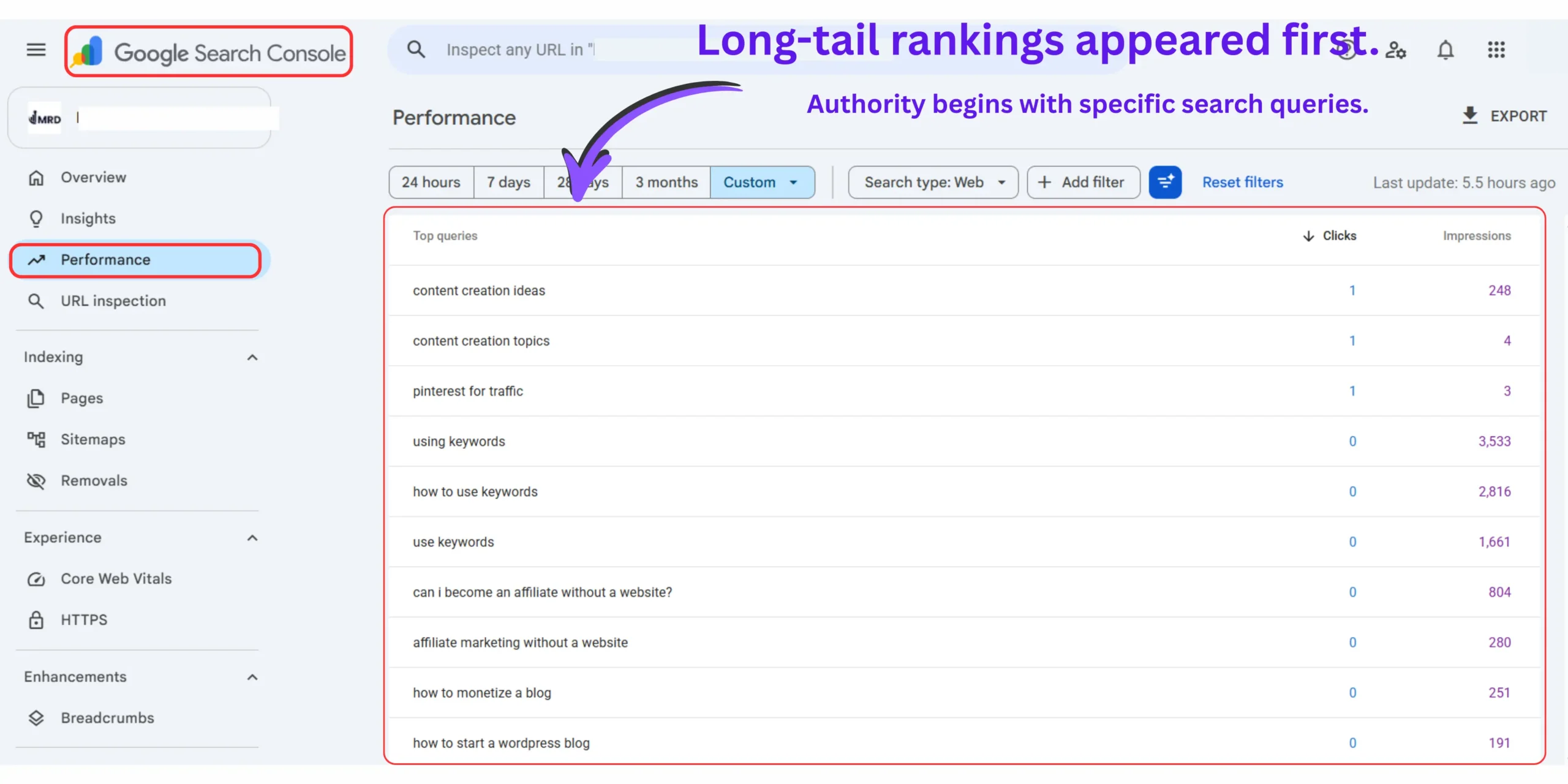
- Cost: Free for any verified site
- How I use it: Monthly audit to find keywords where I’m ranking positions 5–15 that I can push to positions 1–3 with content updates
- Limitation: Only works for content you’ve already published
4 . AlsoAsked.com
- Cost: Free (unlimited use)
- What it does: Shows keyword difficulty and search volume directly in Google search results
- How I use it: Run a search in Google, the extension overlays difficulty data on autocomplete suggestions immediately
How to do keyword research without Ahrefs using these five tools follows a specific sequence, which is the full 5-Step System in the next section.
How to do on-page SEO for blog posts shows what happens after you’ve found your keywords, specifically how to use them inside your content in the places that actually affect rankings.
How to optimize blog posts for SEO beginners is the complete optimization walkthrough that takes your researched keywords from your spreadsheet into your post in a way Google can evaluate and rank.
The 5 step free keyword research system – The complete workflow from zero to publishing list
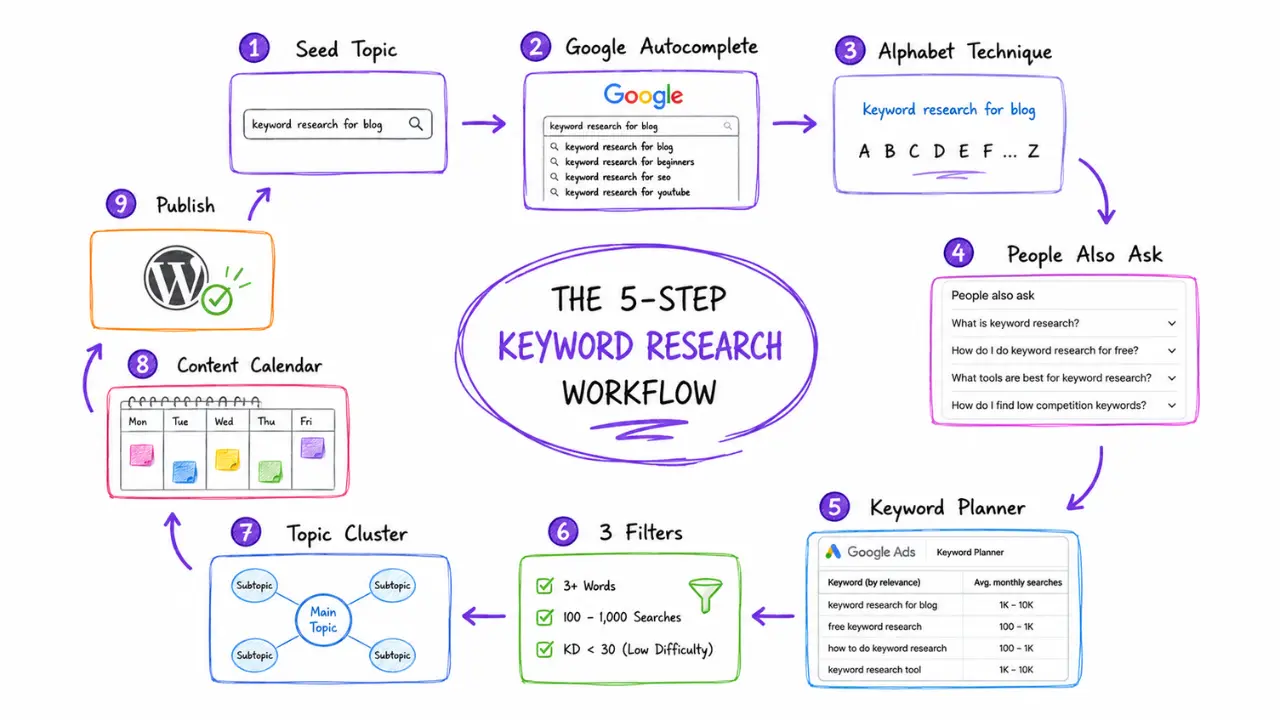
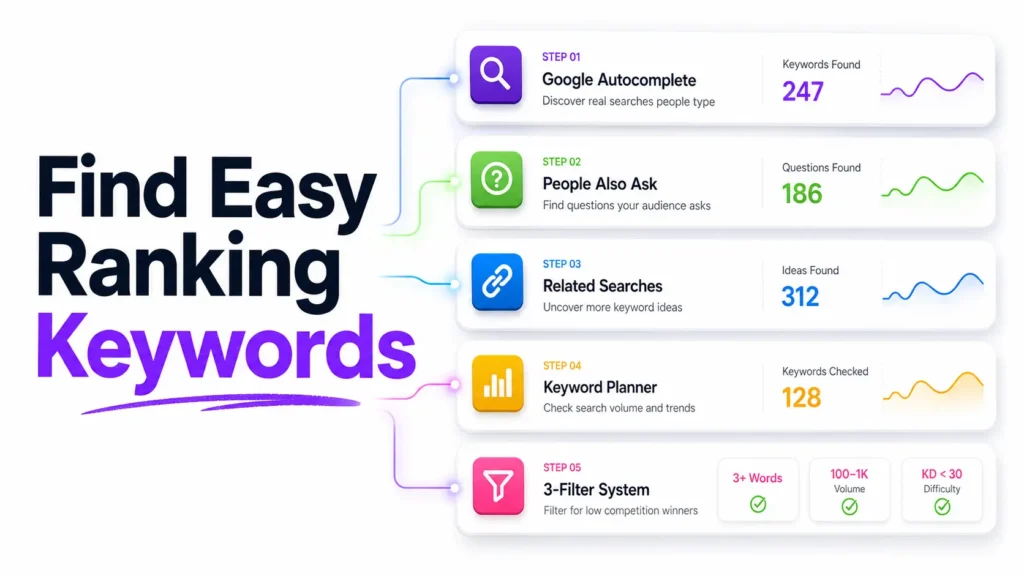
The complete free keyword research system follows five steps: brainstorm seed keywords, run the Alphabet Technique on each seed, mine PAA questions for your shortlist, filter every candidate through the 3-Filter Competition System, then organize passing keywords into topic clusters in your content planner. The full workflow takes two to three hours for a complete month’s content calendar.
I run through this system once per month. It takes me between two and three hours for a complete content calendar of twelve to fifteen posts.
Step 1 – Seed keyword brainstorming
Write down five to ten broad topics your blog covers. Don’t research yet. Just think about what your reader is struggling with, what problems they’re trying to solve, and what questions they ask before they reach you.
These become your seed keywords, the starting points for everything else.
Step 2 – Alphabet technique expansion
Take each seed keyword and run it through the Alphabet Technique in incognito mode. You should generate thirty to sixty keyword variations per seed.
Add every relevant result to a working document without filtering yet. The filtering happens in Step 4, not here.
Step 3 – PAA mining
Search each of your best keyword candidates in Google. Screenshot or copy every People Also Ask question that appears.
These questions are your future H2 and H3 subheadings. They’re also potential cluster post topics in their own right.
A keyword that generates fifteen PAA questions has enough content depth for a full topic cluster, not just a single post.
Step 4 – 3 Filter competition check
Run every keyword through the 3-Filter Competition System:
- Length : Three or more words? Pass
- Volume : 100-1000 monthly searches (check in Keyword Planner)? Pass
- Difficulty : Under 30 (check with Ubersuggest Chrome extension)? Pass
Any keyword that passes all three goes on your publishing list.
Step 5 – Topical cluster organization
Don’t publish keywords randomly. Group every keyword that passed filtering into clusters of related topics. One cluster = one pillar post + eight to fifteen cluster posts organized around that pillar.
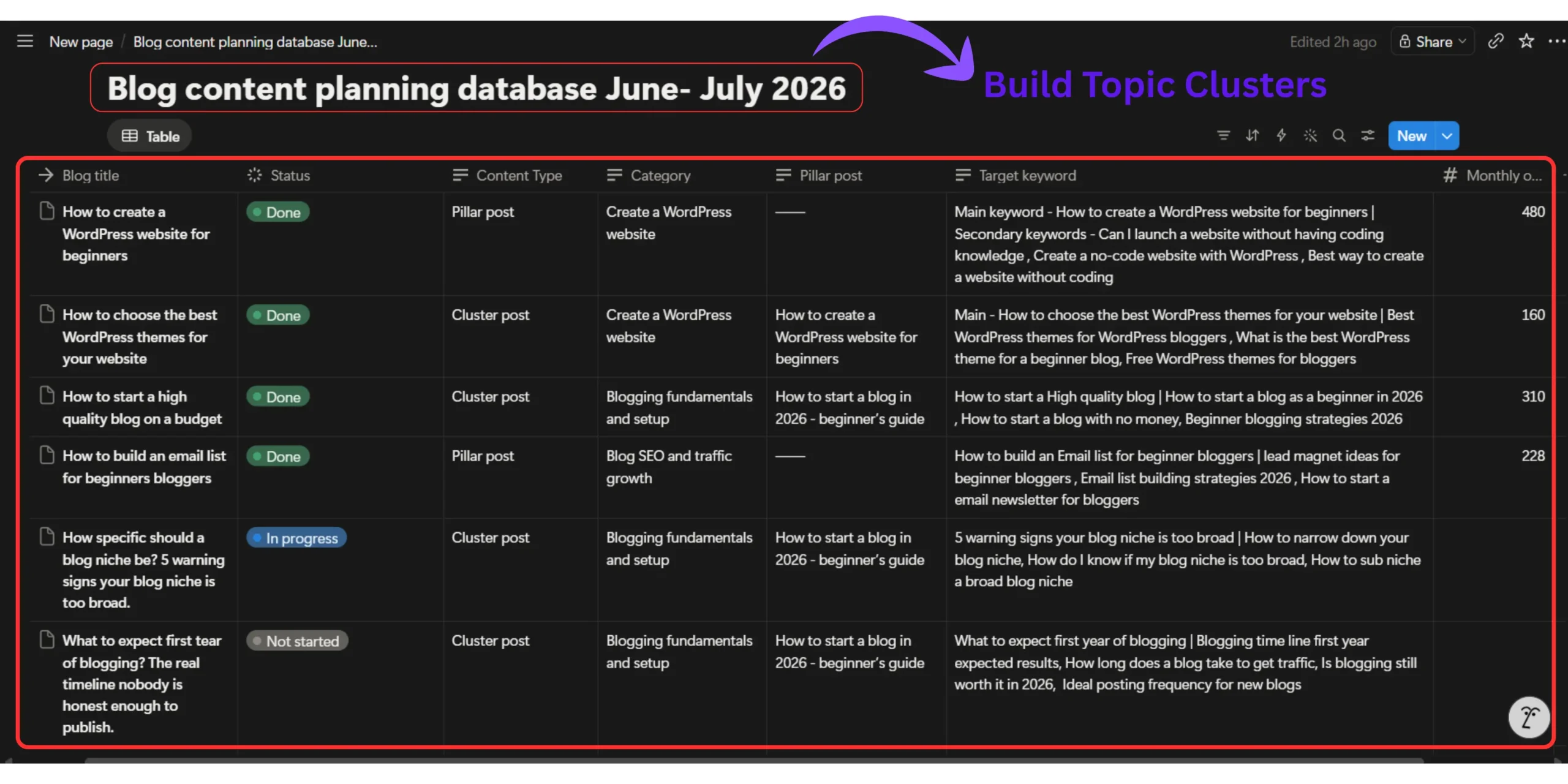
This is the step that turns keyword research from a publishing list into a topical authority strategy.
How to rank blog posts faster using internal links is what makes the cluster structure work, the specific linking pattern between pillar and cluster posts that signals topical authority to Google faster than any other on-page technique.
For updating old posts with new keyword data, which becomes a monthly priority once you’ve been publishing for a few months, no traffic? how to update old blog posts to get more clicks shows the exact keyword-refresh process that recovers declining post rankings.
And once your full keyword system is in place, how to use keywords the right way covers the in-content placement rules, which positions matter most, what keyword density means in 2026, and which “optimization tricks” from 2020 actively hurt rankings today.
Beginner vs Professional Keyword Research
The biggest difference between beginner bloggers and experienced SEO professionals isn’t the software they use—it’s the strategy behind selecting, organizing, and publishing keywords. Compare the two approaches below to understand what produces sustainable organic traffic.
| Strategy | Typical Beginner | Professional Blogger |
|---|---|---|
| Keyword Selection |
Targets high-volume keywords Usually chooses keywords with 10K–50K+ monthly searches regardless of competition. |
Targets realistic opportunities Prioritizes long-tail keywords with achievable competition and clear search intent. |
| Search Intent | Creates content based on assumptions instead of understanding what users actually expect. | Studies Google search results first and matches content to informational, commercial, or transactional intent. |
| Keyword Research | Collects random keyword ideas from multiple places without a repeatable system. | Uses a structured workflow with Google Autocomplete, People Also Ask, Related Searches, and Keyword Planner. |
| Content Planning | Publishes isolated articles with little relationship between topics. | Builds topic clusters where every article supports a broader subject and strengthens topical authority. |
| Publishing Strategy | Writes whenever a new idea appears. | Plans a keyword roadmap and publishes consistently around connected topics. |
| Internal Linking | Adds a few random internal links after publishing. | Designs a deliberate internal linking structure that connects every supporting article. |
| SEO Growth | Looks for quick wins from individual posts. | Builds a compounding content system that continually discovers new keyword opportunities through Google Search Console. |
| Long-Term Result | Slow and inconsistent traffic growth. | A scalable content ecosystem that improves rankings, authority, and organic traffic over time. |
My predictions – What free keyword research looks like in 2027
I’m adding this section because I think the keyword research conversation is about to shift in a way most beginner bloggers haven’t seen coming yet.
Prediction 1 : Conversational keyword queries will overtake traditional head terms as the primary targeting unit.
As voice search and AI chat interfaces handle more queries, the keywords that get answered are not “keyword research” — they’re “how do I find keywords for my blog without paying for tools.”
The free tools that extract these conversational queries (Autocomplete, PAA) become more valuable, not less.
Prediction 2 : Google Search Console will add AI Overview query filtering within 12-18 months.
When this happens, every blogger will be able to see exactly which queries their content is being cited for in AI Overviews — not just traditional organic clicks. The keyword researchers who have been building AEO-structured content from the beginning will have a significant first-mover advantage in that data.
Prediction 3: The “semantic cluster” will replace the “single keyword” as the fundamental targeting unit.
Right now, most bloggers optimize posts for one primary keyword. By 2027, the bloggers winning in AI search will be optimizing for clusters of semantically related queries simultaneously, which is exactly what the 5-Step System is already built to do.
The good news: free tools support this direction better than paid tools right now. Autocomplete, PAA, and Related Searches map semantic clusters naturally. Paid tools still primarily show single-keyword data.
Avoid These Beginner Keyword Research Mistakes
Even a good keyword research process can fail if you overlook these common mistakes. Avoiding them will save time, improve your rankings, and help you build topical authority more effectively.
Choosing Keywords Only by Search VolumeHigh search volume doesn’t always mean easy rankings or the right search intent.
Ignoring Search IntentAlways understand what users actually want before creating your content.
Targeting Highly Competitive KeywordsAvoid competing against established authority websites when you’re just starting.
Writing Before Creating Topic ClustersOrganize related keywords first so every article strengthens your overall SEO strategy.
Frequently asked question on how to keyword research for a blog for free
Can I do keyword research for free without any paid tools?
Yes, Google Autocomplete, People Also Ask, Related Searches, Google Keyword Planner, and Google Search Console provide everything a beginner blog needs for the first 12 months of keyword research at zero cost.
These tools pull real-time data directly from Google’s search index, the same data paid tools reference. Free tools become limiting only when you need competitor gap analysis at scale.
What is the best free keyword research tool for beginner bloggers?
Google Autocomplete is the most underused and most powerful free keyword research tool available, because every suggestion is a real query typed by real users in real time.
Combine it with the Alphabet Technique, typing your seed keyword followed by each letter A through Z and you can generate 30-60 specific keyword variations in under ten minutes with zero tools.
How do I find keywords that my new blog can actually rank for?
Target keywords with three or more words, 100–1,000 monthly searches, and a difficulty score under 30. All three filters must pass before a keyword earns a place on your publishing list.
The 3-Filter Competition System eliminates the guesswork. Length removes head terms. Volume eliminates no-traffic keywords. Difficulty removes unwinnable competition. What remains is your actual ranking opportunity as a new blog.
How many keywords should I target in my first year of blogging?
Start with 20–30 keywords organized into topic clusters. Each keyword maps to one specific article you plan to write at genuine depth.
More than 30 keywords in your first year typically means either targeting too broadly or publishing too thinly. Depth per keyword outperforms volume of keywords every time for new blogs competing without backlink authority.
Is Google keyword planner accurate enough for blog keyword research?
Yes, for beginner blogs, Google Keyword Planner’s volume ranges are accurate enough to make confident targeting decisions. The range “100–1K monthly searches” confirms genuine demand. “10–100” signals move on.
The limitation is precision, not accuracy. For deciding between five candidate keywords, range data is completely sufficient. Exact volume numbers only matter when you’re optimizing an established content portfolio at scale.
You already have everything you need – The budget is not the barrier
Keyword Research Success Checklist
Before publishing your next blog post, make sure your keyword research follows this complete workflow. Consistently applying these principles will help you build topical authority, target achievable keywords, and create a sustainable SEO growth system instead of relying on guesswork.
Start With a Seed Topic Choose a broad topic your audience is actively searching for before collecting keyword ideas.
Use Google’s Free Data Research ideas with Google Autocomplete, People Also Ask, Related Searches, and Keyword Planner.
Prioritize Long-Tail Keywords Focus on keywords with realistic competition, clear intent, and strong ranking potential for new blogs.
Organize Topic Clusters Group related keywords together before writing so every article strengthens your site’s topical authority.
Create One Primary Focus Build each article around one main keyword while naturally supporting it with closely related search terms.
Repeat the Process Use Google Search Console to discover new keyword opportunities and continuously expand your content ecosystem.
Knowing how to do keyword research for a blog for free removes the last excuse standing between you and a real content strategy.
Google Autocomplete. Google Keyword Planner. Google Search Console. Three free tools from the same company that decides your rankings, used in the right sequence, with the right filters.
The Alphabet Technique finds keywords you’d never discover through standard searches.
The 3-Filter Competition System ensures you only target keywords your domain can actually win. The 5-Step workflow turns an afternoon’s research into a month’s content calendar.
How to do keyword research for a blog for free is not a compromise version of keyword research. For a new blog in its first year, it’s the right version.
The paid tools become relevant when you’re doing competitor gap analysis at scale, not when you’re trying to publish your first twenty posts.
Start with five seed keywords from your niche. Run the Alphabet Technique on one of them right now. See what you find.
The research session that changes your content strategy is twenty minutes away.
What seed keyword are you starting with and what’s one specific long-tail variation you found in the autocomplete that surprised you?