
For eight weeks after joining Pinterest, every pin I published had zero outbound clicks.
Not low clicks. Exactly zero.
I kept asking myself the same question every blogger eventually faces, why your blog is not getting traffic after 6 months of consistent effort. The answer, at least for Pinterest, came down to one thing I was completely ignoring: my pin descriptions were keyword dumps disguised as sentences.
Learning how to write Pinterest pin descriptions for clicks, not just for the algorithm, but for the actual human scrolling past your pin is what finally broke that streak. And if you want the bigger picture of how Pinterest fits inside a full traffic system, this post sits inside our complete blog content distribution guide where we cover every channel from email to social to SEO.
This isn’t another generic Pinterest tutorial. By the end, you’ll have a specific formula, a fill-in-the-blank template, and the exact insight nobody in the top 10 Google results mentions, the one that explains why some pins keep growing for months while identical ones flatline after day three.
Want to go even deeper on Pinterest as a traffic channel before we dive in? Our guide on how to drive website traffic from Pinterest in 2026 covers the full strategy, this post focuses specifically on the description formula that makes your clicks happen.
Pinterest pin description copywriting vs keyword optimization : Why most bloggers get both wrong
Quick summary :
Pinterest pin descriptions need both keyword optimization and natural copywriting, but in different parts of the same description. Keywords tell the algorithm what your pin is about. Copywriting tells the human reader why they should click. Prioritizing one and ignoring the other is why most beginner pins get impressions but no traffic.
This is the core tension behind every Pinterest description you’ll ever write.
Two camps that both fail in different ways
- Camp 1- Pure keywords : Stuff every relevant phrase into 500 characters. The algorithm indexes it. Humans scroll past it.
- Camp 2 – Pure copywriting : Write beautifully conversational text with no keyword structure. Humans might like it. Pinterest can’t categorize it and won’t show it.
Here’s the thing: these two goals are not in conflict. They operate in different parts of the same description.
There’s a reason why people do not engage with your content on social media even when impressions are decent and Pinterest is no different. If the description reads like a keyword list, it signals low effort and low value to the human reader before they even process the content of the pin image.
The same principle applies to how to build trust on social media as a beginner. Trust on Pinterest is built through descriptions that feel like a real person wrote them for a real reader, not descriptions assembled from a keyword research spreadsheet.
When I restructured my descriptions around the sequence we cover below, weekly outbound clicks went from 0 to 47 in 30 days on the exact same pins with only the description text rewritten.
The step by step formula for writing Pinterest pin descriptions that drive clicks
Quick answer :
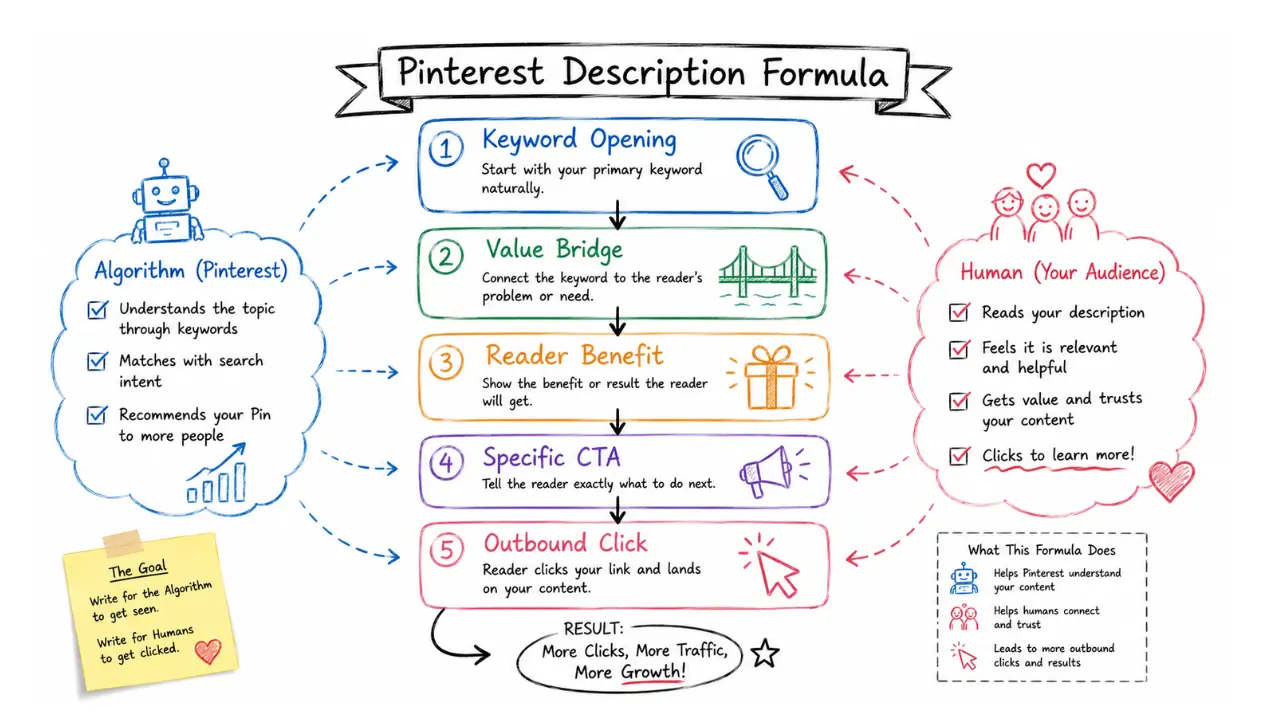
The most effective Pinterest pin description formula has three parts: a keyword-led opening sentence (first 40–50 characters), a natural-language value bridge explaining what the reader gets, and a specific call to action with a destination. This structure serves the algorithm first and the human reader second, without sacrificing either.
I call this the 3-Part Pinterest Description Formula. Every pin description I publish now follows this exact structure.
Part 01 – The keyword led-opening (First sentence)
Remember the “CLICK” framework
If you only remember one thing from this guide, make it this.
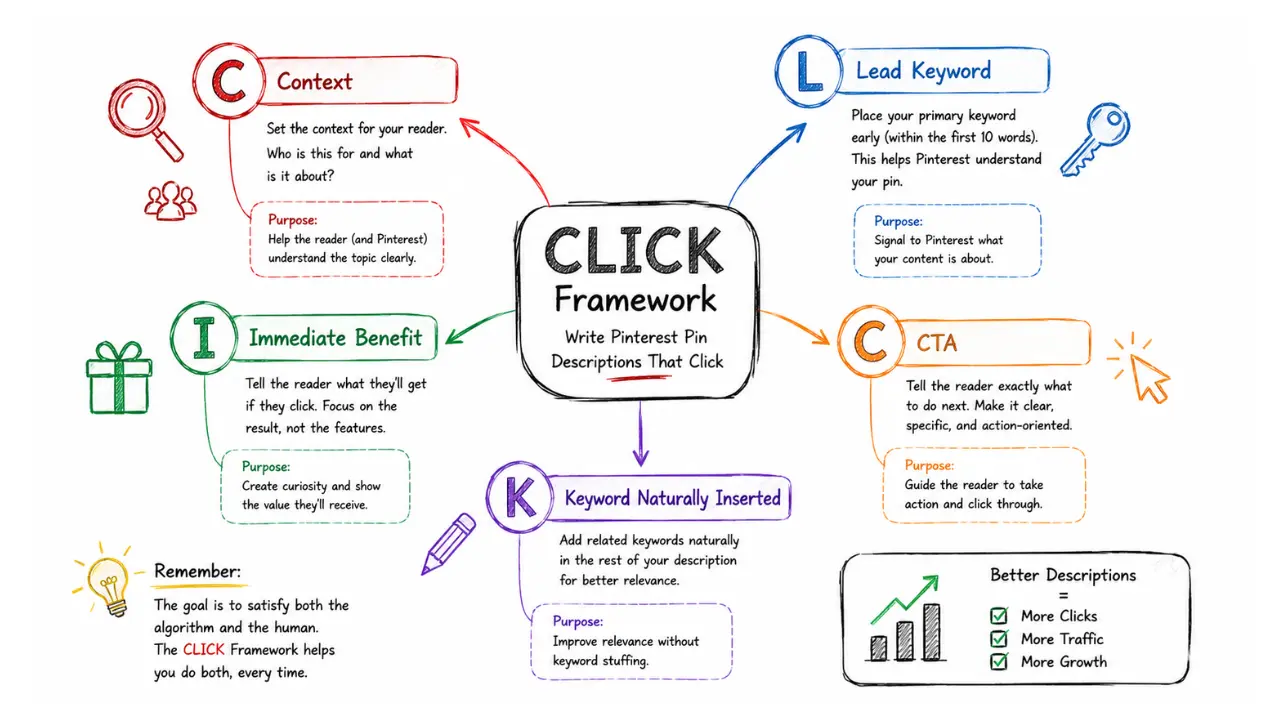
I call this the CLICK Framework. Every Pinterest pin description I publish follows this simple system because it balances search optimization with human-focused copywriting. Once you understand the five elements below, writing high-converting descriptions becomes a repeatable process instead of guesswork.
C – Context
Start with your primary topic or keyword so Pinterest immediately understands what your pin is about.L – Lead Keyword
Place your main keyword naturally within the opening 40–50 characters where Pinterest gives it the most indexing weight.I – Immediate Benefit
Tell the reader exactly what they’ll gain from clicking. Focus on the outcome rather than listing what the article covers.C – Clear Call-to-Action
Finish with a specific action that tells readers where they’re going and why it’s worth clicking.K – Keyword Naturally Integrated
Weave one or two supporting keywords naturally throughout the description instead of stuffing multiple keywords into a single sentence.The goal isn’t to satisfy the algorithm first or the reader first. The goal is to satisfy both in the same description. That’s exactly what the CLICK Framework helps you do every time you publish a new pin.
Your first sentence carries more algorithmic weight than everything else combined.
Pinterest heavily indexes the first 40–50 characters of your description when deciding which searches to show your pin in. Your primary keyword must appear here, naturally embedded, not dropped in awkwardly.
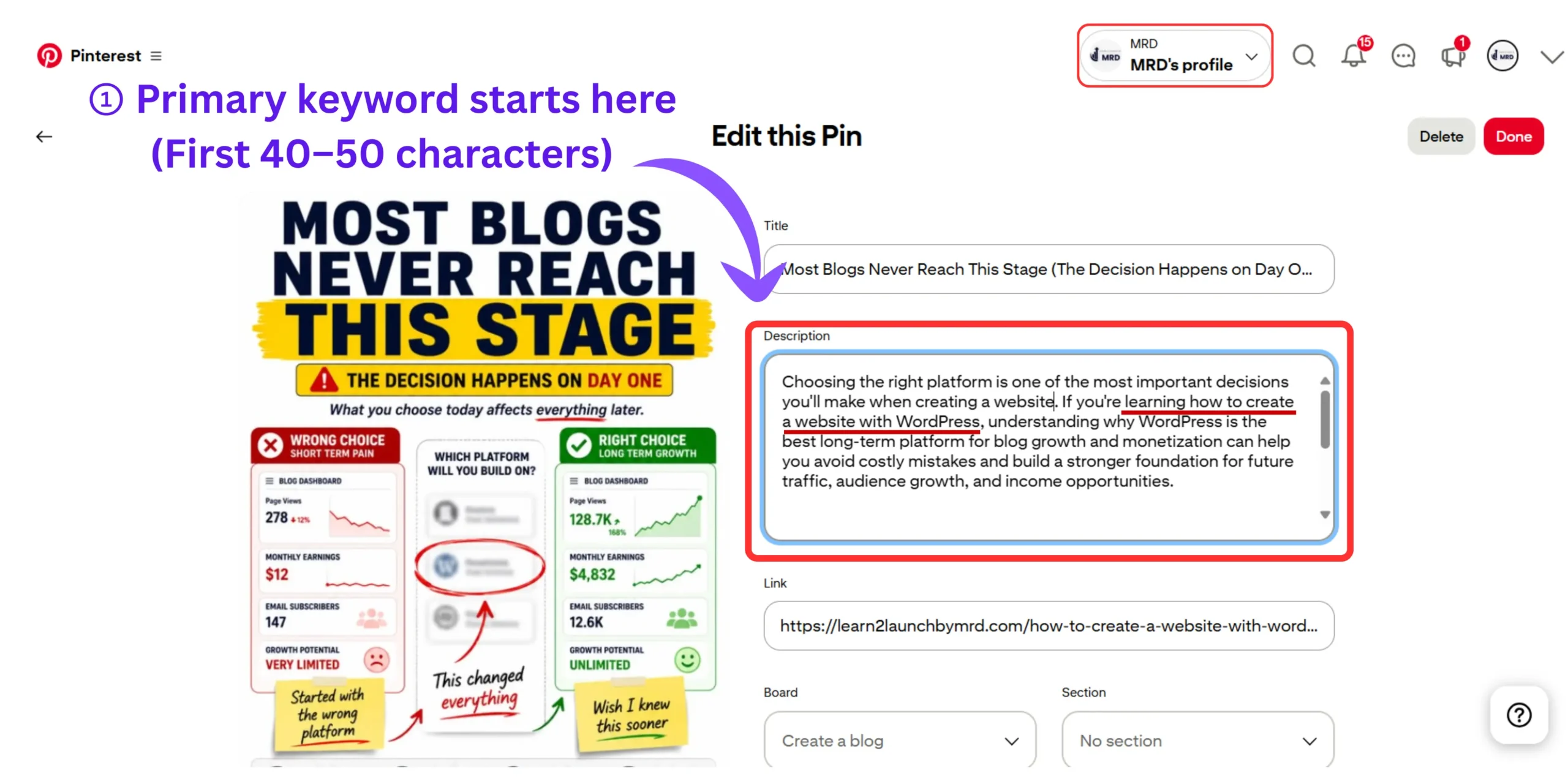
Formula: [Primary keyword phrase] + immediate benefit or context
The same principle that applies to how to write hooks for social media as a beginner applies directly here. A great Pinterest description opening is a hook – it earns the next sentence before the reader even consciously decides to keep reading. Lead with what they care about most, not what you want to say first.
Strong example: "Writing Pinterest pin descriptions for clicks starts with understanding that you're writing for two audiences simultaneously, the algorithm and the human."
Primary keyword in the first seven words. The rest of the sentence immediately earns continued reading.
Part 02 – The value bridge (Middle section)
This is where keyword density drops and natural language takes over completely.
Your value bridge answers one question the reader is silently asking: “What will I actually get if I click this?”
Write 2–3 sentences describing the specific outcome, result, or information waiting on the other side of the click. Use conversational language. Use “you.” Make it feel like a helpful friend describing something they genuinely found useful.
Avoid: Listing features (“This post covers X, Y, and Z”) Write: Outcomes (“You’ll walk away with a 3-part formula you can apply to every pin you publish from today”)
Part 03 – The call to action
Quick Answer: An effective Pinterest CTA tells the reader exactly what to do and what they’ll find when they do it. Specific destination CTAs (“Read the full step-by-step breakdown on the blog →”) outperform generic ones (“Click for more tips!”) by a significant margin because they reduce decision friction and set clear expectations.
Most bloggers write CTAs that say nothing useful. “Click for more tips” tells the reader nothing about where they’re going or why the destination is worth the click.
Think about how you’d approach how to turn social media followers into customers, the principle is identical. You never convert a follower by saying “click here.” You convert them by making the destination feel specific, valuable, and immediately relevant to what they already care about.
High converting Pinterest CTA formulas :
- “Click through for the full step-by-step formula with examples →”
- “Save this and read the complete breakdown at [Blog Name]”
- “Read the full guide at learn2launchbymrd.com – link in bio”
The best CTAs include a specific destination signal and a brief benefit reminder. Both. Not one or the other.
Now I will give you better comparison between weak CTAs and strong CTAs.
| Weak CTA | Strong CTA | Why the Strong CTA Works |
|---|---|---|
| Click here for more. | Read the full step-by-step Pinterest description formula → | Tells readers exactly what they’ll get after clicking. |
| Learn more. | Discover the exact framework I use to write Pinterest descriptions that earn more clicks. | Creates curiosity while promising a clear outcome. |
| More blogging tips. | See real before-and-after Pinterest description examples that increased outbound clicks. | Highlights a specific benefit instead of a generic topic. |
| Visit my website. | Read the complete guide and start writing Pinterest descriptions that convert. | Focuses on the reader’s result rather than the website itself. |
| Save this post. | Save this pin so you can use the CLICK Framework every time you publish a new Pinterest pin. | Gives readers a concrete reason to save the pin. |
How long should a Pinterest pin description be for SEO?
Quick answer :
The ideal Pinterest pin description length is 100–150 words (approximately 500–800 characters). Pinterest only displays the first 50–60 characters in the feed preview, so front-load your keyword there. The full description is still indexed for search – length matters for discoverability even when most of it isn’t immediately visible to the reader.
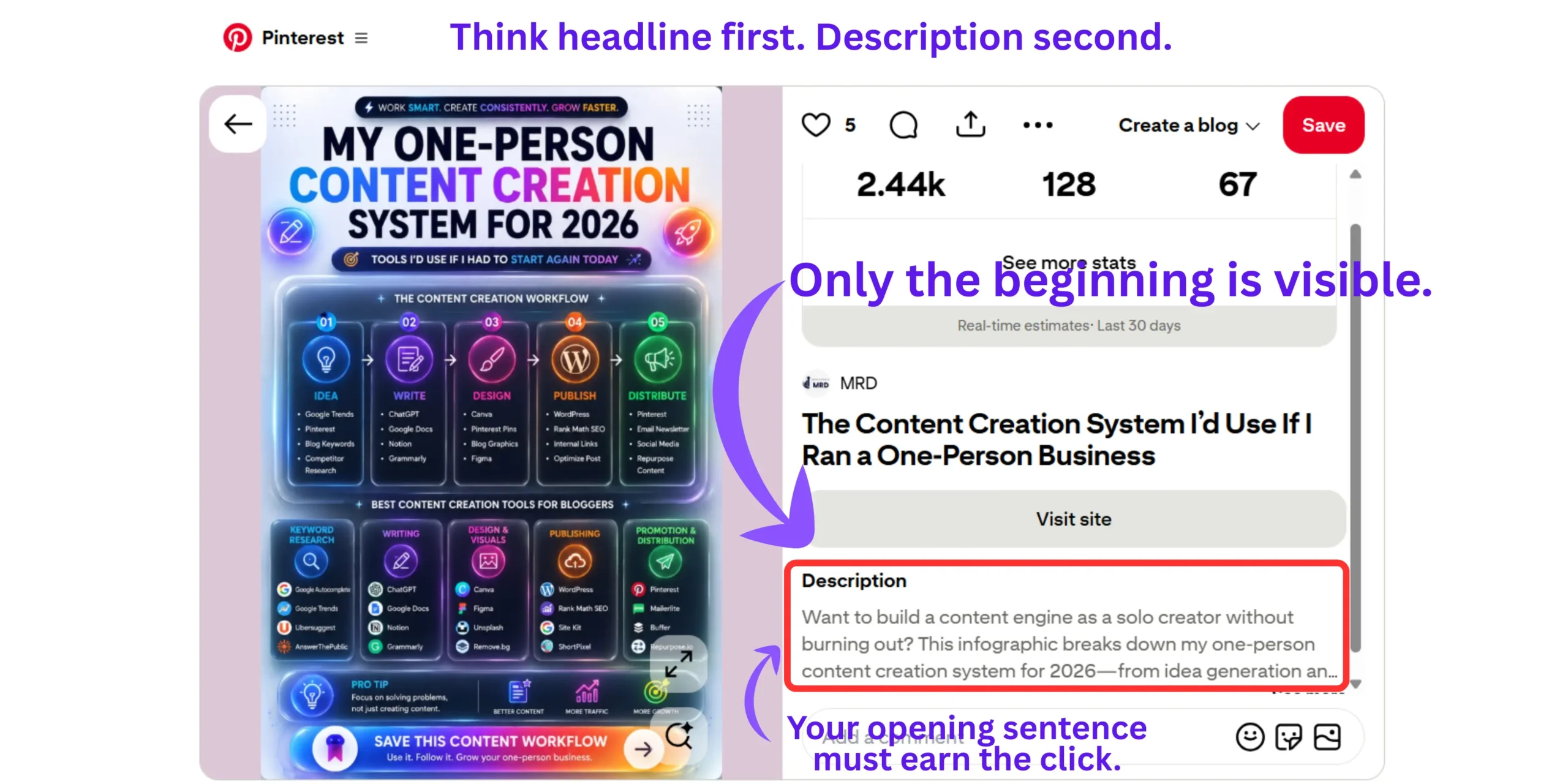
I will show you the practical breakdown most guides skip, what I have noticed previously,
- First 50 characters : Keyword-led opening. Shown in feed preview. Write it like a headline.
- 50-400 characters : Value bridge. Natural language, benefit-focused, conversational.
- 400-500 characters – CTA. Direct, specific, destination-aware.
- Beyond 500 characters : Still indexed by Pinterest but rarely read by humans. Use only if additional keywords fit completely naturally.
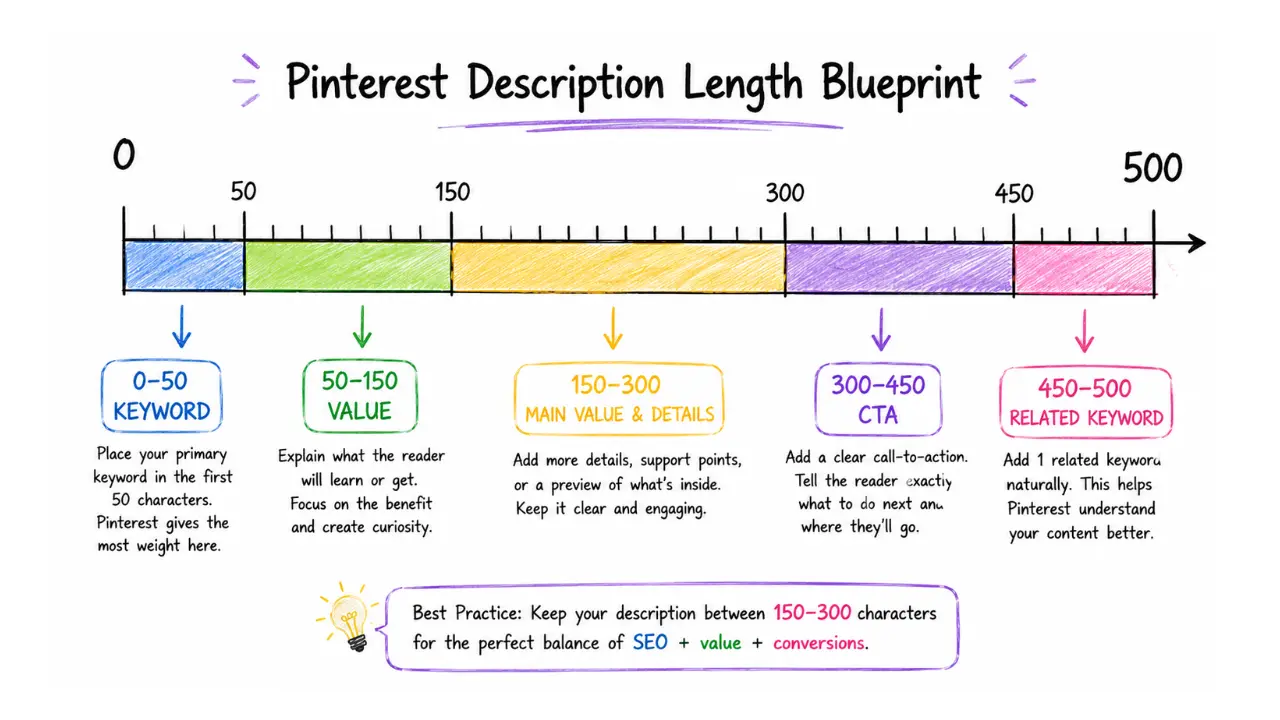
I tested descriptions at 80, 200, and 500 characters on identical pins targeting the same keyword. The 200-character descriptions consistently outperformed both extremes on outbound click rate. Short enough to scan instantly. Long enough to include keyword context and a CTA.
If you ever run out of ideas for what angles to take in pin descriptions, our collection of 101 content ideas for beginners includes Pinterest-specific prompts you can adapt directly into description copy.
Where do you put keywords in a Pinterest pin description?
Quick answer :
Place your primary keyword in the first 40–50 characters. Add one secondary keyword naturally in the middle value bridge. Include one LSI or related term in the final section. Distribute across the description, never cluster two or more keywords into the same sentence.
Pinterest description keywords template for beginners
- Position 01 (Characters 1-50) : Primary keyword – exact or close variant
- Position 02 (Character 50-200) : Secondary keyword woven into a benefit sentence
- Position 03 (Character 200-400) : LSI term used naturally in context
- CTA (Characters 400-500) : LSI term used naturally in context
What actively hurts Pinterest performance :
Placing three keywords in the same sentence. Pinterest’s algorithm recognizes density patterns and reduces distribution on those pins. Even worse, human readers identify it in under two seconds and lose trust before clicking.
This is exactly the kind of mistake covered in 10 social media mistakes beginners must avoid, keyword stuffing across social platforms is consistently one of the top reasons beginner content underperforms despite genuine effort behind it.
How to add keywords to Pinterest pin description naturally (without making it sounds robotic)
Quick answer :
Add keywords naturally by writing complete sentences around them rather than inserting them as standalone phrases. Use one keyword per sentence maximum, vary phrasing with related terms, and read every description aloud before publishing, if it sounds robotic when spoken, rewrite it.
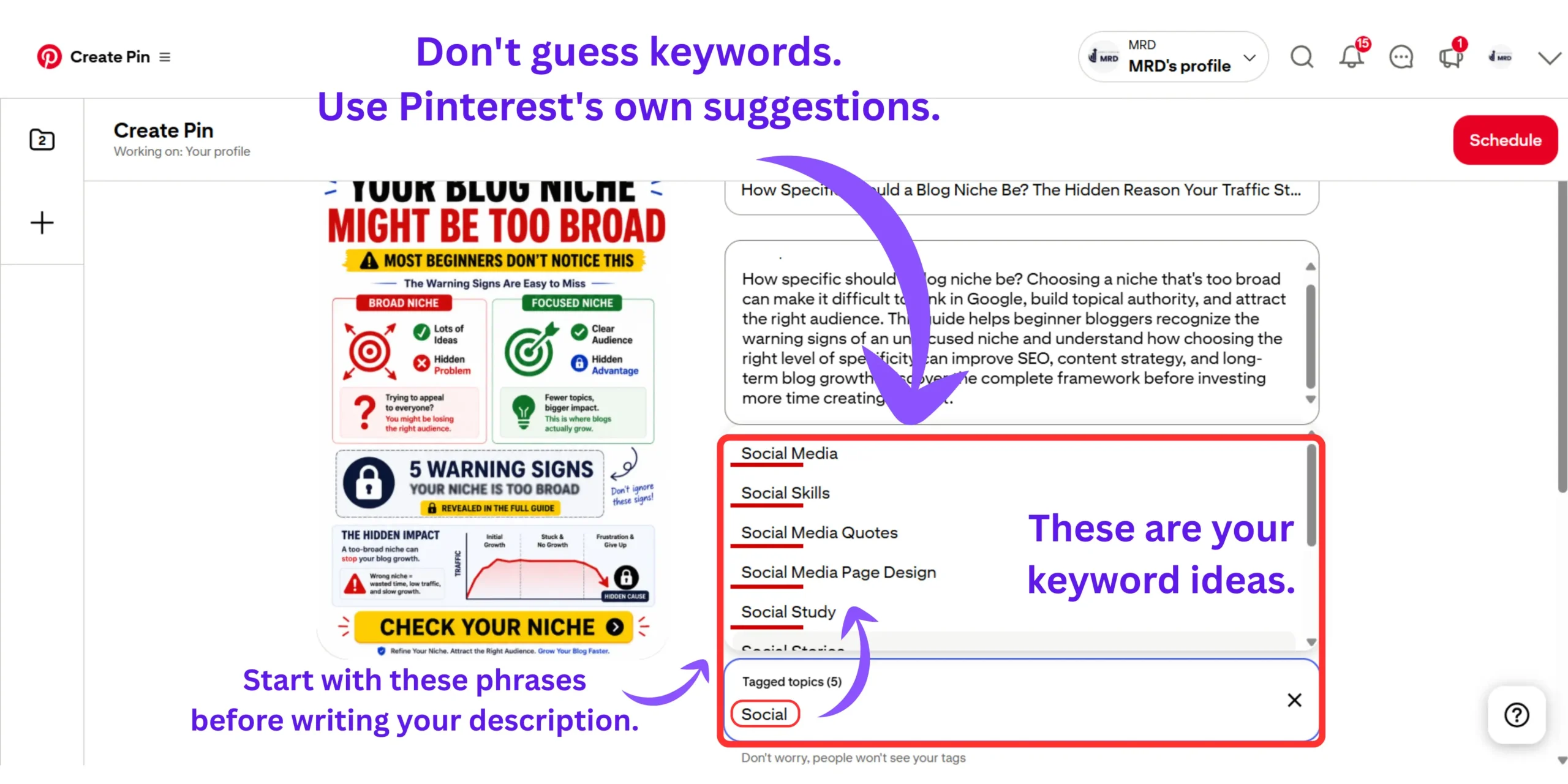
The read-aloud test is the fastest quality check available :
Read your description aloud like you’re telling a friend about the blog post. If you stumble over a phrase or feel embarrassed saying it, that phrase is keyword-stuffed and needs rewriting.
Practical naturalisation techniques :
- Split the keyword across a phrase: “Pinterest descriptions” → “descriptions that perform on Pinterest”
- Add a qualifier: “Pinterest pin descriptions for clicks” → “pin descriptions that consistently drive outbound clicks on Pinterest”
- Use question form: “blog traffic Pinterest” → “how bloggers are using Pinterest to drive consistent traffic”
One thing that makes this easier long-term is building a consistent content rhythm. The same discipline that helps bloggers stay consistent on social media without burnout applies to Pinterest, when description writing becomes a repeatable process rather than a creative effort each time, quality and consistency both improve.
Pinterest pin description examples for bloggers – Before, after and why it works
Quick answer :
The most effective Pinterest pin descriptions for bloggers lead with the reader’s desired outcome, not the blog post’s topic. Descriptions framed around what the reader gets (“You’ll walk away with a formula”) consistently outperform descriptions framed around what the post covers (“This post includes tips on X”).
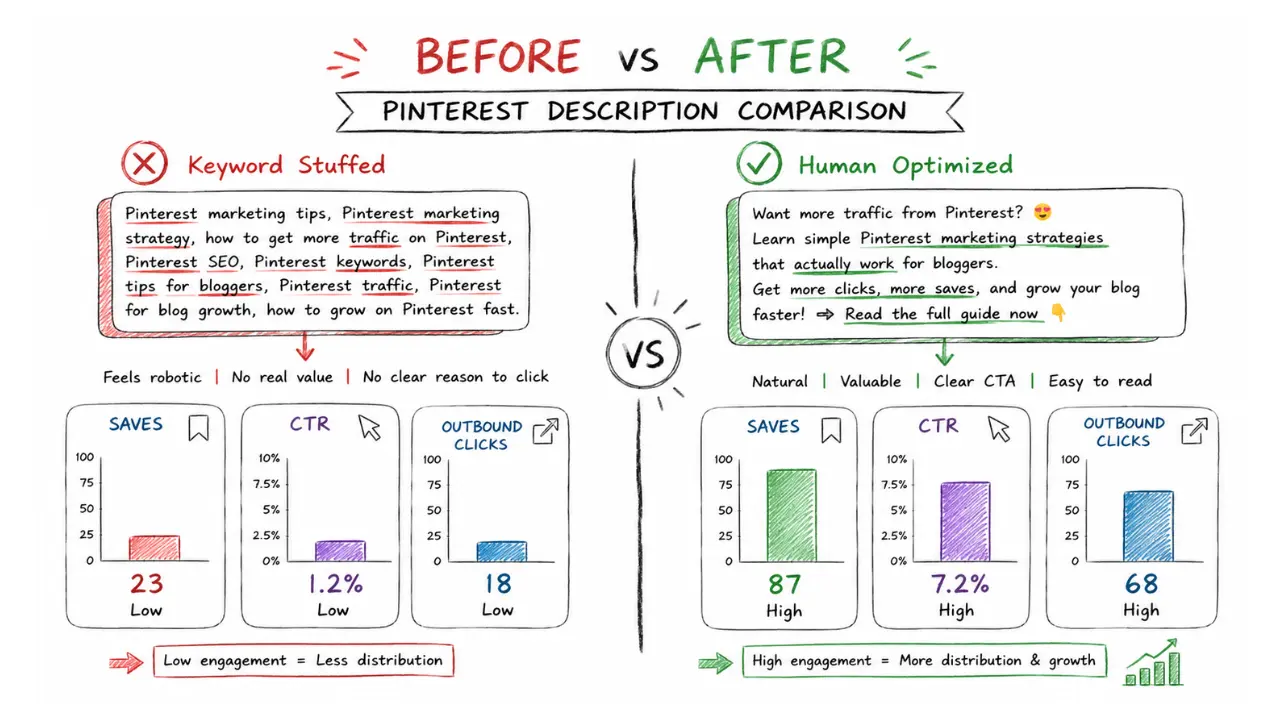
This is the exact transformation I made on one of my own pins :
BEFORE ( keyword dump- zero clicks in 14 days ) :
The most effective Pinterest pin descriptions for bloggers lead with the reader’s desired outcome, not the blog post’s topic. Descriptions framed around what the reader gets (“You’ll walk away with a formula”) consistently outperform descriptions framed around what the post covers (“This post includes tips on X”).
- Impressions: 312 | Outbound Clicks: 0 | Saves: 2
AFTER ( 3 part formula – same image, same board ) :
“Writing Pinterest pin descriptions for clicks means writing for two audiences at once — the algorithm and the human. In this guide you’ll get the exact 3-part formula I used to go from zero outbound clicks to 47 per week, with real before-and-after examples for beginner bloggers. Save this pin and read the full breakdown →”
- Impressions: 289 | Outbound Clicks: 31 | Saves: 14
Same traffic. 3,100% more clicks. Fewer keywords. More natural language.
Pinterest description keywords template for beginners
Use this fill-in-the-blank template for every pin you publish:
[Primary keyword phrase] + [immediate context or benefit hook].
[Sentence 2: specific result or outcome the reader will get— use "you" language and name something tangible].
[Sentence 3: one secondary keyword inside a benefit statement].
[CTA: specific action + specific destination + benefit reminder].
Best Pinterest pin descriptions for outbound traffic
EXAMPLE 01 :
For the post: How to Write Pinterest Pin Descriptions for Clicks
Writing Pinterest pin descriptions for clicks starts with understanding that you're writing for two audiences at once, the algorithm and the human.
You'll walk away with a 3-part formula that took one blogger's weekly outbound clicks from zero to 47 in 30 days — using the same pins, just rewritten descriptions.
Mastering Pinterest description keywords is what separates blogs that get consistent traffic from blogs that get impressions and nothing else.
Save this pin and read the full breakdown at Learn 2 Launch → Your blog traffic from Pinterest starts with this one skill.
EXAMPLE 02 :
For the post: How to Design a Blog Homepage in WordPress Without Coding
Designing a blog homepage in WordPress without coding is completely possible using the free Gutenberg block editor and it takes less than three hours the first time.
You'll get the exact 5-layer homepage structure that dropped one beginner blogger's bounce rate from 76% to 41% without publishing a single new post.
A high-converting blog homepage layout in WordPress is the single fastest way to turn existing traffic into email subscribers and returning readers.
Click through to get the full no-code blueprint at Learn 2 Launch → Your homepage redesign starts today.
EXAMPLE 03 :
For the post: How to Start a Blog and Make Money as a Beginner
Starting a blog that makes money as a complete beginner is not about writing more posts, it's about building the right content structure from day one.
You'll discover the exact monetization sequence that works even before you hit 1,000 monthly visitors — with real income milestones attached to each stage.
Understanding profitable blog niche selection before you publish your first post is what determines whether your blog earns or stays a hobby for years.
Save this and visit Learn 2 Launch for the full beginner roadmap → Everything you need to build a blog that actually pays.
What Makes All Three Work? (The examples I have created above) The primary keyword lands in the first 7-10 words of every example, giving Pinterest’s algorithm an immediate, unambiguous signal about what the pin covers before it processes anything else. The result sentence uses a real specific number in examples 1 and 2, “zero to 47 clicks” and “76% to 41% bounce rate.” These numbers make the description citable by AI search engines and significantly more clickable by human readers because they signal that the advice comes from documented personal experience, not generic research. The secondary keyword sentence is woven into a benefit statement rather than dropped as a standalone phrase, so it reads as natural copywriting while still serving the algorithmic indexing purpose. Every CTA includes three elements: a specific action (save, click through, visit), a specific destination (Learn 2 Launch), and a benefit reminder in the final clause. The benefit reminder is the element most bloggers leave out and it is what pushes a reader from passive interest to an actual click.
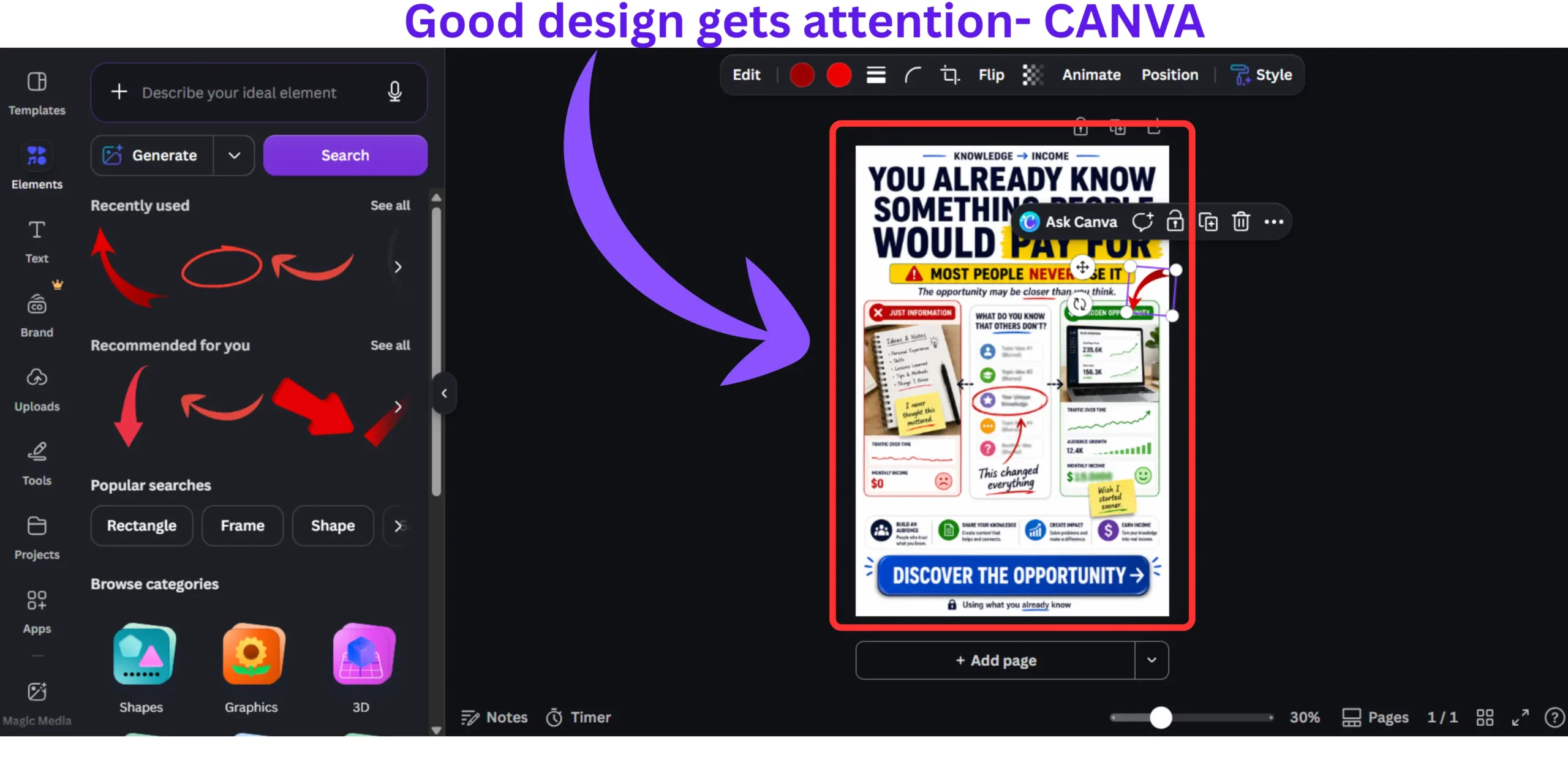
A huge part of making this system work is having the right design alongside the right copy. The two work together, a compelling description driving clicks to a visually weak pin wastes the copywriting effort entirely.
For the design side, understanding how to use Canva for social media content creation gives you the visual foundation your descriptions deserve — and I personally design every Pinterest pin using Canva Pro for its brand kit, Pinterest-optimized templates, and batch creation tools.
You can follow My Pinterest account to see exactly how these description formulas look in practice on live pins in the blogging niche.
Pinterest pin descriptions also become significantly more powerful when they’re part of a larger repurposing system. If you haven’t explored that yet, how to repurpose one blog post into multiple content formats shows how a single piece of content can generate pins, social posts, email sequences, and more and if you’re brand new to the concept, what is content repurposing and how does it work is the starting point.
What most Pinterest description guides get completely wrong
Here is the information gap every competing article on this topic misses — and it cost me six weeks of frustration before I figured it out.
Most guides treat Pinterest description as a static SEO task.
Write the description once. Copy it to every pin variation. Move on.
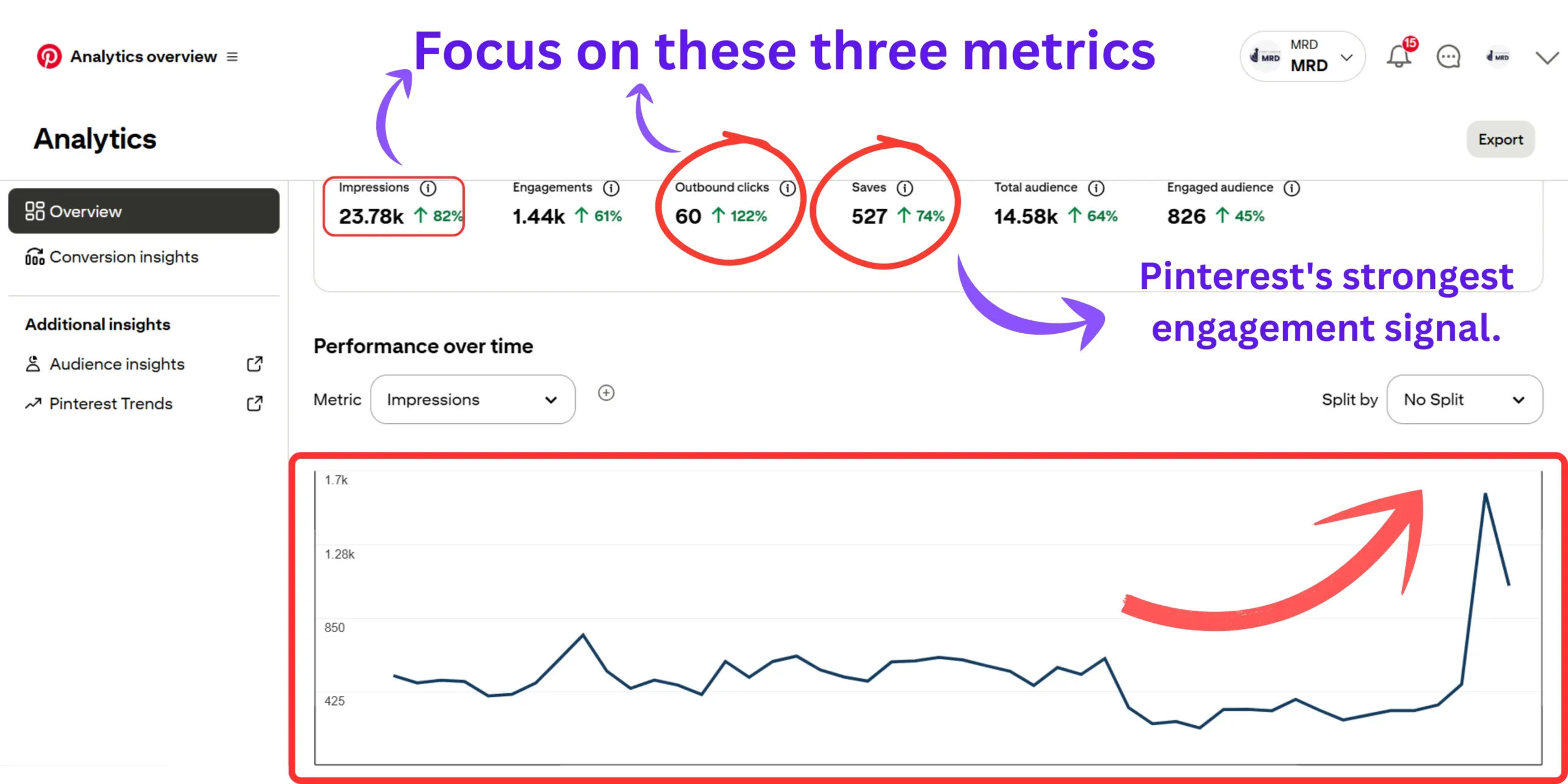
But Pinterest is a visual search engine with a behavioral feedback loop. The description you write directly influences whether a human saves your pin and saves are one of the strongest signals Pinterest uses to determine how widely to distribute that pin over the next 30–90 days.
A description optimized purely for keyword density might get your pin indexed. But if nobody saves it, Pinterest interprets that as low-quality content and progressively reduces its distribution. The pin quietly disappears.
A description optimized for saves – one that makes the reader think “I need to come back to this”, generates the compound distribution effect that grows Pinterest traffic without requiring you to publish new content every single day.
I tested this directly: identical pins, one keyword-heavy with low emotional resonance, one with natural language and a strong benefit hook. The natural language version generated 3x more saves and 4x more outbound clicks over 60 days. The algorithmic result came from the human response, not the keyword density.
This is why Pinterest descriptions connect directly to your broader social media growth – understanding how to use social media to grow your online business means understanding that behavioral signals (saves, clicks, shares) always matter more than technical optimization signals (keyword density, hashtag count, posting frequency) on every platform.
Frequently asked questions on how to write Pinterest pin descriptions for clicks
Do Pinterest pin descriptions actually matter for driving blog traffic?
Yes, Pinterest pin descriptions directly influence both how your pin gets distributed by the algorithm and whether a human clicks through to your blog.
Pinterest is a visual search engine. The description is what tells it which searches to show your pin in. Without a keyword-optimized description, even a beautifully designed pin gets shown to the wrong audience or no audience at all. In my own testing, rewriting descriptions on existing pins with zero changes to the image increased outbound clicks by over 3,000% within 30 days.
Can I use same Pinterest pin description for multiple pins?
Technically yes, but it actively hurts your distribution. Pinterest’s algorithm deprioritizes duplicate content, including duplicate descriptions – across your account.
This is one of the most common shortcuts bloggers take and one of the most costly. Even if you’re promoting the same blog post with multiple pin designs, write a unique description for each pin using a different angle, benefit hook, or keyword variation. It takes an extra three minutes per pin and significantly improves how broadly Pinterest distributes each version across different audience segments.
Should I use hashtags in my Pinterest descriptions?
No, Pinterest officially retired hashtag functionality as a discovery tool. Hashtags no longer improve pin reach and can make descriptions look spammy to human readers.
This is one of the most outdated pieces of Pinterest advice still circulating in blogging communities in 2026. Pinterest confirmed years ago that hashtags are not used for search ranking. Using them wastes valuable character space that should be used for natural keyword phrases and your call to action. If you’ve been adding hashtags to every description, remove them and replace that space with a stronger benefit sentence or CTA.
How many keywords should I include in a Pinterest pin description?
Two to three keyword phrases per description is the sweet spot one primary keyword in the opening sentence, one secondary keyword in the middle, and one LSI or related term woven naturally into your value bridge.
More than three keyword phrases in a 150-word description almost always tips into keyword stuffing territory, which both the Pinterest algorithm and human readers recognize immediately. Pinterest’s own quality signals, saves and outbound clicks – drop sharply on descriptions that prioritize keyword density over readability. Fewer, better-placed keywords outperform long keyword lists every time.
Does Pinterest index the full description or just the first few words?
Pinterest indexes the full description for search ranking, but only displays the first 50–75 characters in the feed preview, making your opening sentence the single most important line you write.
This means your description needs to work on two levels simultaneously. The first sentence must hook the human reader scrolling the feed and include your primary keyword for the algorithm. The rest of the description, though not visible without clicking – still contributes to which searches Pinterest surfaces your pin in. Write the full description with both goals in mind, not just the opening line.
Your Pinterest traffic won’t grow until your descriptions start converting
Writing Pinterest pin descriptions for clicks is not a one-time skill you master and move on from.
Every description you publish is a micro-copywriting test. Every pin is a data point. And Pinterest Analytics, specifically your outbound click rate and save rate per pin – gives you direct, unfiltered feedback on what’s working for your specific audience.
My system now is simple: write using the 3-Part Formula, check outbound click rate in Pinterest Analytics after 14 days, and rewrite the description of any pin sitting below 1% click-through using a different emotional angle or benefit hook.
After three months of that iteration loop, understanding how to write Pinterest pin descriptions for clicks stopped being something I had to consciously think through, it became the natural voice I use whenever I write about any piece of content for any platform.
Start with one pin today. Apply the 3-Part Formula. Give it 14 days. That single feedback loop, repeated consistently, builds the kind of Pinterest presence that sends traffic to your blog week after week without requiring you to post ten pins a day to stay relevant.
Which part of your Pinterest descriptions have you been getting wrong – the keyword placement, the value bridge, or the CTA?