

Nearly every SEO platform out there makes you feel like you have to spend $150- $200 a month on software just to get started. When I began planning my own content, I fell for that trap too.
I wasted countless hours bouncing between dashboards, keyword scores, and search metrics, but none of it helped me understand what real people actually wanted to know.
At one point, the process became so overwhelming that it almost made me stop doing blogging completely to save my own sanity and budget.
The strange thing was I was getting more information than I’d ever had, but my content planning was becoming slower instead of clearer. Most tutorials were tool-heavy but very few explained how to break down human search behavior itself.
That frustration prompted me to investigate how Google Autocomplete operates in real-time. I started noticing that Google was revealing small intent patterns directly inside the search bar long before many legacy SEO tools reflected those shifts in their databases.
The modern search reality (AEO and GEO) : AI search engines are increasingly prioritizing conversational relevance and contextual intent rather than simple keyword matching. Mastering how to group search intent manually using Google Autocomplete for long-tail keywords helps us uncover those live conversational patterns directly from real, shifting user behavior.
While building out the content systems for my how to start a one person AI blog pillar guide, I kept returning to one workflow repeatedly. The more I tested it, the more I realized that manual intent grouping helped me understand reader psychology far better than automated clustering reports.
The biggest shift happened when I stopped treating keywords like isolated data points and started treating them like connected search journeys.
For example,
A search such as “best AI writing tools” can quickly branch into beginner intent, pricing intent, or workflow intent depending on the modifiers users add. That level of nuance is completely missed when corporate content factories group topics strictly by keyword similarity scores.
What surprised me most was how quickly autocomplete data changes around emerging topics. Sometimes a single modifier like “for beginners,” “without tools,” or “step-by-step” completely changed the underlying intent cluster.
Those little observations became much more valuable for planning my content than chasing static based keyword difficulty numbers. Instead of relying only on software-generated groupings, I began to build topic maps myself from actual autocomplete paths.
KEY TAKEAWAY :
As a solo creator, your competitive edge isn’t a massive software budget; it’s raw agility. By learning how to group search intent manually using Google Autocomplete for long-tail keywords, you ensure your articles align perfectly with how humans naturally search, compare, and solve problems online.
Why find search intent without expensive tools
One of the biggest mistakes solo creators make is focusing on numbers, not truly understanding people. Most premium SEO tools (SEM rush , Ahrefs) show historical estimates and cached databases, missing entirely the live emotional context behind a search.
This disconnect becomes clear once you start mapping keyword dashboards to real-time Google Autocomplete behavior.
When I shifted away from chasing raw search volume metrics, my content planning process became much clearer. I stopped asking, “How many people searched this?” and started asking, “What problem is this person trying to solve right now?” That single shift changed the quality of my content ideas completely.
You can see this, especially when you dig into search behavior in fast-moving, competitive digital environments. A solo creator or remote founder in a tech hub like Austin or Berlin doesn’t want generic information. They want the shortest path to a clear and actionable solution.
Learning how to find search intent without tools forces you to slow down and observe how real people think during a search journey. Instead of grouping phrases purely by text similarity, you begin noticing emotional patterns, workflow friction, and urgency signals hidden inside small keyword modifiers. This structural shift is exactly how to use keywords the right way by matching the exact depth of answer Google is currently choosing to reward.
As I moved toward a more manual workflow I kept running into three different patterns of intent that most automated software tools struggled to interpret correctly:
- The “right now” search pattern : Autocomplete reveals problems people are actively dealing with today, not weeks later after a corporate database refresh. This is incredibly vital when covering fast-changing AI tools or SEO topics.
- The friction modifier effect : When users type phrases like “for beginners,” “without expensive tools,” or “stuck on step 3,” they are signaling frustration or workflow panic. Those modifiers completely alter the underlying intent behind the query.
- The intent mixing problem : Many automated clustering tools group phrases that look similar linguistically but represent entirely opposite mindsets. A beginner researching a concept and an experienced creator looking for optimization require completely different answers.
When I began to manually analyze live search behavior, I discovered that most keywords are actually compressed questions. What may look simple on the surface of a phrase is, underneath, a key moment of decision-making.
For example,
When a solo creator searches for “best AI writing tools,” they aren’t just looking for a list. Depending on their hidden workflow modifiers, they are actually trying to solve budget limitations, content scaling bottlenecks, or beginner confusion. The surrounding autocomplete suggestions reveal that true context.
What I noticed :
“When you manually analyze search behavior long enough, patterns start becoming obvious. People rarely search in perfectly structured SEO phrases. They search in moments of raw confusion, urgency, and curiosity. The creators who decode the friction behind the search always outperform corporate blogs with massive budgets.“
You do not need an expensive monthly subscription to understand audience psychology. The live Google search bar already exposes an enormous amount of real-time intent data for free. Once you learn how to read those patterns, your content planning becomes completely human-focused and strategically accurate.
Google autocomplete search hacks for SEO : scrapping the row data
Trying to compete with massive media sites can feel completely discouraging when you are building a blog alone.
Whatever you’re working from – a small apartment in London, a coworking space in Berlin or a home office in Austin – the reality is the same. Big publishers have entire teams, huge software budgets and endless production lines.
As solo creators, we just don’t have that initial leverage. But what changed the game for me was understanding that most big sites are totally missing the psychological layers of users’ behavior.
They chase broad, high-volume terms because their business model depends on sheer scale. Smaller creators can move much faster by targeting highly specific intent patterns before corporate content factories even notice they exist.
When I first started mapping out my own keyword systems, I wasted weeks reading generic lists of 101 content content ideas for beginners. Most of those resources felt completely recycled, mechanical, and disconnected from live search behavior.
After a few late nights of zero progress, I stopped brainstorming randomly. I started treating the Google interface itself as an active, real-time research engine.
That was the turning point where I began experimenting heavily with targeted Google autocomplete search hacks for SEO.
The fascinating part is that the search bar quietly exposes thousands of micro-search patterns most corporate creators never analyze properly. Once I understood how to read these breadcrumbs, content research stopped feeling like a guessing game.
This manual approach completely transformed my entire workflow for how to group search intent manually using Google autocomplete for long tail keywords
Instead of building content around broad categories, I started grouping searches based on emotional context, hidden workflow friction, and specific implementation hurdles.
This is truly the definitive blueprint on how to find content ideas for beginners who want to build immediate topical authority without a massive budget.
My manual extraction workflow relies on three core methods:
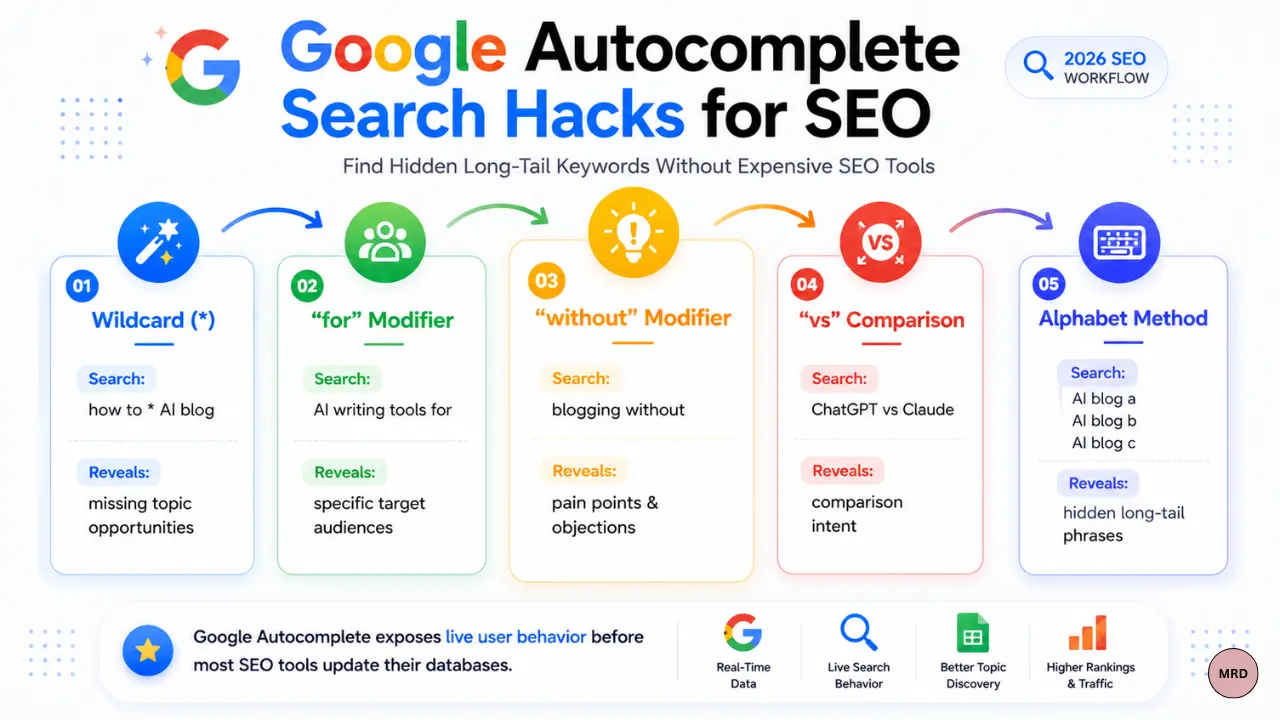
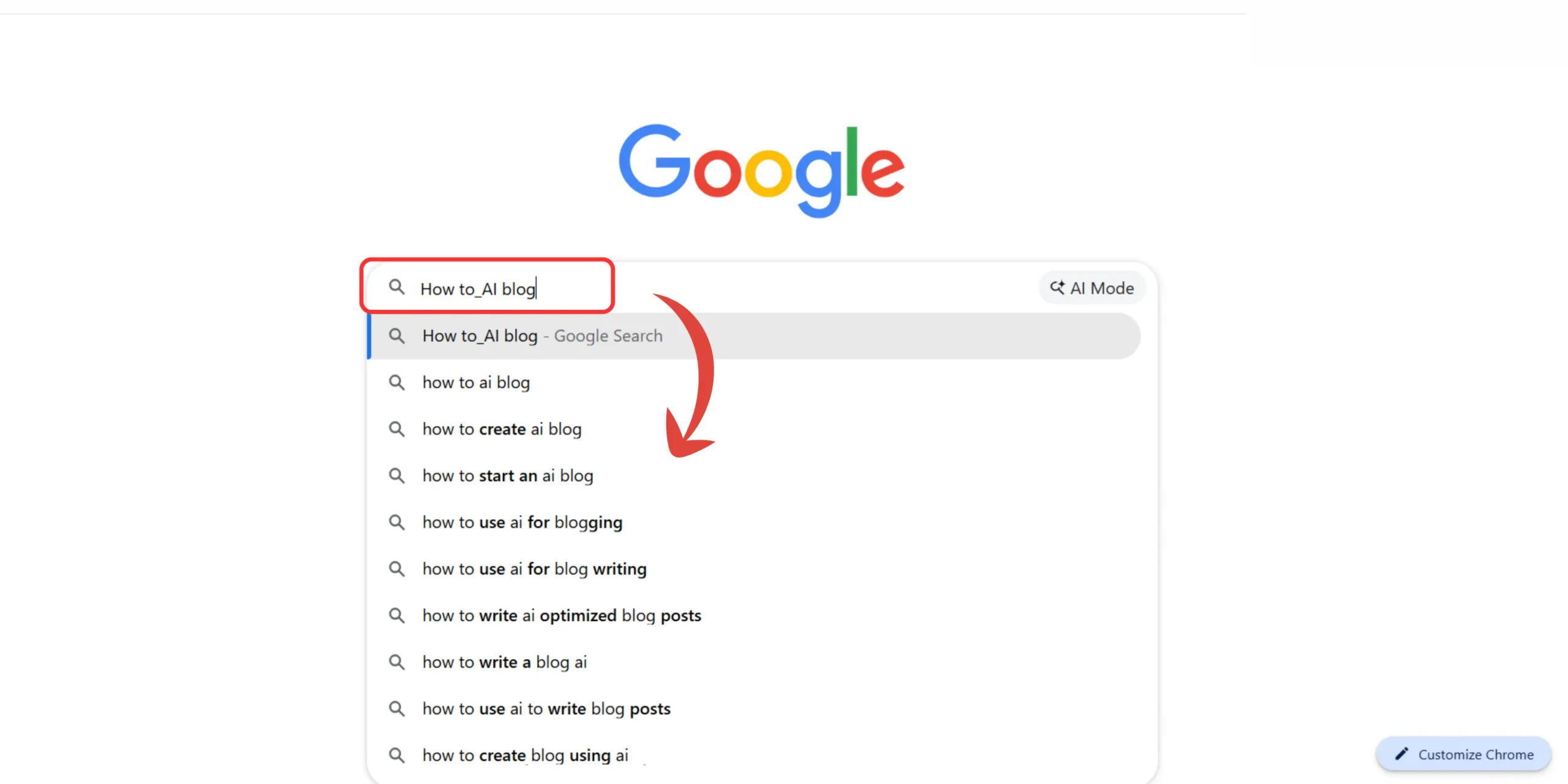
- The Wildcard start method (*) : Pop a seed phrase into Google and place an asterisk in the middle, such as how to * AI blog. Google immediately fills in the blank with real, live searches like “how to monetize an AI blog” or “how to grow an AI blog without ads.”
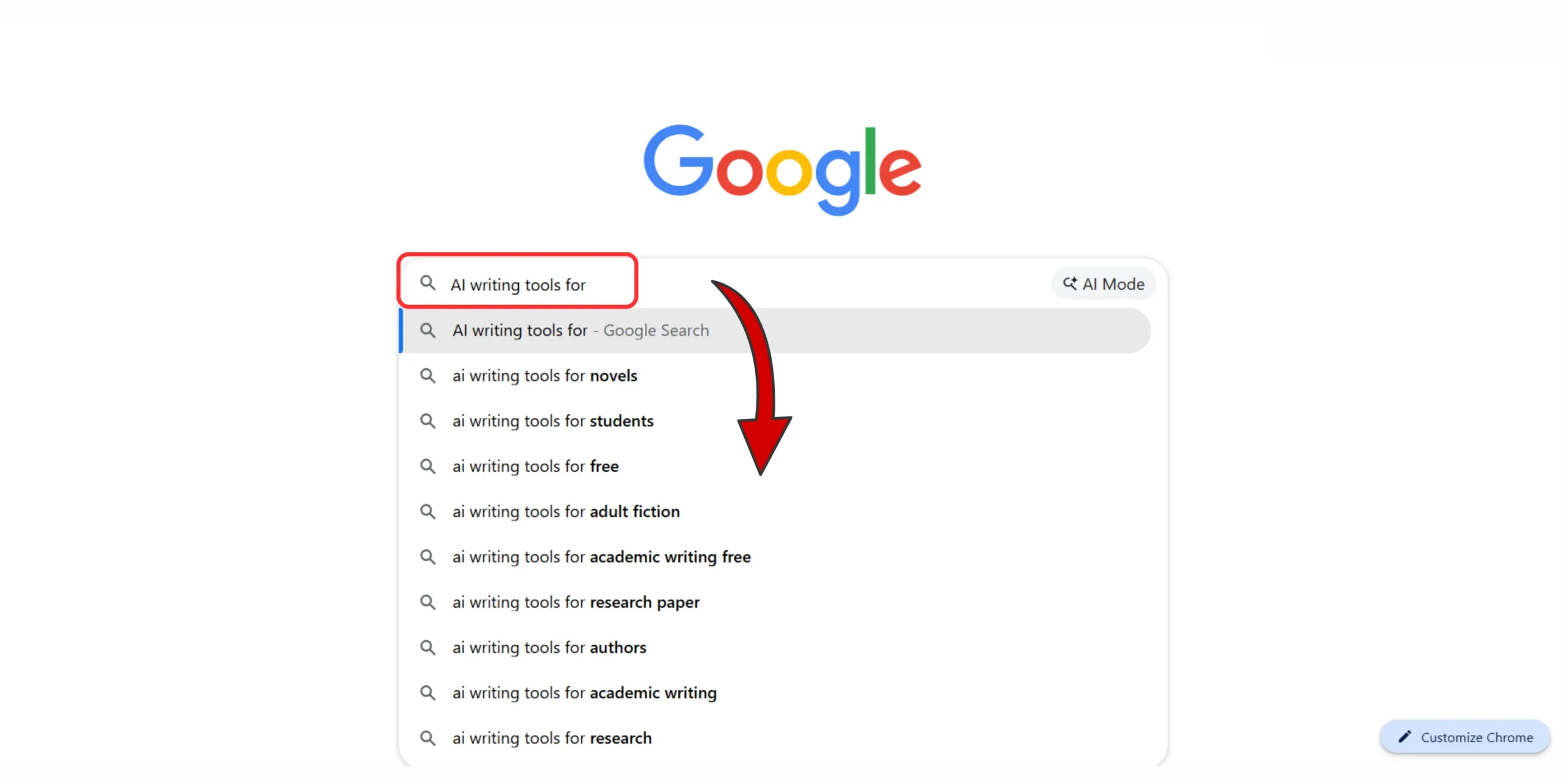
- The preposition trigger method : Combine your core topic with fluid prepositions like for, with, without, or versus. Typing AI writing tools for …… instantly surfaces highly specific user situations tailored for freelancers, startup founders, or remote workers.
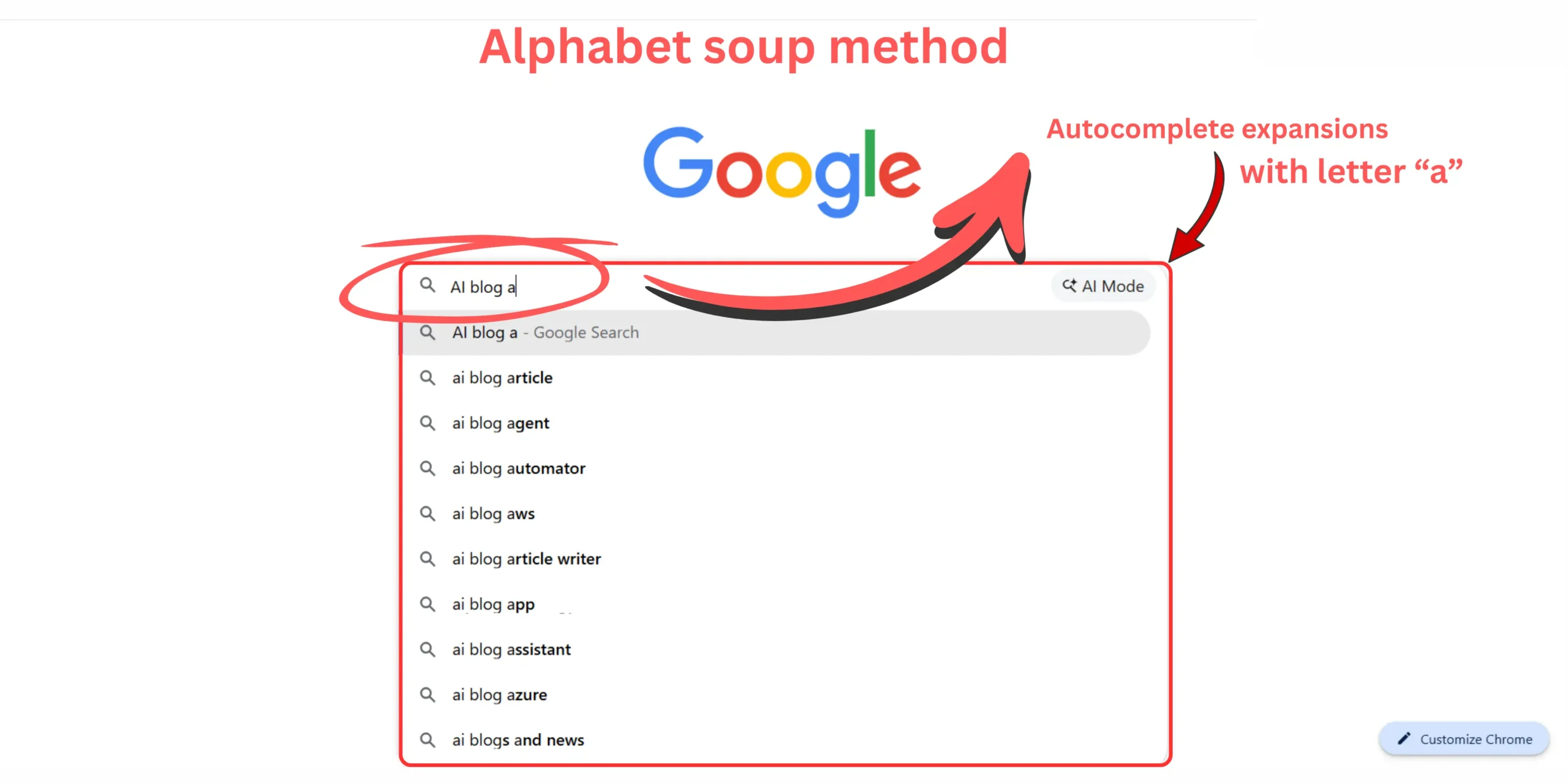
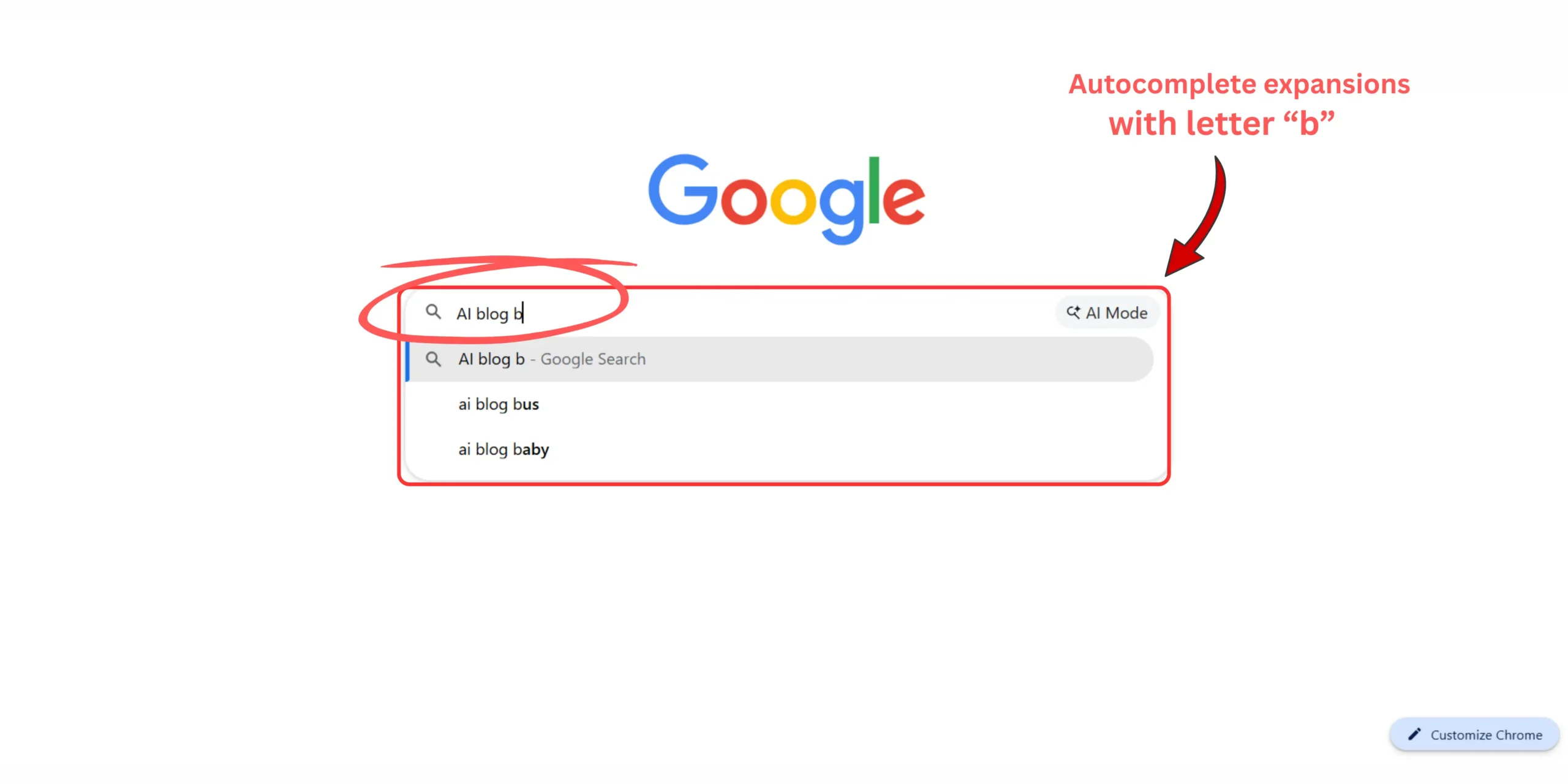
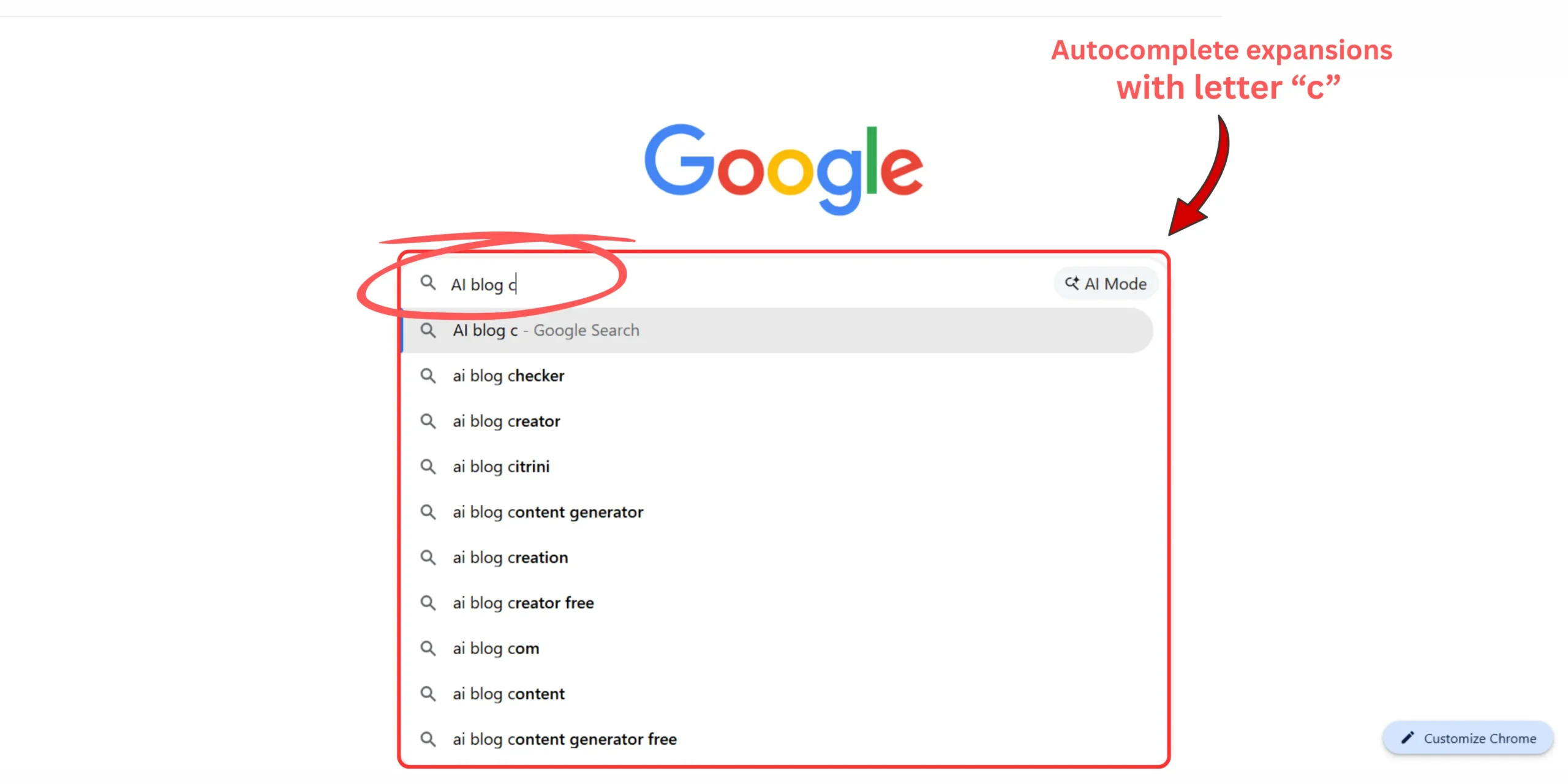
- The Alphabet soup method : Type your seed keyword, press space, add the letter “a”, and document the suggestions. Repeat this process through the entire alphabet. I remember doing this late one evening and watching the search intent shift dramatically letter by letter from informational queries to urgent buying decisions.
Special tip :
When you target readers across major commercial hubs like New York, Amsterdam, Toronto, or Dublin, search behavior becomes highly practical. Audiences in the US and Europe rarely search in broad, generic phrases anymore. They search with explicit modifiers tied to pricing, local regulations, and workflow compliance.
Through my own deep dives, I found that AI search engines actively look for these regional nuances. When scraping manually, keep a close eye out for these five distinct geographic triggers:
- Currency and pricing : Searches ending in “in euros” or “in USD” indicating active buying intent.
- Compliance barriers : Phrases like “GDPR compliant” or “AI tools privacy safe” for European audiences.
- Structural mechanics : Long-tails targeting corporate entity setups, like “AI tools for US LLCs.”
- Operational scale : Queries focusing on “for remote teams” or “for solo founders.”
- Budget friction : Specific low-budget modifiers like “without expensive software” or “free open source alternatives.”
Manually analyzing autocomplete data allows you to spot these crucial regional friction points that automated clustering software completely flattens.
To filter the gold from the garbage during this process, I look for longer phrases containing five or more words that reference a highly specific pain point. If a phrase sounds like something a real human would type into a search bar during a moment of genuine frustration or urgency, it goes straight into my content spreadsheet.
Stop forcing yourself to invent content concepts in isolation. The live search bar is already exposing exactly what your audience in the US and Europe is actively struggling with every single day. Once you master these autocomplete patterns, you start building content around real-time human behavior instead of outdated metrics.
Step by step manual keyword clustering tutorial
Once you use my search bar hacks to scrape 30 to 50 raw long-tail keywords, you’ll be staring at a completely unorganized mess.
This is where most beginners make a critical mistake. They try to write an individual post for every single variation they uncover.
This creates unnecessary ranking overlap. It makes it much harder for Google to understand which page to prioritize.
You end up writing five different articles that all essentially answer the exact same underlying question.
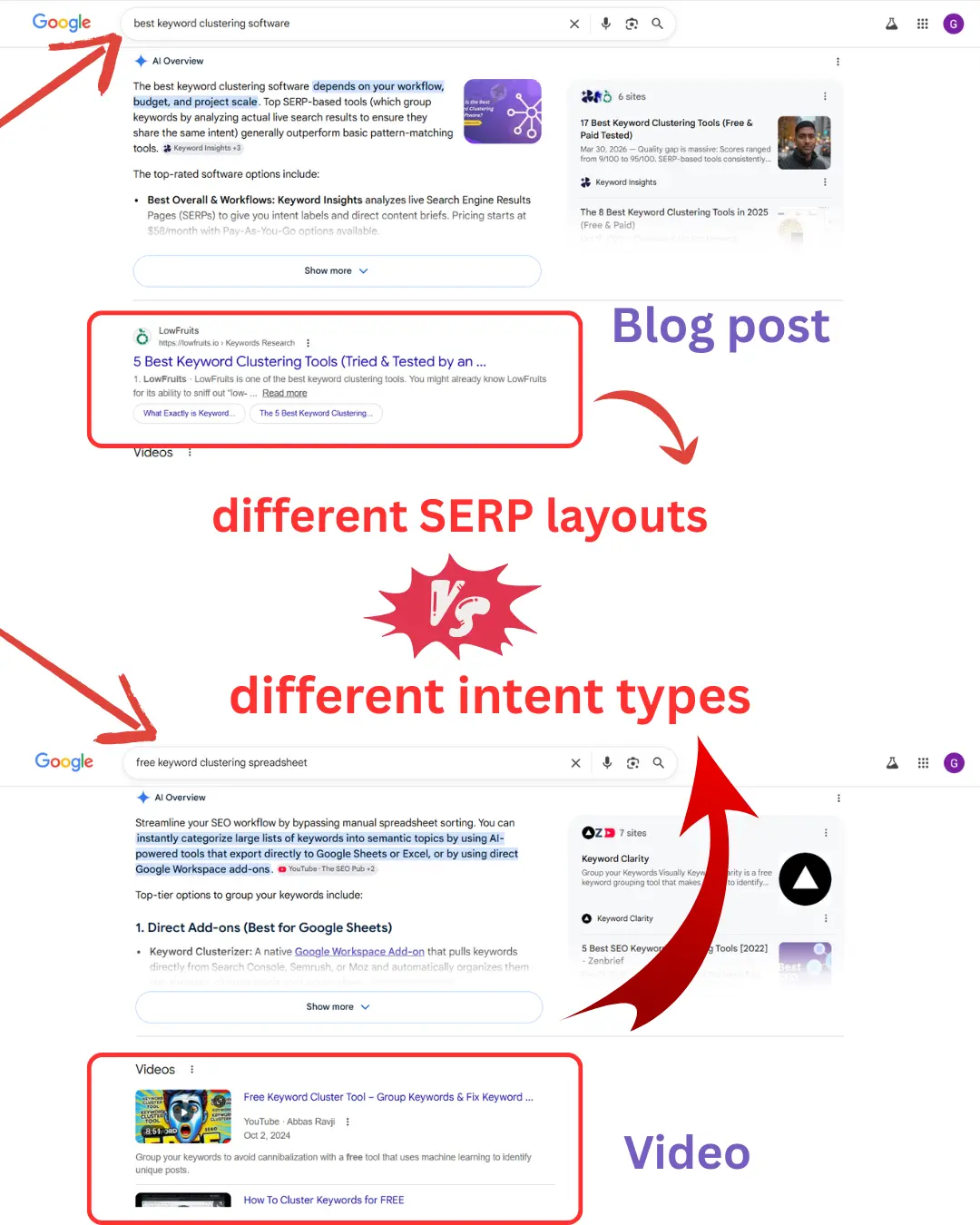
Sometimes two keywords look completely different linguistically. But when you compare the top-ranking pages side by side, the user intent is identical.
In this manual keyword clustering tutorial, my goal is to let the live search results dictate our architecture instead of guessing.
While testing workflows like Google Gemini vs Claude for blog SEO and keyword research, I noticed that language models respond much better to clean input structures.
If you feed them messy, repetitive keyword lists, they usually generate messy, repetitive drafts in return.
Before generating drafts with AI tools, I like to organize a clean planning system manually first.
Grouping keywords manually makes your article frameworks much cleaner. It helps you avoid creating multiple pages that compete against each other.
It also makes it easier to understand how to optimize blog posts for SEO beginners without creating overlapping content pathways.
This part feels slow at first. But after a few sessions, you start spotting intent overlap almost instantly.
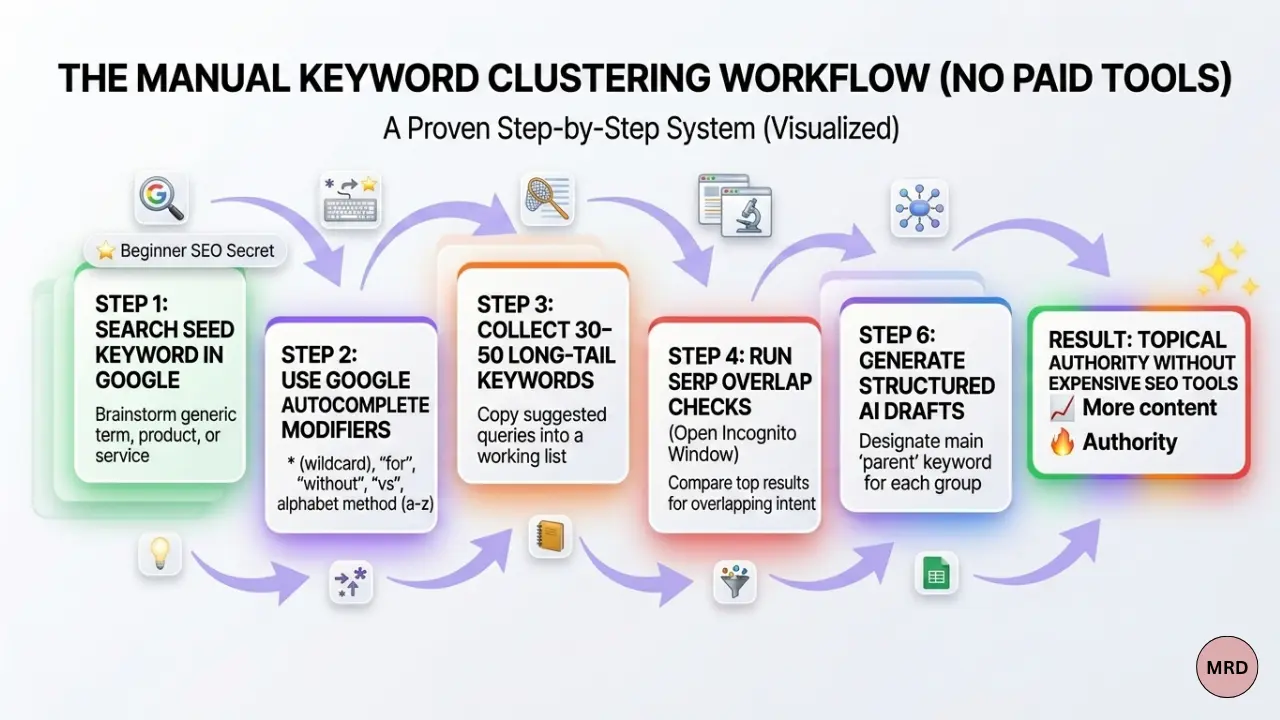
Here is how I actually do this on my own site:
Step 01 . The core intent audit
Open a completely fresh incognito browser window.
Take your first three long-tail keywords and search them one by one.
Then compare:
- The top-ranking URLs
- Competitor article angles
- Content formats (e.g., listicle vs. deep tutorial)
Step 02 . Identify SERP overlap
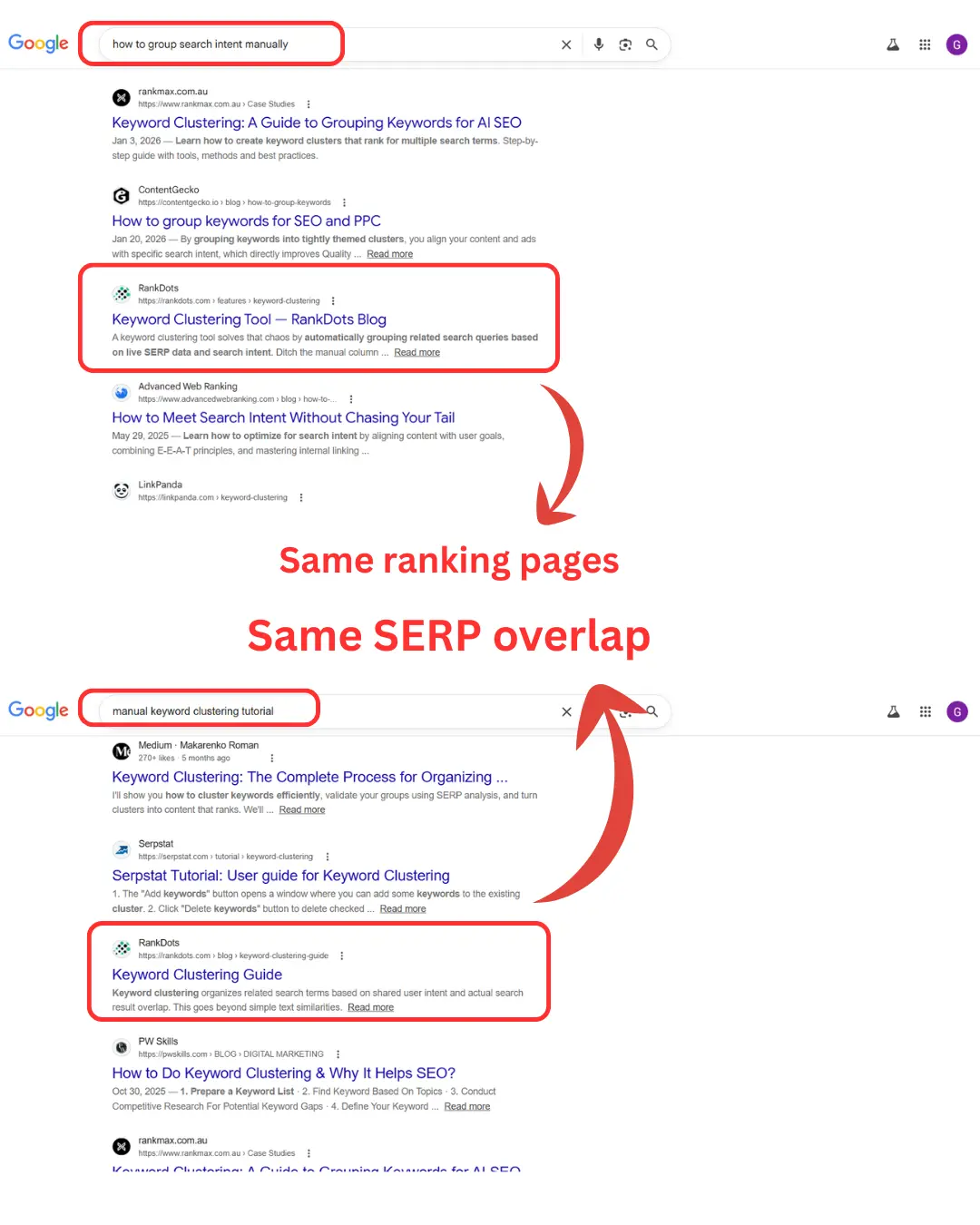
Are the exact same URLs or identical blog post structures ranking for different search terms?
If Google is serving the same three articles for two different keywords, those keywords belong in the same cluster post.
An annoying discovery I made early on:
I once planned three separate articles because the keywords looked totally different. It wasn’t until I checked the live search results that I realized Google was serving the exact same competitor pages for all three terms. I had almost wasted three days writing duplicate content.
Step 03 . Isolate unique intent
Look for keyword modifiers that surface completely different competitors.
For example, notice if the results shift from a standard blog post to a downloadable spreadsheet or a video tutorial.
That shift means you have found a unique intent. That phrase requires its own separate topic structure.
Step 04 . Establish the parent anchor
For each group of overlapping keywords, pick the phrase with the clearest, most natural language as your main title.
The remaining variations will become your subheadings.
I still check clusters manually because Google occasionally shifts search intent without warning. To see what this looks like when you’re sorting data, look at this quick example of a real cluster I mapped out recently:
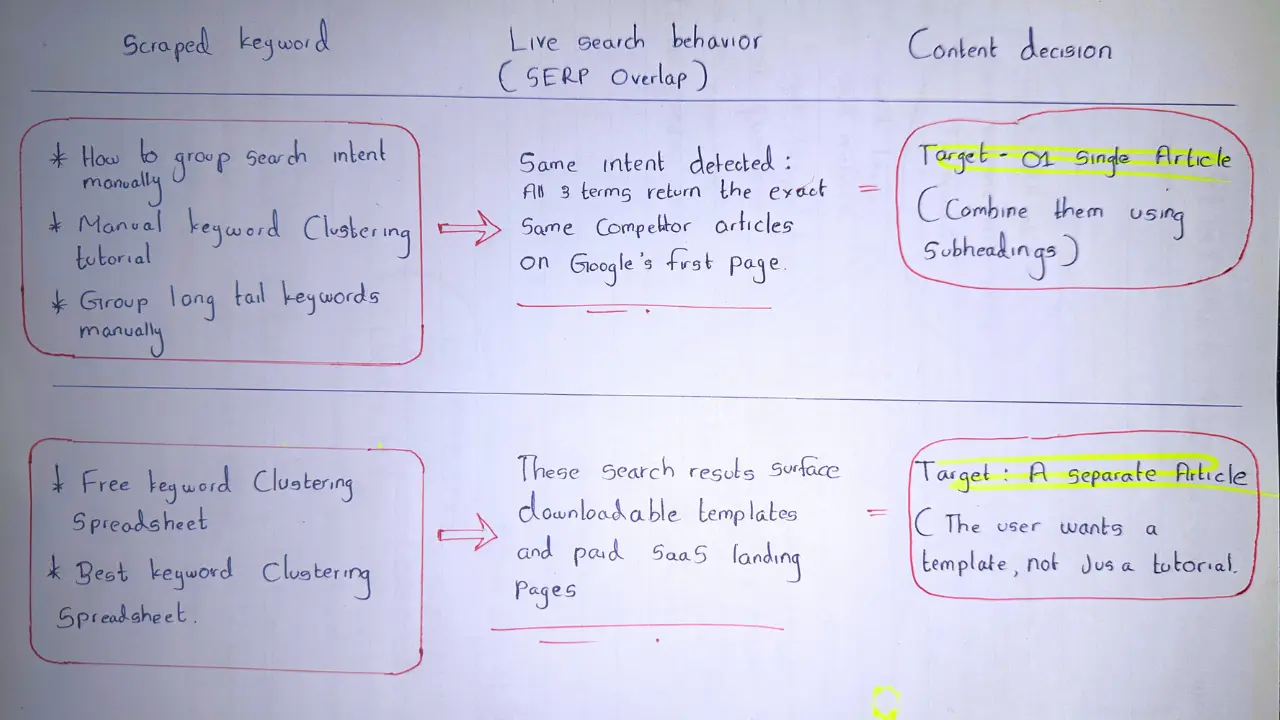
“AI search systems appear to rely more heavily on semantic relationships and topical completeness rather than rigid keyword repetition. By manually verifying how Google groups intents on the live page, you naturally build a page that answers the topic more completely. Pages that cover related intent paths clearly also tend to be easier for AI systems to interpret contextually.“
After doing this a few times, I noticed something interesting. My content mapping became much clearer
I stopped generating duplicate AI drafts for keywords that were essentially the same topic.
Instead, it just gave me a much cleaner content outline to work with.
Do not let software tools or unguided AI do your clustering for you. By manually verifying how Google groups intents on the live search results page, you keep your site organized, reduce content overlap, and make scaling your content much easier later because every article already has a distinct purpose.
How to map and group search intent manually
Once you finish sorting your clusters manually, you need a realistic way to track them.
Expensive SEO tools want you to believe that you need their complex dashboards to manage your data architecture.
YOU DON’T.
When you are starting out, complex software usually just leads to analysis paralysis. A simple tracker works much better.
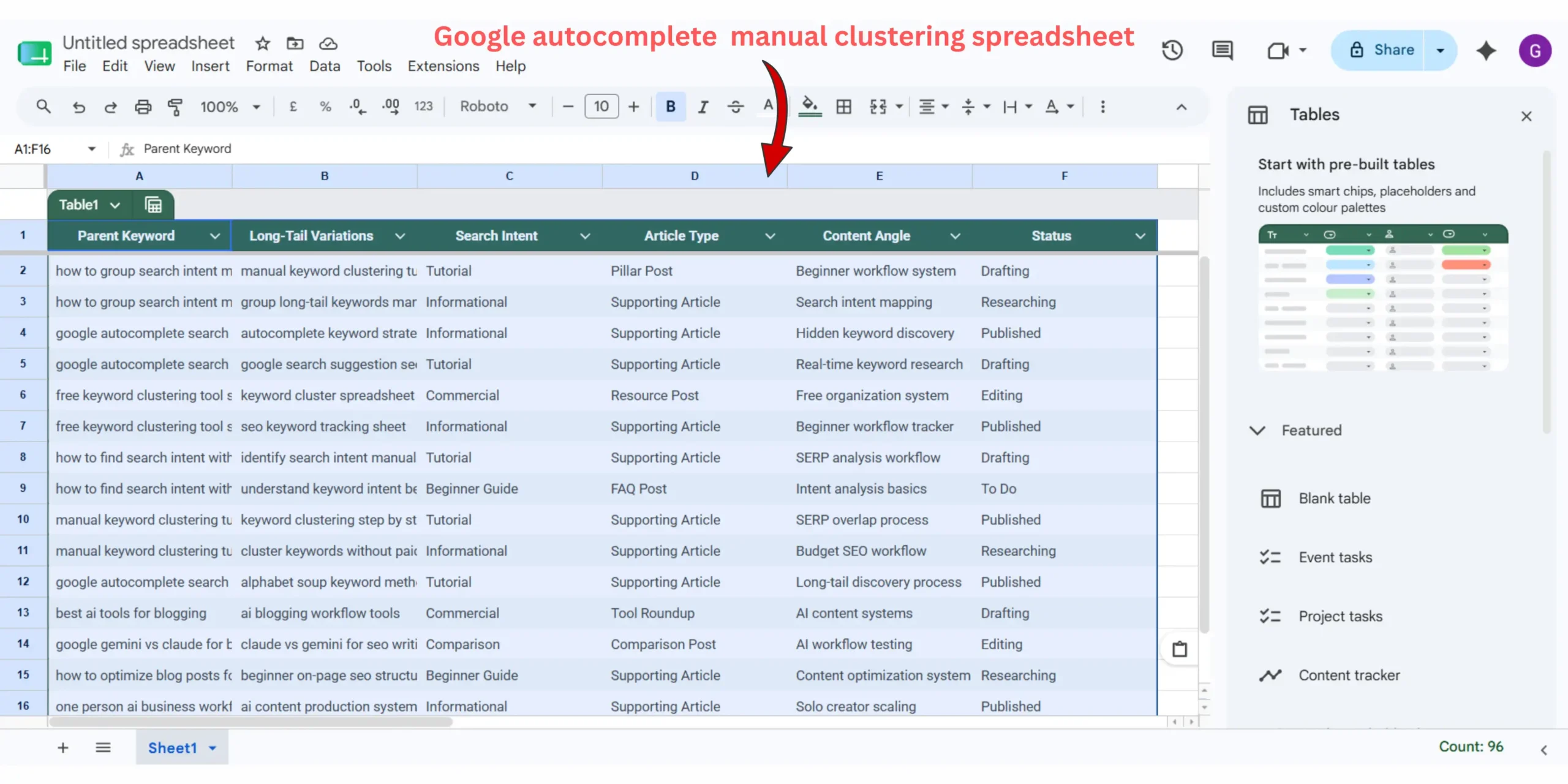
I use basic free keyword clustering tool spreadsheet to keep my content layouts clear before I ever let an AI tool touch my drafts.
You can build this tracker in Google Sheets or Excel in under two minutes.
It keeps you from guessing what to write next. More importantly, it ensures you actually maintain that distinct topic structure we mapped out in the last step.
Here are the four essential columns you need to set up:
Column 1 : Parent anchor keyword
This is your main topic title phrase. It is the core keyword you found with the clearest natural language.
Column 2 : Long tail variations
Paste every single overlapping keyword variation you found during your SERP check into this cell.
These are your automatic subheadings (H2 and H3 tags).
Column 3 : Intent type
Mark down what the user is actually looking for based on your live search check.
- Is it informational (a guide)?
- Is it commercial (a template or tool list)?
Column 4 : Content status
Keep this strictly functional. Use simple labels like:
- To do
- In progress
- Published
I noticed something interesting after tracking my clusters like this.
It completely stops you from accidentally writing about the same topic twice. If you get a new keyword idea later, you just check it against your parent column first to see if it already fits an existing line item.
You do not need expensive software subscriptions to stay organized. Building a clean tracker helps you maintain your content outlines easily, making it much simpler to step into production with your AI tools later.
The long term play : Internal linking and future maintanance
Building a clean topical cluster is only half the battle.
The real magic happens when you connect these pages together structurally.
Knowing how to rank blog posts faster using internal links allows your minor cluster articles to pass topical authority directly back to your main pillar guides.
It forms a closed loop that helps search engines understand your entire site architecture easily.
Every few months, I like to run a quick maintenance check on my oldest clusters.
If you see an older post stall out with no traffic, learning how to update old blog posts to get more clicks by manually re-verifying their search intent ensures your one-person media engine remains lean, fast, and authoritative.
You just pop the parent keyword back into an incognito search bar.
Check if the top results have shifted from text guides to templates or videos. If they have, tweak your content outline to match that new reality.
Topical authority is an active system, not a one-time setup. By linking your cluster posts back to your pillar and occasionally updating them based on live search behavior, you protect your rankings from corporate competitors over the long haul.
Frequently asked question on manual keyword clustering.
Is manual keyword clustering actually better for beginner blogs?
In most cases, yes. When I first started out, I relied purely on expensive tools and kept targeting the exact same high-competition terms as everyone else.
Tools are great for broad trends, but they often miss the real-time patterns you find manually. Typing terms into Google Autocomplete takes longer, but it’s the easiest way to find low-competition gaps that software completely overlooks.
How many keywords should I include in a single content cluster?
There’s no magic number here, and it’s easy to overcomplicate it. The easiest way to decide is by checking search intent.
If a reader would expect completely different information from two keywords, they probably deserve separate articles. For a narrow tutorial, 3 to 5 phrases might do it. For a massive guide, you might group 12.
Can Google autocomplete replace paid keyword research tools?
Not entirely, because it doesn’t give you hard search volume metrics. But it’s often much more useful for mapping out the actual, real-time questions people are asking. I made the mistake early on of only trusting tool metrics, but Autocomplete is actually my go-to now for figuring out how a real person naturally phrases a problem.
How do I know if two different keywords have the same search intent?
Just type both terms into Google and look at the first page of results. If the top five websites are basically identical for both searches, Google already treats them as the same question.
That means you should group them into a single article. If the results show completely different topics, write separate posts.
Should every single keyword variation get it’s own blog post?
Definitely not. I made this mistake early on and ended up with a dozen thin, useless articles all fighting each other for the same traffic. It completely ruined my site’s focus.
Instead, pick your main target phrase and naturally answer the smaller, related Autocomplete questions within that same page.
Stop guessing, start documenting
At the end of the day, long-term search growth isn’t about chasing secret software algorithms. It is simply about out-executing your competition by understanding your audience better.
By taking time to learn how to group search intent manually using Google autocomplete for long tail keywords, you build a clean, organized content plan that automated tools simply cannot duplicate. You stop wasting hours on duplicate drafts and start building a real, useful site that people actually enjoy reading.
The first few times you do this manually, it feels slower than using automated software. But after a few sessions, you start recognizing intent patterns almost automatically. It is the exact execution process that keeps solo blogs growing while other sites struggle with constant search visibility drops.
Set up your tracker spreadsheet today. Pick your first three scraped keywords, open an incognito window, and see what the live results are actually trying to tell you.