


If you have just started blogging ( website ) , you’ve probably heard that your success depends on how to use keywords the right way . But the real challenge is knowing where o start , what keywords to choose and how to place them naturally to search engines actually rank your content.
Most beginners struggle with keyword research for beginners because they don’t know the best way to use keywords without over – optimizing or stuffing them . The good news ? You don’t need advanced SEO skills , this guide shows you beginner keyword SEO in the simplest way possible
In this guide you will learn ,
- How to find keywords for a blog using beginner-friendly tools
- How to use keywords the right way inside your title , URL , introduction and headings
- The exact places to add keywords in WordPress ( even if you’re new )
- Mistakes to avoid so you don’t harm your rankings
- Simple internal linking strategies to increase topical authority
Table of Contents on how to use keywords the right way

What is a keyword – beginner definition
Keywords are simply the words and phrases people type into Google when they want information . But if you’re learning how to use keywords the right way , you need to understand that keywords aren’t just “ words ” – they are search intent signals that tell Google what your content is about .
When you know how to find keywords for a blog , you can create content that matches what your audience wants , which is the foundation of beginner keyword SEO.
Why keywords are important?
- They help Google understand your topic
- They bring targeted readers to your blog
- They increase your chances of ranking higher
- They guide your content structure and ideas
- They help you choose the best way to use keywords inside your posts
Types of keywords every beginner should know
01 – Short – tail keywords (broad and competitive)
Examples :
- “SEO”
- “blogging tips”
- “WordPress blog”
Hard to rank for , specially for new blogs
02 – Long – tail keywords (easy and beginner friendly)
Examples ;
- “ how to use keywords the right way ”
- “ best way to use keywords in blog posts ”
- “ how to find keywords for a blog as a beginner ”
These have lower competition and are perfect for beginner keyword SEO
03 – Search intent keywords
Before choosing a keyword , it’s important to understand why someone is searching for it . This is called search intent – the real purpose behind a user’s search . When your content matches the correct intent , Google ranks it higher because it satisfies what users want .
01 . Informational Intent
Users want to learn something. they are looking for answers , explanations or step by step guides.
Examples ;
- “how to use the keywords right way”
- “what is SEO”
- “how to start a blog”
02 . Navigational content
Users want to go to a specific website or page. They already know where they want to go .
Examples ;
- “YouTube login”
- “Facebook ads manager”
- “Ahrefs blog”
03 . commercial intent
Users want to compare options before buying . They are researching products or services but are not ready to purchase yet .
Examples ;
- “best keyword research tools”
- “Ahrefs vs SEMrush”
- “top budget laptops for students”
04 . Transactional intent
Users are ready to buy something right now . These keywords often have high buyer intent .
Examples ;
- “buy SEO tools online”
- “Ubersuggest pricing”
- “best website hosting for small business“
If your readers are just beginning their SEO journey, they may also want to understand the basics of publishing content. A great next step is learning how to write your first blog post for beginners , where you walk them through choosing topics, structuring content, and optimizing for search engines .

The 6 step keyword process
If you’re learning how to use keywords the right way, this simple 6 – step process will give you a clear roadmap . It’s designed for keyword research for beginners – so even if you’re new , you’ll know exactly how to find keywords for a blog and use them effectively .
01 – Seed ideas
Start with broad topics you care about – like WordPress setup, blog structure, or content creation. This is the best way to use keywords from the very beginning because it keeps your niche focused and relevant .
02 – Google snoop
Use Google’s real user suggestions
- Autocomplete
- People also ask
- related searches
These give you low-competition long-tail phrases , perfect for beginner keyword SEO.
03 – Expand with tools
Beginners can find profitable keywords more quickly and comprehend actual search demand by selecting the appropriate keyword research tools. These are the best choices
- Free tool with accurate search volume data
- Ideal for beginners and content planning
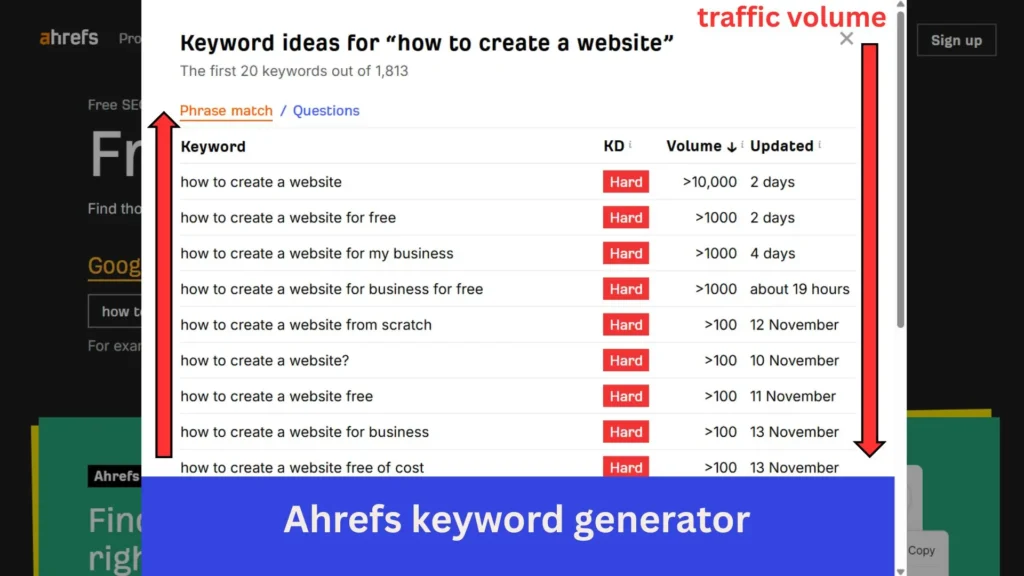
02 . Ahrefs
- Shows keyword difficulty, backlink data, and competitor analysis
- Great for deep SEO insights
03 . SEMrush
- Offers keyword gaps , SERP (search engine result page ) data and topic research
- Useful for competitive SEO strategies
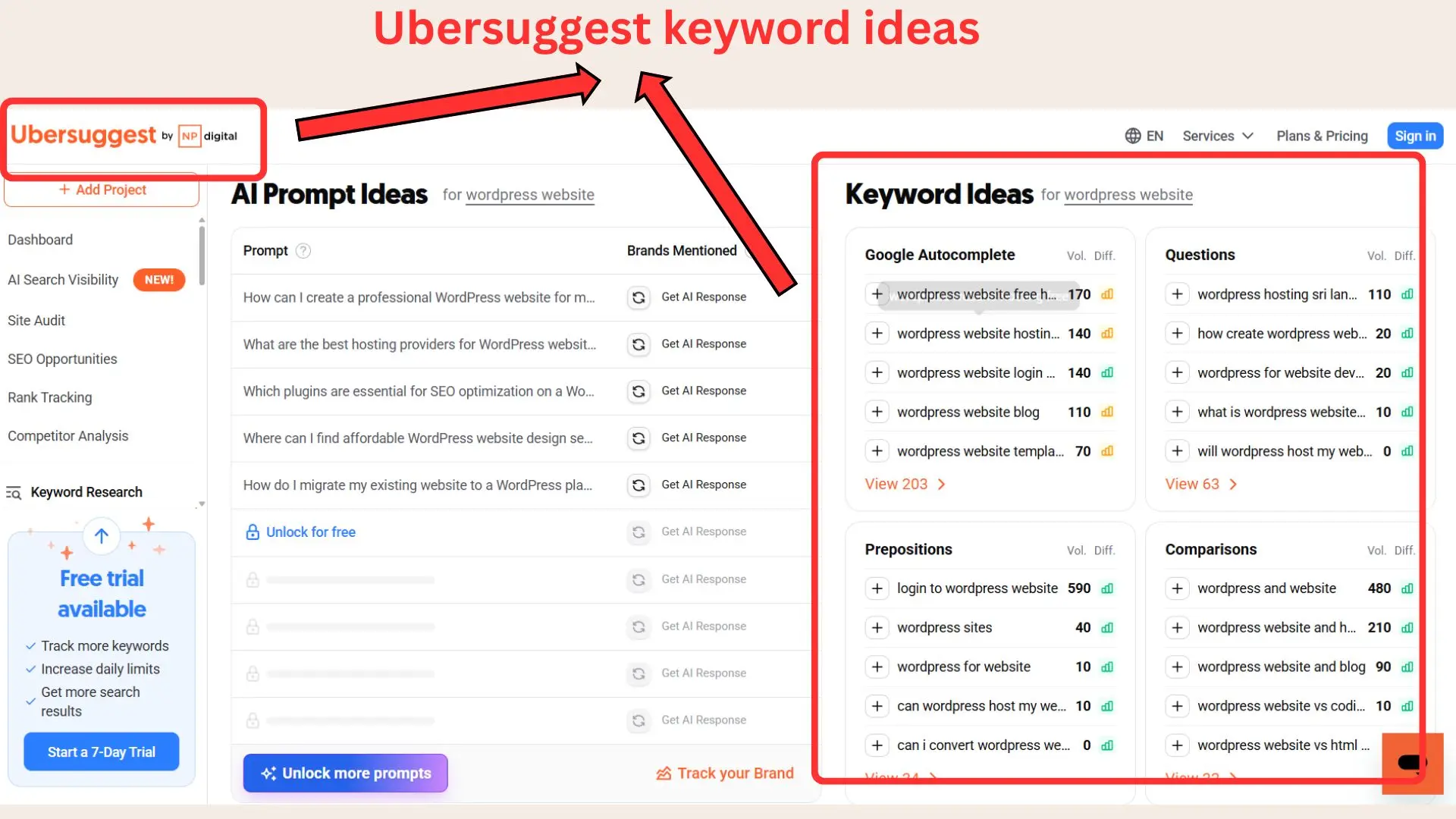
04 . Ubersuggest
- Beginner – friendly keyword ideas + SEO difficulty
- Includes content suggestions and basic analytics
05 . Keywords everywhere
- Browser extension showing search volume and competition instantly
- Perfect for quick on-page keyword checks
Using a mix of these tools makes keyword research faster , more accurate and more strategic.
04 . Assess search intent
For keyword research for beginners , this is crucial. decide whether the keyword is ;
- Informational
- Navigational
- Transactional
Now blogs should always start with informational “How- to ” terms like “how to create a website with WordPress“.
05 . Prioritize smartly
Choose keywords that have :
- Low competition
- relevant intent
- search volume of even 50 – 200 / month (still very valuable for the beginners)
These are usually long – tail keywords – perfect if you want the best way to use keywords to rank faster .
06 . Create and optimize your content
Once you pick your keywords ,
- Place your main keyword in the title , URL , first 100 words and 1 – 2 H2s
- Use secondary keywords naturally
- Add image alt tex
- Add internal links to related posts (Example : your guide on how to write your first blog post)
- Keep the article genuinely useful
The exact placement – where to add keywords in WordPress
Learning how to use keywords the right way isn’t just about choosing good terms – placement is what makes Google understand your article clearly . For keyword research for beginners , this section shows exactly where to put your primary and secondary keywords so your post ranks faster .
01 . Title / H1 (Strongest ranking signal)
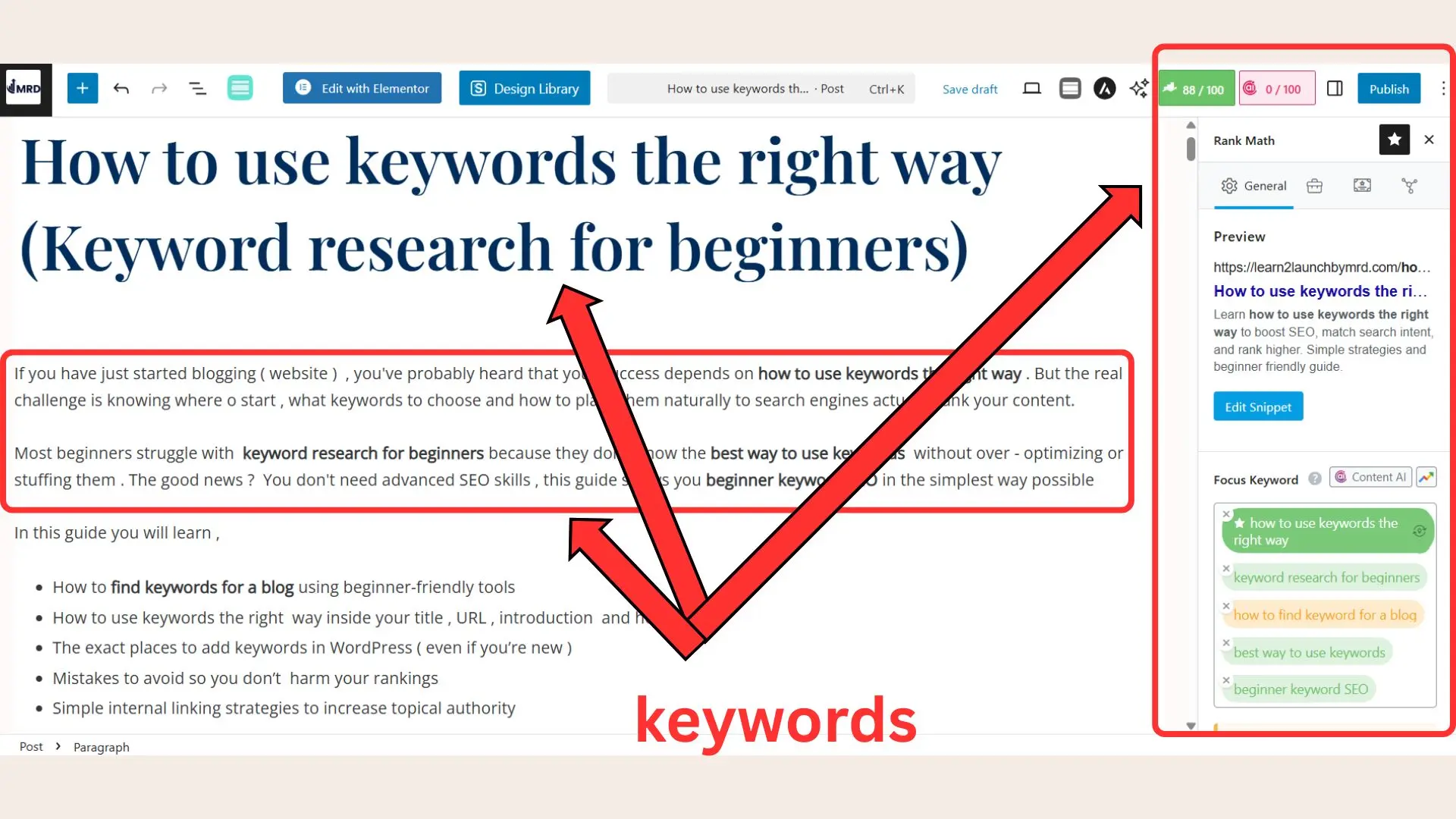
Always include your priamry keywords in the title.
Example ; How to Use Keywords the Right Way ( Keyword Research for Beginners )
This gives Google an instant clue about your topic .)
02 . URL Slug (clean + keyword focused)
Use a short , readable slug : / how-to-use-keywords-the-right-way
This helps both SEO and user experience.
03 . First 100 words (intro section)
Place your main keyword once in the opening paragraph .This shows Google what the article is about immediately and helps with beginner keyword SEO.
When you’re writing your introduction , make sure your main keyword appears once within the first 100 words . This helps Google immediately understand what your content is about . If you’re still getting comfortable with structuring your intro or shaping your opening paragraphs , you might find my guide on how to write your first blog post helpful – it walks you through crafting a strong , clear beginning that keeps readers engaged from the very first line.
04 . H2 /H3 headings
Use secondary keywords such as :
- Keyword research for beginners
- How to find keywords for a blog
- Best way to use keywords
05 . body text (natural keyword usage)
Use your primary keyword 2 – 4 times across the article. Add secondary terms when they fit naturally. Keep readability as the priority – Google penalizes forced repetition .
06 . Image name and ALT texts (Most bloggers forget this)
Name files something like :
- how-to-use-keywords-the-right-way-guide-jpg
- keyword-research-for-beginners-chart-png
This boosts image rankings and accessibility .
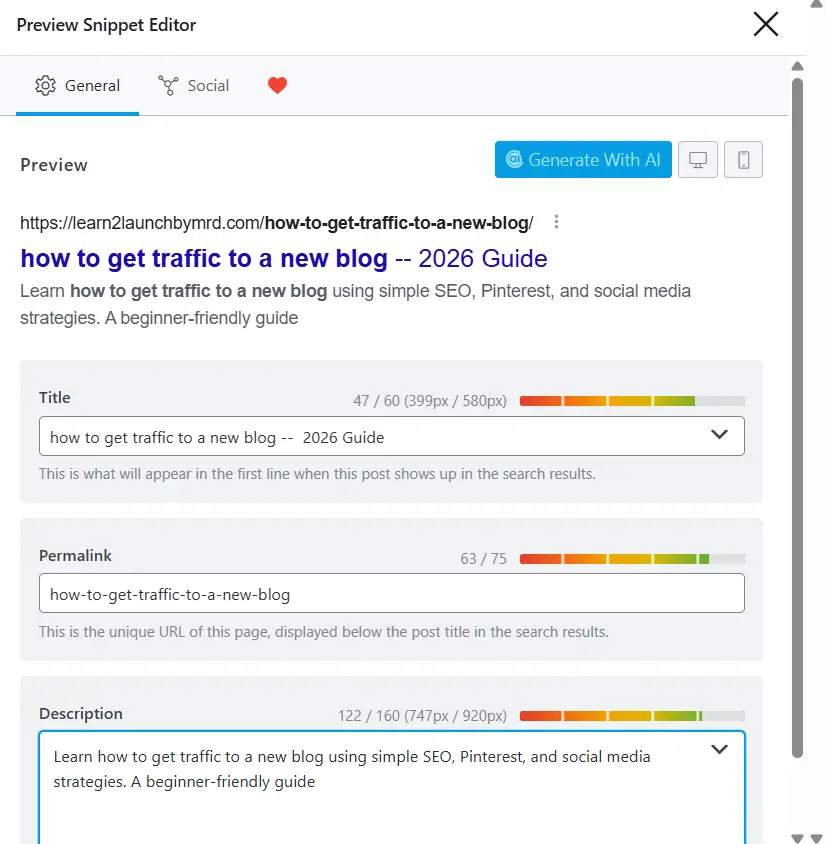
07 . Meta title and meta description (SEO plugin area)
Using Rank Math or Yoast , include :
- Primary keywords in meta tittle
- primary or secondary keywords in the meta description
Example meta description : how to use keywords the right way (primary keyword)
“ Learn how to use keywords the right way using this beginner-friendly keyword research guide. Perfect for new bloggers . ”
08 . Internal linking (boost topical authority)
Connect to your own related blog posts to guide readers deeper into your site .
- “ …as I explained in my guide on how to write your first blog post, structure matters… ”
- “ …once your blog is set up (see how to create a WordPress blog that makes money), keyword placement becomes your next big step… ”
These internal links help Google understand your blog’s overall topic cluster .
09 . Where to add keywords inside WordPress
- H1 block = Add your title with the primary keyword
- Permalink settings = Edit the slug
- First paragraph block = place the keyword early
- Image block = Add keyword rich alternative text
- SEO plugin box = Fill in meta title + meta description
This is the complete keyword placement system new bloggers should follow .
Improving your keyword strategy directly helps your blog attract more readers, but keywords are only one part of growing your audience. If you want to explore more ways to get consistent clicks and steady ranking improvements, the post on how to get traffic to a new blog fits perfectly here.
Write the content – match intent and answer every sub question
To truly master how to use keywords the right way , your content must fulfill the search intent from start to finish . Google ranks pages higher when they answer every question a beginner has – especially for terms like ( In my niche ) keyword research for beginners , how to find keywords for a blog , and beginner keyword SEO .
01 . Break your article in to clear h2 sections
Structure your post around sub – questions people commonly search :
- How many keywords should you use ?
- What is the best way to use keywords in a blog post ?
- Which tools are best for keyword research for beginners ?
- How do you find long tail keywords ?
This layout helps you match search intent and improves user satisfaction .
02 . Use lists , examples and steps
New bloggers need simple , actionable explanations . Add :
- Bullet points
- short steps
- Quick examples
- Screenshots or diagrams
These increase readability and help your article rank for long – tail variations like the “best way to use keywords.”
03 . Add an SEO friendly FAQ section
Use questions found inside Google’s “ People Also Ask ” box .
- What is the easiest way to do keyword research for beginners ?
- Where should I place keywords in a blog post ?
- Should you use multiple keywords in one article?
FAQs improve your chance of appearing in SERP (Search Engine Result Page) features .
04 . Keep paragraphs short and use formatting
- Use bold for actions
- Italic for emphasis
- 2 -4 sentence paragraphs
- clear spacing
This improves readability and helps both users and Google find important points .
05 . Insert internal links naturally
It is very important for SEO and add internal links only where they are contextually relevant , examples;
- When explaining how to outline a post , link to write your first blog post ( /how-to-write-your-first-blog-post ) .
- When breaking down headings , link to blog post structure ( /perfect-blog-post-structure ) .
- When discussing SEO placement in WordPress , link to WordPress blog setup ( /how-to-create-a-WordPress-blog-that-makes-money ).
- When introducing deeper SEO concepts , link to beginner SEO ( /beginner-seo-for-bloggers) .
Internal links help Google understand your topical authority and increase rankings sitewide .
How many keywords per blog post?
When you’re learning how to use keywords the right way , the most important rule is this : focus on one primary keyword and support it with a few secondary keywords . That’s all a beginner needs for clean , effective SEO .
Ideal keyword setup for beginners
- 1 Primary keyword ( Main topic of the post )
- 2-4 secondary keywords ()
( variations like keyword research for beginners , best way to use keywords , how to find keywords for a blog )
How to use them naturally
- Place the primary keyword in the title , intro, one H2 ,URL and 2 -3 times in the body .
- use secondary keywords where they naturally fit inside headings and paragraphs – especially in sections that answer specific sub – questions .
- Avoid overusing keywords . If a sentence feels forced , rewrite it for clarity .
The frequency with which your keyword appears in your content is known as keyword density. Aiming for 1-2 % density – that is , utilizing your primary keyword organically and without forcing it – is a good general guideline. Keyword stuffing, or overusing keywords, can hurt your SEO because Google might view it as manipulative or spammy . Rather , focus on writing organically , utilizing variations , and utilizing keywords where they are useful .
Common mistakes to avoid
Many beginners struggle with keyword usage because of a few common errors ,
- Targeting keywords that are too broad , making it hard to rank .
- Ignoring search intent , which leads to mismatched content and higher bounce rates .
- Keyword stuffing , which weakens readability and hurts SEO performance .
- Not using long-tail keywords , missing easier ranking opportunities .
Avoiding these mistakes helps your post rank higher and perform better over time .
Related questions on how to use keywords the right way
What is the right way to use keywords inn a blog post?
Use one primary keyword and a few related secondary keywords naturally. Place the primary keyword in the title, URL, intro, at least one H2 , and a couple of times in the body . This helps search engines understand your topic while keeping content readable .
How many times should I use my primary keyword?
For beginner SEO , use your primary keyword 2 – 4 times across the post . Focus on clarity and providing a full answer to the reader’s query rather than hitting an exact keyword count .
What is the easiest keyword research method for beginners?
Start with a few seed ideas , check Google autocomplete and “ People Also Ask , ” then expand using tools like Ubersuggest , AnswerThePublic or Google Keyword Planner . This helps you discover long – tail keywords with real search volume .
Where should I place keywords in WordPress?
Place your main keyword in the H1/title , URL , first paragraph , H2s and image alt text . Also add it in your meta title and description using an SEO plugin like Rank Math or Yoast to strengthen SEO signals .
Can I target multiple keywords in One blog post ?
Yes, but keep it simple. Target one primary keyword and 2 – 4 related secondary keywords. This ensures your post ranks for multiple variations without keyword stuffing .
What happens if I use too many keywords?
Overusing keywords creates keyword stuffing , which hurts readability and SEO . Google now prioritizes helpful , clear content over exact keyword repetition .
How do I know if my keyword usage is correct?
Overusing keywords creates keyword stuffing , which hurts readability and SEO . Google now prioritizes helpful , clear content over exact keyword repetition ./
Now you know how to use keywords the right way
The real test of great SEO is simple , does your content fully answer the reader’s question ? If yes , you’re already using beginner keyword SEO correctly – and Google will reward that effort .
Now you know how to use keywords the right way by choosing intent – focused long – tail keywords , placing them naturally in your title , URL , first 100 words , headings and image alt text , and writing content that genuinely solves the reader’s problem . When you follow this system , even beginners can rank using related terms like “ best way to use keywords ” or “ keyword research for beginners ” without worrying about over – optimization .
Before you go , strengthen your skills even further by exploring my related guide on how to write your first blog post – it pairs perfectly with everything you learned here and helps you build a strong foundation for every article you publish .
Stay tuned for more practical SEO tips and content strategies and come back anytime when you’re ready to grow your blog even faster .