

If you’re struggling to figure out how to post on LinkedIn for online business beginners , you’re not alone. You post consistently, yet your reach stays low. Engagement feels random. Leads? Almost none. It’s frustrating – especially when everyone else makes LinkedIn growth sound “ easy ”.
In actuality, LinkedIn’s saturation isn’t the reason why most beginners aren’t succeeding. They’re failing because they don’t have a well-defined posting strategy.
This guide is created specifically for:
- Coaches trying to build authority
- Bloggers growing a personal brand
- Freelancers looking for inbound clients
- Affiliate marketers promoting without being salesy
- Solopreneurs building long term visibility
You don’t need hacks.
You don’t need ads.
You don’t need to post every day.
What you need is a LinkedIn posting strategy for beginners that works with the platform , not against it.
In this step by step guide , you will learn ,
- How beginners actually grow reach (even with small accounts)
- Practical LinkedIn growth tips for beginners that focus on trust , not virality..
- What to post if your goal is to grow an online business with LinkedIn
- Simple proven LinkedIn content ideas for beginners you can apply immediately.
Table of Contents on how to post on LinkedIn for online business beginners
Why LinkedIn powerful for online business beginners
LinkedIn is one of the few platforms where , beginners can still get organic reach without paying for ads . Unlike entertainment-driven platforms, LinkedIn is built around professional value, ideas and problem solving , which creates a real opportunity to grow an online business with LinkedIn , even with a small audience.
The key difference is intent .
On most social platforms, people are scrolling to be entertained. On LinkedIn, people are scrolling to,
- Learn something useful
- Improve their career or business
- Discover tools, strategies and solutions
This means your content doesn’t need to be flashy or viral. It needs to be clear ,helpful and relevant .
LinkedIn also rewards new and smaller creators . The platform expands its reach beyond your immediate network when your post attracts early engagement, especially comments. Because of this, beginners can succeed without having thousands of followers. Generic content is never as effective as a targeted message delivered to the appropriate audience.
Why LinkedIn works so well for beginners ,
- High trust platform – professional context builds credibility faster
- Decision makers are active – founders, marketers and buyers are already there
- Content lifespan is longer – posts can gain reach for days, not minutes
For online business beginners , LinkedIn is not crowded – It is underutilized . And that’s exactly why it works .
How the LinkedIn algorithm works
The LinkedIn algorithm rewards particular behaviors, but it is not mysterious. Once you understand the fundamentals, your posts stops to feel random and begin to benefit you. This clarity is essential for applying effective LinkedIn growth tips for beginners .
First-hour engagement is the most crucial element. LinkedIn first displays a post you make to a select group of your connections. Early interaction increases the platform’s reach because it believes your content is valuable.
But not all engagement is equal.
- Meaningful comments matter more than likes
- Replies and conversations signal quality
- One thoughtful comment can outperform ten likes
Additionally, LinkedIn monitors dwell time or the amount of time users spend reading your post. The algorithm is informed that your post is worthwhile to distribute further when users pause, reread, or save your content.
Going viral is not as important as consistency. Regular posting helps the algorithm identify you as an active creator. Without consistency, a single viral post seldom results in long-term growth.
What boosts LinkedIn reach,
- Early comments (especially conversations)
- Clear, skimmable posts
- Saves and longer reading time
- Consistent posting schedule
What kills LinkedIn reach ,
- External links in the post body
- Long, dense paragraphs
- Engagement bait (“ comment YES ”)
- Inconsistent posting
Once you align your content with these principles, LinkedIn becomes predictable and that’s when growth starts compounding.
If your LinkedIn posts get views but no interaction, it’s usually a signal not a failure. Understanding why people do not engage with your content on social media helps beginners identify gaps in clarity, relevance or emotional connection, and adjust posts to encourage comments instead of silent scrolling.
Before you post : Optimize your LinkedIn profile for business growth
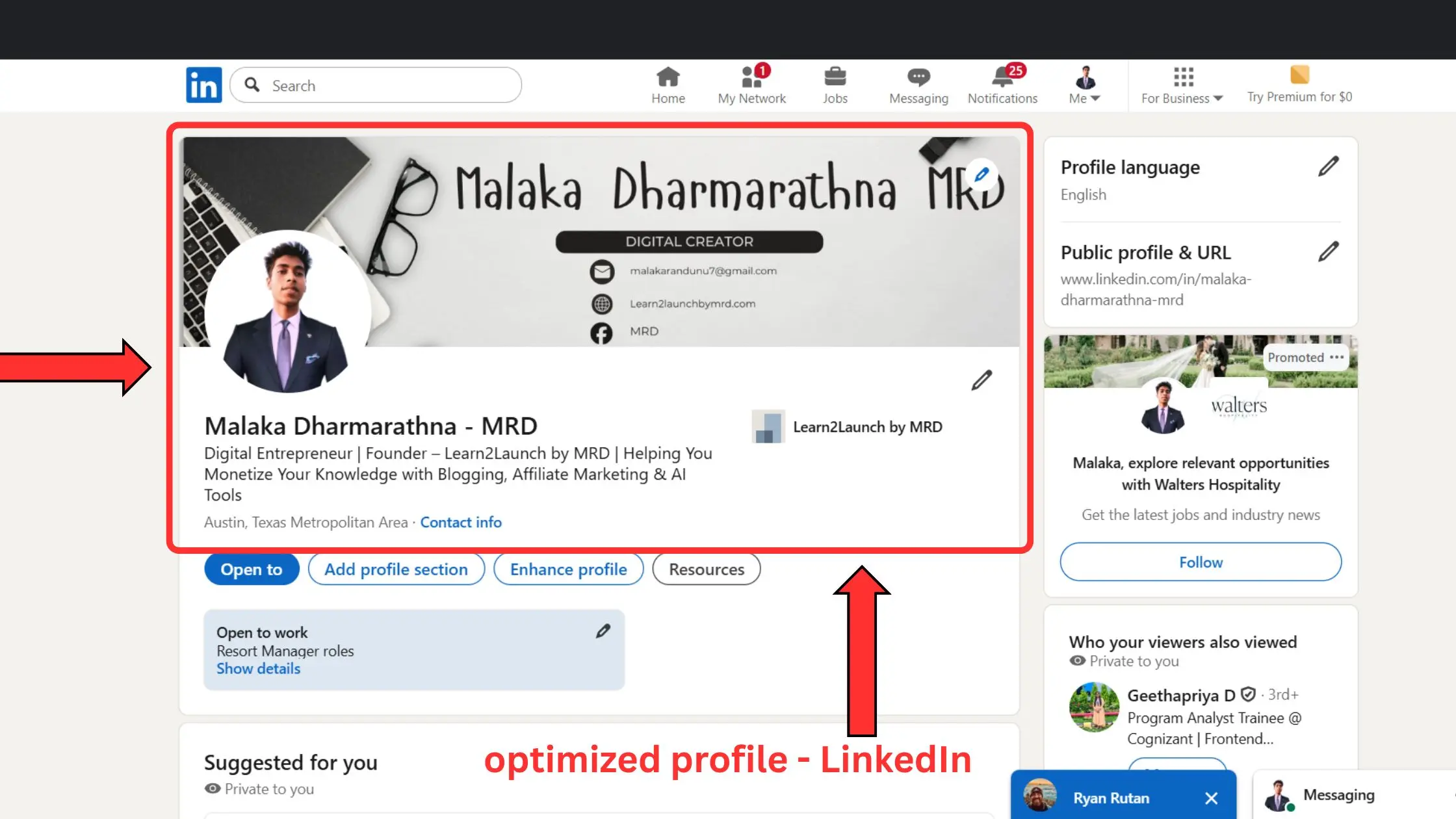
Your profile needs to be prepared to turn attention into trust before you start worrying about content. One of the most common mistakes made by beginners is to post without optimizing their profile. If your goal is to grow an online business with LinkedIn , your profile should clearly communicate who you help and why you’re worth following.
Profile photo and banner
Your profile photo and banner create the first impression , often before someone reads a single post.
Best practices ,
- Use a clear, well-lit headshot with a neutral background
- Face the camera and smile naturally
- Avoid logos, sunglasses or cropped group photos
Your banner should ,
- Reinforce your niche or expertise
- Include a simple value statement (who you help + outcome)
- Stay clean and readable on mobile
These visuals silently communicate professionalism and credibility.
Headline that attracts the right audience
Your headline is not your job title – it’s your positioning statement
A strong headline –
- Focuses on who you help
- Highlights a clear outcome or problem
- Uses simple, benefit driven language
Example structure –
Helping [who] achieve [result] using [method]
This instantly tells the right people they’re in the right place.
About section that converts profile views into followers
Think of your About section as a mini landing page ,
Include,
- A short, relatable problem statement
- Your perspective or experience
- What type of content you share
- A soft invitation to follow or connect
When your profile is optimized, every post works harder – turning views into followers and followers into opportunities.
How often should beginners post on LinkedIn?
One of the most common questions beginners ask is how often they should post. The short answer is, you don’t need to post everyday to grow . A sustainable LinkedIn posting strategy for beginners focuses on consistency , not burnout .
For most beginners, posting three to five times a week works best. This helps the algorithm see you as active and lets you keep your posts high quality. If you post every day without a plan, your content may feel rushed, get less engagement, and become inconsistent over time.
LinkedIn values clear and useful posts, not just posting a lot. A single thoughtful post that starts a conversation will do better than several rushed posts that people ignore.
Beginner friendly posting schedule ;
- 3 posts per week if you’re just starting
- 4 – 5 posts per week once you build confidence
- Rest days to reflect, analyze and improve
Common consistency mistakes beginners make ;
- Posting daily for one week, then disappearing
- Waiting for “ perfect ” ideas before posting
- Copying viral creators without context
- Over posting promotional content
The goal is to establish a rhythm that you can maintain over the long term. Sustainable consistency is what leads to trust, reach and steady growth on LinkedIn.
LinkedIn growth doesn’t require daily posting, it requires sustainable habits. Beginners often quit because consistency feels exhausting. Learning how to stay consistent on social media without burnout helps you plan realistic posting schedules, reduce pressure and build momentum without sacrificing clarity or motivation.
What to post on LinkedIn as online business beginner
One of the biggest reasons beginners stop posting is simple: they don’t know what to post. The good news is you don’t need endless ideas or viral creativity. You need a small set of repeatable content types. These LinkedIn content ideas for beginners are proven to build reach , trust and business momentum
Educational content
Educational posts help your audience learn something useful in minutes.
Post ideas ,
- Simple explanations of tools or strategies
- Step-by-step breakdowns
- Beginner mistakes and how to avoid them
- Clear frameworks or checklists
These posts position you as helpful and practical – two qualities LinkedIn rewards.
Personal learning stories
You don’t need to be an expert. You need to be honest and specific
Share ;
- Lessons you learned the hard way
- Mistakes you made as a beginner
- What you’d do differently now
Learning stories feel relatable, which increases comments and saves.
Authority building insights
Authority comes from clear thinking , not credentials .
Example :
- Your opinion on a common myth
- Why a popular tactic doesn’t work for beginners
- A small insight most people overlook
These posts show confidence and attract the right audience.
Soft promotional posts
Promotion works when it’s subtle and value first.
Behind-the-scenes content ;
- What you’re building
- How you structure your workflow
- Why you chose a specific approach
Avoid hard selling. Let curiosity do the work.
High performing beginner post ideas
- Mistakes you see beginners make
- Lessons learned from experience
- Simple frameworks you see
- Behind the scenes business processes
Master these four content types and you’ll never run out of things to post on LinkedIn.
Beginners often believe they need new ideas every day to grow on LinkedIn. In reality, learning what is content repurposing and how does it work allows you to reuse blogs, comments and past posts across formats, saving time while staying consistent and visible.
Proven LinkedIn posting formats that get reach
Choosing the right format matters just as much as choosing the right topic. LinkedIn favors simple , readable formats that keep people on the platform . These LinkedIn growth tips for beginners will help you use formats that consistently perform well.
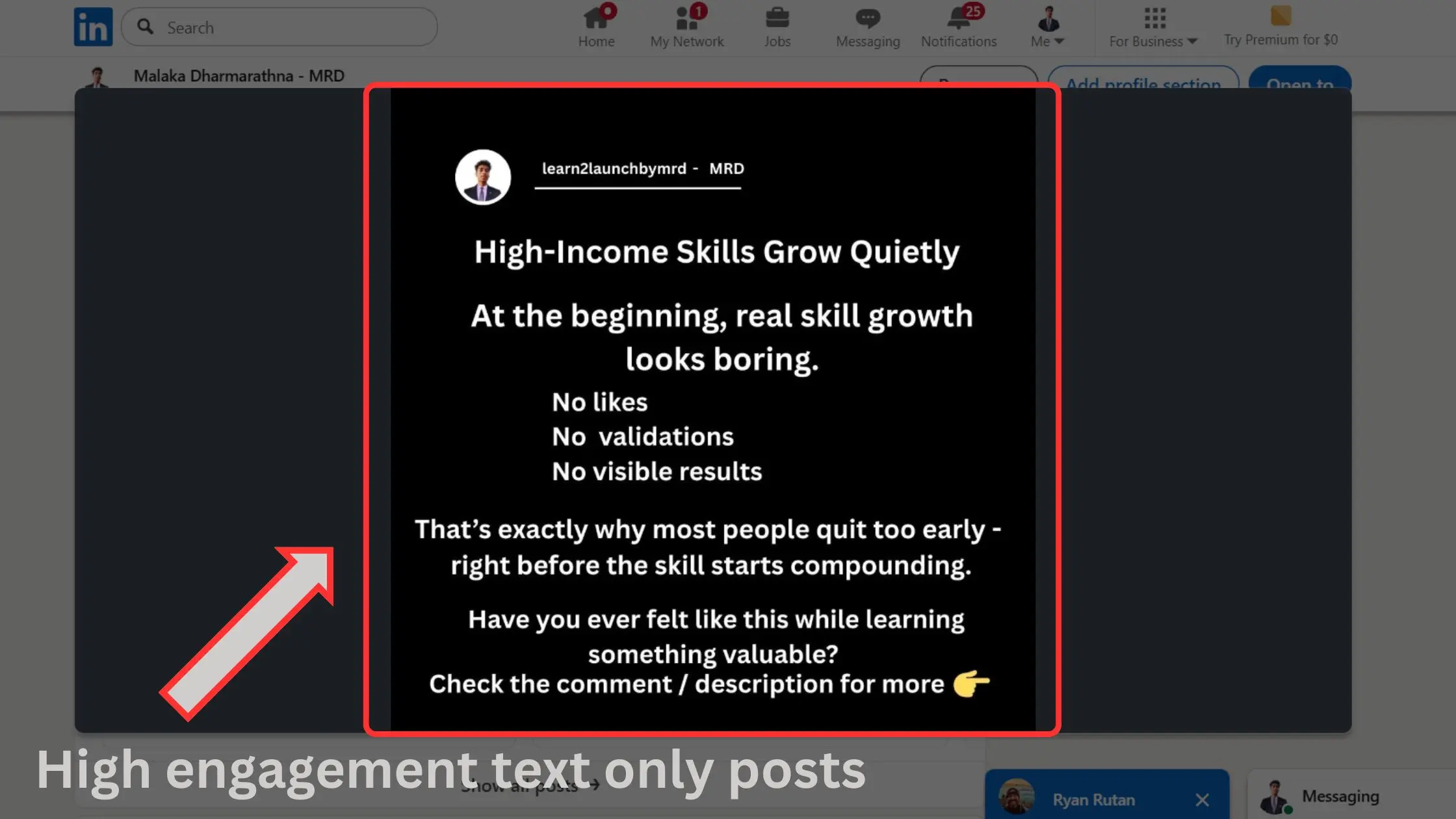
Text only posts
Text posts still dominate LinkedIn because they’re fast to load and easy to read , especially on mobile.
Use text only posts , when ;
- You’re sharing insights or lessons
- You want higher dwell time
- Your message is clear without visuals
Short paragraphs and white space increase reach.
Short story posts ;
Story-based posts build emotional connection and trust.
Use story posts when ;
- Sharing a lesson learned
- Explaining a mistake or breakthrough
- Teaching through personal experience
Keep stories focused. One message per post performs best.
List style posts
Lists are skimmable and highly saveable.
Use list posts when ;
- Teaching frameworks or steps
- Sharing tools or tips
- Breaking down complex ideas
Example ;
- “3 lessons I learned”
- “5 mistakes beginners make”
Question based posts
Questions invite engagement , but only when they’re thoughtful.
Use questions when ;
- You want discussion, not bait
- The topic is relevant to your audience
- You can add context before asking
Why text posts still dominate ;
- Higher dwell time
- Faster consumption
- No distraction from the message
Master these formats and your content becomes predictable , in a good way.
A beginner friendly LinkedIn posting strategy isn’t only about what you write, it’s also about how your content looks. Simple visuals can significantly improve attention and readability. Learning how to use Canva for social media content creation helps beginners design clean post visuals, carousels, and quote-style graphics that support written LinkedIn posts without overwhelming the message
How to write LinkedIn posts that get engagement
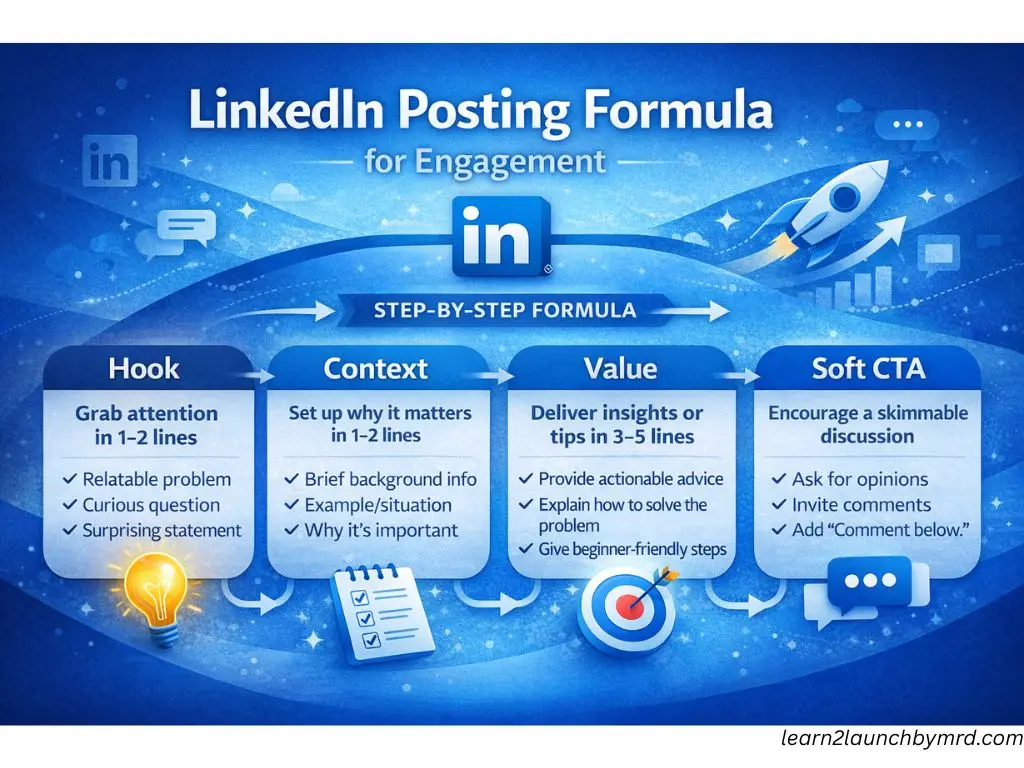
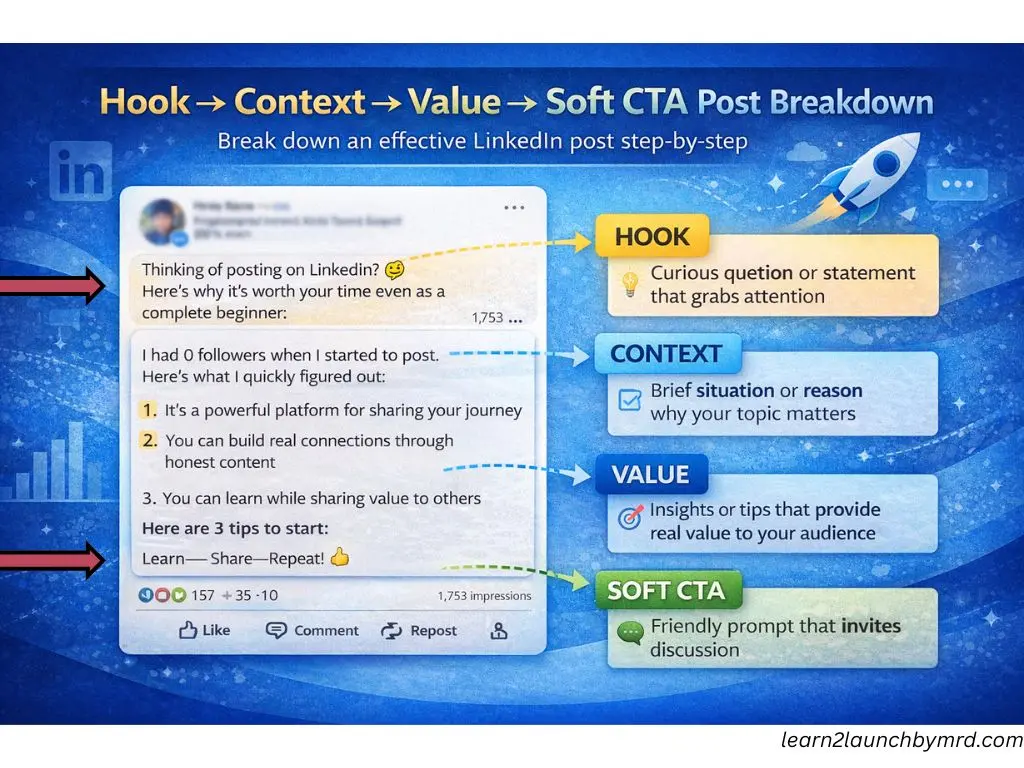
If you are series about learning how to post on LinkedIn for online business beginners , mastering a simple framework is key. The formula isn’t complicated. Hook = context = value = soft CTA. It ensures your posts capture attention, provide actionable insights and guide readers toward the next step , without being pushy.
Writing hooks that stop the scroll
The first 2–3 lines are everything. A strong hook immediately signals relevance.
Hook examples ;
- “I wasted 6 months posting on LinkedIn before I discovered this simple trick…”
- “Most beginners make this one mistake that kills reach…”
- “Here’s what no one tells you about growing on LinkedIn as a beginner…”
Hooks should be curious , relatable and benefit driven – not clickbait.
Keep posting skimmable
LinkedIn readers scroll quickly , so structure matters.
- Use short paragraphs (1-3 sentences )
- Include bullet points or numbered lists
- Bold or capitalize important phrases when necessary
- Use white space to separate ideas
Skimmable posts increase dwell time and saves, which the algorithm rewards.
Ending with engagement – based CTAs
A soft call to action encourages converdation without hard selling.
CTA examples ;
- “What’s your experience with this?”
- “Comment below if you’ve tried this approach.”
- “Which of these tips will you try first?”
These CTAs boost meaningful comments, which signals quality to the LinkedIn algorithm.
By following this framework consistently, beginners can turn every post into an opportunity to grow an online business with LinkedIn, building authority, reach and engagement simultaneously.
Once your LinkedIn posts start building trust, the next step is capturing attention off – platform. Learning how to use lead magnet with social media traffic helps beginners turn LinkedIn views into email subscribers or warm leads without aggressive selling or constant DMs.
Early LinkedIn growth isn’t about hacks – it’s about positioning and consistency. Exploring how to get your first 1000 followers as a beginner for free helps you focus on engagement driven posting, profile clarity and value-based content instead of chasing shortcuts.
Common LinkedIn posting mistakes beginners must avoid
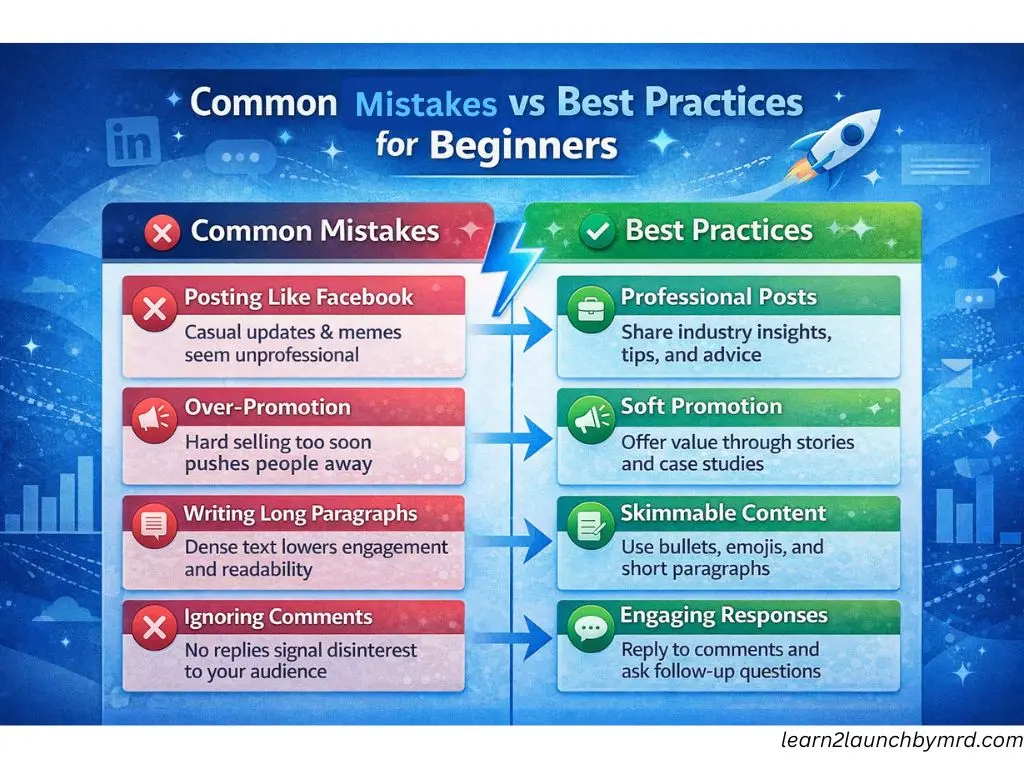
Even with a solid LinkedIn posting strategy for beginners , it’s easy to make mistakes that limit reach and engagement. Many beginners post like they would on Facebook, too casual, too personal or too promotional. Understanding what not to do is just as important as knowing what works.
Beginner content mistakes
- Posing like Facebook – Personal updates or memes may get likes elsewhere but often fail on LinkedIn.
- Over promotion – Hard selling too soon turns off your audience and reduces algorithmic reach.
- Writing long paragraphs – Dense blocks of text are hard to read on mobile, causing low dwell time.
- Ignoring comments – Not responding signals low engagement and discourages future interactions.
Many beginners struggle on LinkedIn not because of lack of effort, but because of avoidable mistakes. Things like copying Facebook style posts or over promoting too early can limit reach. Reviewing 10 social media mistakes beginners must avoid helps you recognize what silently blocks engagement before you double down on posting.
Why they hurt reach
These errors affect how your content is distributed by the algorithm. Reduced visibility is caused by low engagement, brief dwell time, and little conversation. Beginners can maintain a professional presence and gradually increase their audience by avoiding these mistakes.
Recall that clarity, relevance and engagement are rewarded on LinkedIn. Even if you don’t have a large following, focusing on these fundamentals guarantees that your posts are seen by the right people.
How to grow your online business with LinkedIn
When used properly, LinkedIn can be an effective sales and authority-building tool in addition to being a networking site. The secret for beginners is to follow the following simple funnel: Content → Trust → DM → Conversion. You can convert casual viewers into paying customers without being pushy if you understand each step.
Followers alone don’t grow an online business, relationships do. Understanding how to turn social media followers into customers helps beginners move naturally from content to conversation, and from conversation to value-based offers, without damaging trust on LinkedIn.
Turning viewers into followers
Every post is a chance to draw in the appropriate audience. Focus on producing relevant, relatable content that speaks to your niche. To get readers to stop scrolling, use hooks, clear formatting and insights.
Tips ;
- Share lessons learned or beginner friendly advice
- Include soft call to action to follow your profile
- Highlight outcomes your audience wants
Even a small but engaged follower base can be more valuable than thousands of passive connections.
Turning followers into conversations
Once people follow you, the next step is engagement . Comments, likes and reactions open the door to meaningful interactions .
Strategies ;
- Reply to every comment thoughtfully
- Ask follow up questions in posts
- Use DMs ( Direct Messages ) sparingly to offer free value or answer questions
Conversations build trust – the currency of online business
Turning conversations into business
When trust is established, converting followers into clients becomes natural. Focus on helping first , selling second .
Conversion tactics ;
- Offer consultations or free resources
- Invite followers to webinars or workshops
- Share success stories and case studies
By applying this funnel consistently, beginners can steadily grow an online business with LinkedIn, turning content into meaningful business opportunities while maintaining credibility and authority.
LinkedIn is one of the best platforms for knowledge-based businesses. Understanding how to monetize your knowledge online helps beginners see how educational posts, insights and personal experiences can lead to services, digital products or consulting , without aggressive selling.
A simple 30 day LinkedIn posting plan for beginners
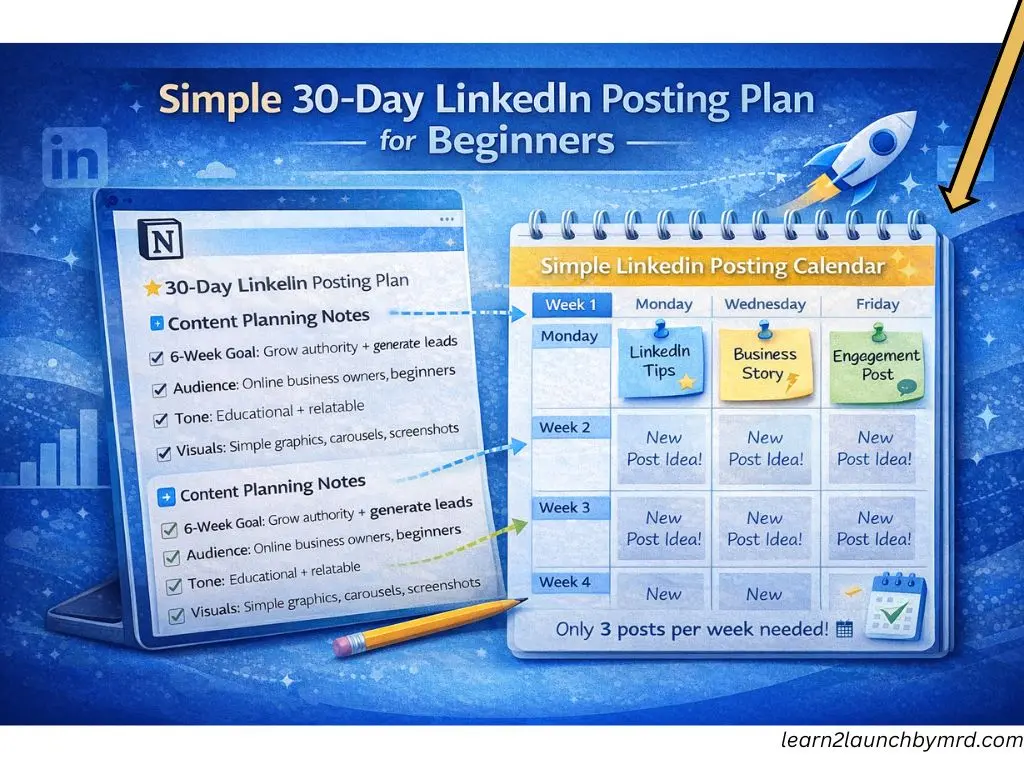
Posting is made less uncertain with a well-thought-out plan. A 30-day posting schedule guarantees consistency and covers every facet of audience growth for beginners. Over the course of a month, these beginner friendly LinkedIn content ideas aim to increase authority, engagement, trust, and conversions.
Week 01 – authority
- Share insights, tips or lessons in your niche
- Post short educational content or frameworks
- Goal : Position yourself as a knowledgeable source
Week 02 – Engagement
- Ask questions or share relatable stories
- Encourage comments and discussions
- Goal : Start meaningful interactions
Week 03 – Trust
- Share personal learning experiences or mistakes
- Highlight behind-the-scenes content
- Goal: Build credibility and human connection
Week 04 – Soft promotion
- Introduce your services, products or lead magnets gently
- Use case studies, testimonials or lessons learned
- Goal : Convert trust into opportunities without being pushy
Daily post ideas and execution tips –
- Alternate between text, list, story and question formats
- Keep posts short, clear and skimmable
- Respond to all comments to reinforce engagement
- Track which types of posts get the most reach and interaction
By adhering to this strategy, beginners can produce regular, valuable content that increases followers, promotes interaction and ultimately advances business objectives on LinkedIn.
Posting consistently on LinkedIn works best when trust comes before promotion. Beginners often overlook that people follow people, not offers. Understanding how to build trust on social media as a beginner helps you focus on sharing experiences, lessons, and honest insights, which makes your LinkedIn content feel human, relatable and credible over time.
Many beginners stop posting because they “ run out of ideas. ” Learning how to find content ideas for beginners helps you turn everyday experiences, questions and lessons into LinkedIn posts that feel natural, relevant and aligned with your online business goals.
Frequently asked questions on how to post on LinkedIn for online business beginners
Can beginners grow on LinkedIn without ads?
Absolutely. LinkedIn rewards quality , consistency and engagement over paid promotion. By posting valuable content and interacting with your audience, beginners can steadily grow followers, increase reach and attract leads without spending a dollar. Focus on meaningful posts and responding to comments to leverage organic growth.
How long should a LinkedIn post be?
Shorter posts often perform best, especially for beginners. Aim for 150-300 words per post with short paragraphs and bullet points. This makes your content skimmable, keeps dwell time high, and improves algorithmic reach , key LinkedIn growth tips for beginners.
Is LinkedIn good for small online businesses ?
Yes. LinkedIn is ideal for small businesses that want to build trust , authority and professional connections . Even with a small audience, consistent posting and interaction can lead to partnerships, leads and sales. Focus on content that educates, engages and build credibility
How long does it takes to see results in LinkedIn?
Results vary depending on consistency, content quality, and audience engagement. Beginners typically see noticeable growth within 1–3 months of posting regularly. Following a structured posting plan ensures your efforts compound over time.
Should beginners use hashtags on Linkedin?
Yes, but strategically. Use 3 – 5 relevant hashtags per post that match your niche and audience. Hashtags help LinkedIn categorize your content and expose it to people beyond your immediate network, boosting reach and engagement.
LinkedIn is a skill , not a hack
Learning how to post on LinkedIn for online business beginners isn’t about chasing virality or copying trending content . It’s a skill that develops with patience, consistency and a focus on providing real value. Beginners have an advantage – they can experiment, learn, and iterate without the pressure of a massive audience. Consistency is more important than perfection.
Posting regularly using a clear LinkedIn posting strategy for beginners ensures your content compounds over time. Every post that shares insights, lessons or LinkedIn content ideas for beginners builds trust and positions you as a reliable voice in your niche.
Key takeaways to grow effectively;
- Patience pays off – Results may be gradual, but consistent posting builds authority and reach.
- Engagement matter more than likes – Meaningful comments and interactions signal quality to LinkedIn’s algorithm.
- Focus on learning , not virality – Documenting your journey and sharing insights works better than chasing trends.
- Use your profile as a funnel – Optimize it to convert followers into opportunities, as detailed in posts like How to Build Trust on Social Media as a Beginner and 10 Social Media Mistakes Beginners Must Avoid.
LinkedIn works best when viewed as part of a bigger ecosystem. Learning how to use social media to grow your online business helps beginners align LinkedIn content with long-term goals like brand authority, traffic, leads and conversions , instead of chasing viral posts.
Ultimately, LinkedIn growth is about long term brand building . By applying these strategies thoughtfully, beginners can confidently grow an online business, turning small steps into lasting professional impact, without hype or shortcuts.